How to Set Up the Factory in Graveyard Keeper 2
Build the Smithy inside the underground Factory, add power and conveyors, connect the Assembly Bench, and automate deliveries to the Town Warehouse.
Updated:
Quick Answer
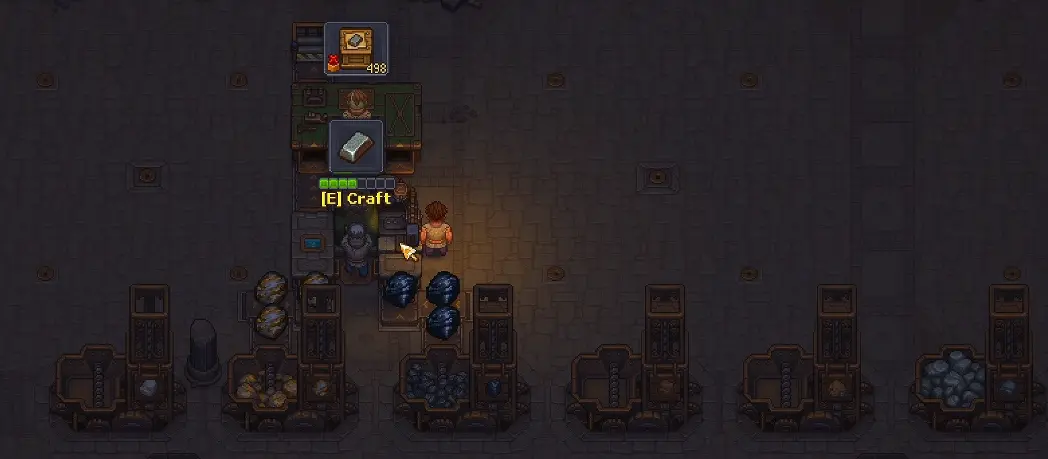
Build the Smithy inside the underground Factory, not in your Yard. Get the Zombie Carousel running for Factory Power, then connect the Smithy to an Assembly Bench with conveyors and finish the line with a Supply Station and delivery workers.
Unlocked Smithy I but cannot find anywhere to build it in the Yard? The blueprint is not missing. The production Smithy belongs inside the underground Factory beneath the Inquisitor base.
That distinction matters because there is also a Smithy connected to the Town. The Factory version is the workstation used with zombies, machine extensions and conveyor belts; restoring the Town Smithy does not give you the production station in your Yard.
I would not start pouring reinforced materials, gears and zombies into the room the moment it becomes accessible. Factory automation only becomes useful after several story and technology requirements meet in the same place, and an incomplete line can consume a lot of resources without delivering anything.
Build the Smithy in the Underground Factory, Not the Yard
Enter the underground Factory from the Inquisitor base and use its own build menu for Factory machines.
This is where the Smithy, Assembly Bench, conveyors, Supply Station and the other automation structures belong. Searching the outdoor Yard construction menu will not reveal the production Smithy even after its technology has been unlocked.
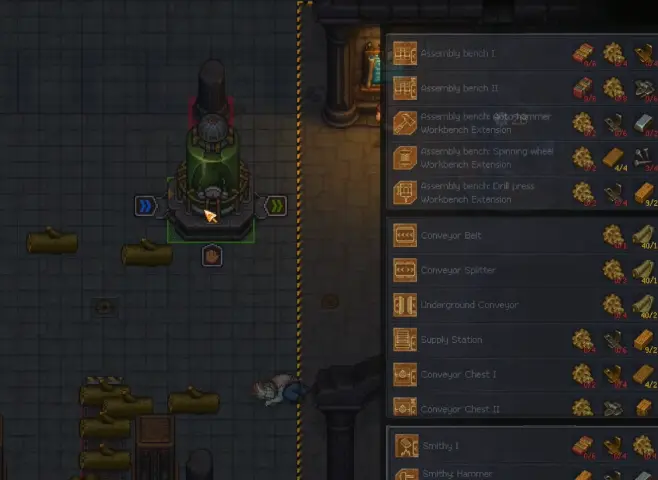
Before committing to a large layout, make sure the story has moved far enough for the systems around the Factory to function. The automation route shown here assumes you have progressed through the Forest and mine sequence and completed Jack’s Back in Business.
The technology side matters as well. For an automated Iron line, you need the Smithy progression far enough to unlock Smithy Hammer, while the building branch continues through Conveyors, Assembly Bench, Crates and Zombie Delivery.
Reaching the Factory room before those unlocks is normal. It does not mean you should immediately build around whatever few blueprints are currently available.
Clear the Factory Route Before Building the Final Layout
The underground area still contains blocked sections when you first begin setting it up.
There are four blockades along the route used for the automated delivery chain. They use the same type of repair materials, so I prefer bringing enough for all four instead of clearing one obstruction, returning home, crafting another batch and repeating the trip.
Keep pushing through the Factory until the route reaches the ladder connected to the Town Warehouse. That connection is important later because Factory production does not end at the Assembly Bench; finished supply crates eventually need a path into the Warehouse order system.
Factory construction is expensive enough that layout mistakes hurt more here than they do around a normal early workstation. Reinforced materials, metal parts, gears and heavier wooden components all compete with other late-game projects, so clear the usable space first and then place the production chain.
Power the Factory With the Zombie Carousel
Conveyors and Factory machines need Factory Power.
The Zombie Carousel provides that power when zombies are assigned to it. In the starter setup shown here, the production line needs 10 power, so two zombies are placed on the Carousel before the conveyor network is expanded.
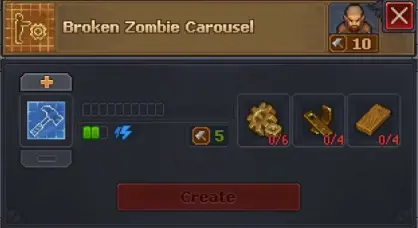
Every additional conveyor segment consumes part of the available power. That makes long decorative routes expensive even when you already have the materials to build them.
I build the shortest functional line first, watch it complete an order, and only then spend more resources on extra belts or additional production branches. When a conveyor network is dark or newly placed machines never start, check the Factory Power total before replacing workers or rebuilding the Smithy.
More Carousel capacity becomes useful after the first line is stable. It is not the first thing worth overbuilding.
Use the Smithy Hammer Extension for the Iron Line
For the basic automated Iron-supply chain, place the Smithy where Iron and Coal can enter it from the conveyor system.
The Smithy also needs the appropriate extension. Smithy Hammer is the key unlock for the Iron production route shown here; simply placing the base Smithy does not give you the complete automated chain.
From there, the material flow should continue into an Assembly Bench.
The working route is:
Iron + Coal → Smithy → Iron Ingots → Assembly Bench → Supply Station → Supply Porter → Supply Pallet → Town Warehouse
For the Iron supply being produced in this setup, the Assembly Bench waits until it has 8 Iron Ingots before the finished crate can move onward.
This is where a lot of Factory setups look finished while still doing nothing. A Smithy standing next to an Assembly Bench is not a production chain by itself—the inputs, power, workers, extensions and belt direction all need to agree.
Point Every Conveyor in the Direction the Materials Need to Move
Conveyor direction is easy to miss because the belt can be placed successfully even when it is pointing the wrong way.
Look at the arrows on each conveyor segment. Those arrows show where the item will travel.
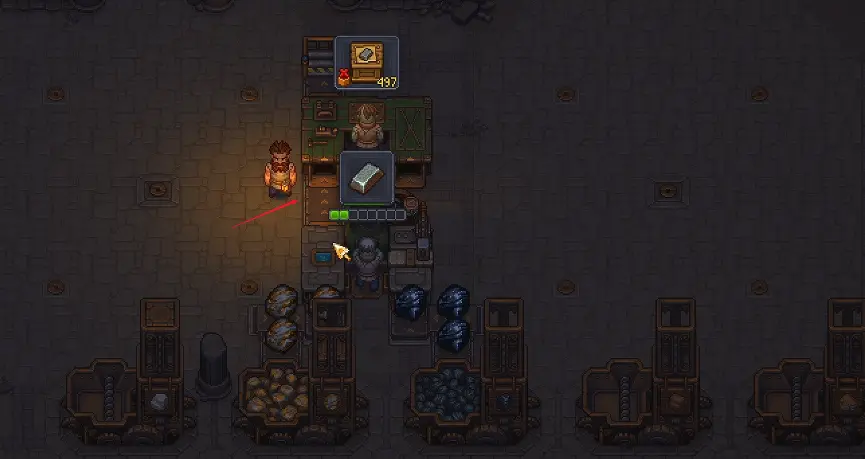
One compact example uses 7 conveyor belts, but seven is a layout example rather than a universal requirement. A different placement can need a different number.
What matters is continuity. Starting from the incoming Iron and Coal, I follow the arrows one segment at a time until they reach the Smithy, then do the same from the Smithy output to the Assembly Bench.
A reversed belt is cheaper to fix than rebuilding an entire production area.
Give Each Factory Zombie the Job and Tool It Actually Needs
Factory automation uses several zombies for different roles, and they are not interchangeable just because they are standing beside the correct machine.
In the working Iron setup, the Smithy worker uses a Hammer. The Assembly Bench worker shown in the same chain uses a Pickaxe, while Zombie Miners also need Pickaxes for extraction. Porters do not need tools simply to carry materials.
The Factory itself also consumes workers quickly. The starter example already uses two zombies for Carousel power before counting the Smithy, Assembly Bench and supply jobs.
Five zombies can get the Factory floor started in a small setup, but that should not be mistaken for the number required by the entire mine-to-Warehouse system. Zombie Miners and external transport add more workers once raw materials are being supplied automatically.
When a zombie is placed correctly but refuses to begin a valid job, the issue can be its Mastery, equipment or other worker requirements rather than the Factory layout. The Zombie Automation guide covers those worker-level failures in detail.
Feed Iron and Coal Into the Factory Instead of Carrying Every Batch Yourself
A Factory can technically process materials you deliver manually, but that only automates the middle of the job.
The stronger setup connects the Forest mine to the production line. Zombie Miners collect Iron and Coal, a porter moves those materials onward, and the Factory receives them for Smithy production.
Once raw-material transport is working, the Keeper no longer needs to interrupt other tasks just to carry another load of ore to the Factory.
The mine has its own unlock, storage and porter requirements. When the Factory is ready but Iron or Coal never arrives, fix the Iron and Zombie Mine before changing the conveyor layout.
That keeps the two problems separate: the mine is responsible for producing and moving raw resources, while the Factory is responsible for turning those resources into the finished supply chain.
Send the Finished Crate to the Town Warehouse
The Assembly Bench is not the end of the route.
Once enough Iron Ingots have been processed into the required supply item, the finished crate reaches the Supply Station. A supply worker then moves it to the Supply Pallet, and the outgoing porter carries the delivery toward the Town Warehouse.
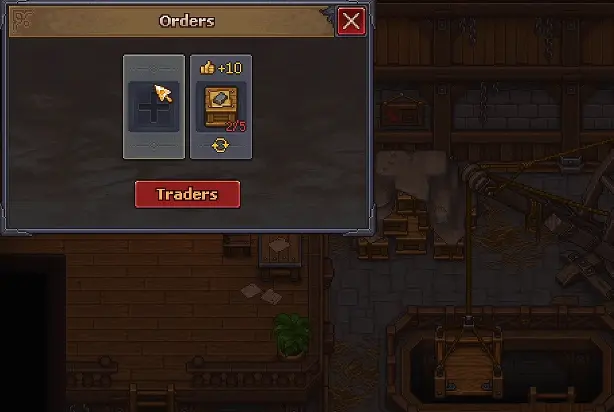
The Warehouse board includes repeatable orders. In the Iron-supply example, completing one repeatable order awards 10 Town Gratitude.
Finishing the required crates does not necessarily make the order disappear the moment the last item arrives. Completed orders are collected on the relevant weekly cycle, so a correct Factory can continue working while the board waits for the next matching day.
That delay is easy to mistake for a broken delivery line. Before tearing anything apart, check whether the Warehouse counter has actually increased. If the required quantity is present, the Factory has done its job.
When the Factory Stops, Find the First Point Where the Item Stops
A working Factory is easier to diagnose from left to right than by changing several things at once.
Start with the raw materials. Iron and Coal should reach the Factory input. Next, confirm that the Smithy has power, its extension and a capable worker. Watch the Iron Ingots leave the Smithy, follow their conveyor arrows into the Assembly Bench, then check whether the finished crate reaches the Supply Station and Supply Pallet.
The failure point tells you what to fix.
No Iron or Coal arriving means the problem is upstream. Materials sitting before a machine point to power, worker, tool or machine requirements. Items stopping between machines usually mean the conveyor route is wrong. A finished crate sitting in the Factory points to the supply or porter side instead.
Once one complete crate reaches the Town Warehouse, leave that line alone long enough to prove it can repeat the cycle. Expanding after the first successful delivery costs far less than building a large Factory and then trying to work out which part never functioned.