Teamfight Manager 2 Early Access Meta Guide
A practical Teamfight Manager 2 Early Access meta guide covering the launch meta snapshot, Pub Meta Report signals, patch response, AI meta behavior, opponent-specific drafts, and how to keep your own tier list updated.
Updated:
Quick Answer
The Teamfight Manager 2 Early Access meta is not just a champion tier list. The real skill is updating faster than the AI and the rest of your league. Start with the launch meta snapshot, check the Pub Meta Report for real signals, react quickly after patches, track which opponents are still drafting old ideas, and turn your personal tier list into a patch-by-patch draft notebook.
Early Access Meta Snapshot
Use this as a launch-window working snapshot, not as a permanent tier list. Early Access patches, new champions, AI draft behavior, and your own roster can all change the answer quickly.
| Champion or group | Current launch-read | How to treat it in draft |
|---|---|---|
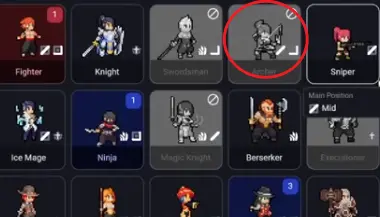
| Archer | High-priority versatile damage pick. Early gameplay shows the AI often respects or bans Archer because she fits many situations. | Treat as a first-ban / first-pick signal. If Archer is banned every match, the league is telling you she matters. |
| Sniper | High-ceiling carry. Strong when protected, but fragile if the fight reaches her too early. | First-pick only if you can add peel, frontline, or control. Do not draft her as your only plan without protection. |
| Ice Mage | Safe control pick. Less about raw carry damage and more about slowing, peeling, and making fights easier to read. | Good stabilizer when you need CC, anti-dive, or a safer mid/control slot. |
| Swordsman | Waveclear and pressure threat. Can make lanes and map movement uncomfortable if left open. | Ban or counter when your comp needs time to scale and cannot match early pressure. |
| Fighter / Cavalry / Lancer | Flexible bruiser/control options. They can become high-value when the meta favors reliable engage and durable frontliners. | Use them to give fragile carries a real frontline, not just as random melee picks. |
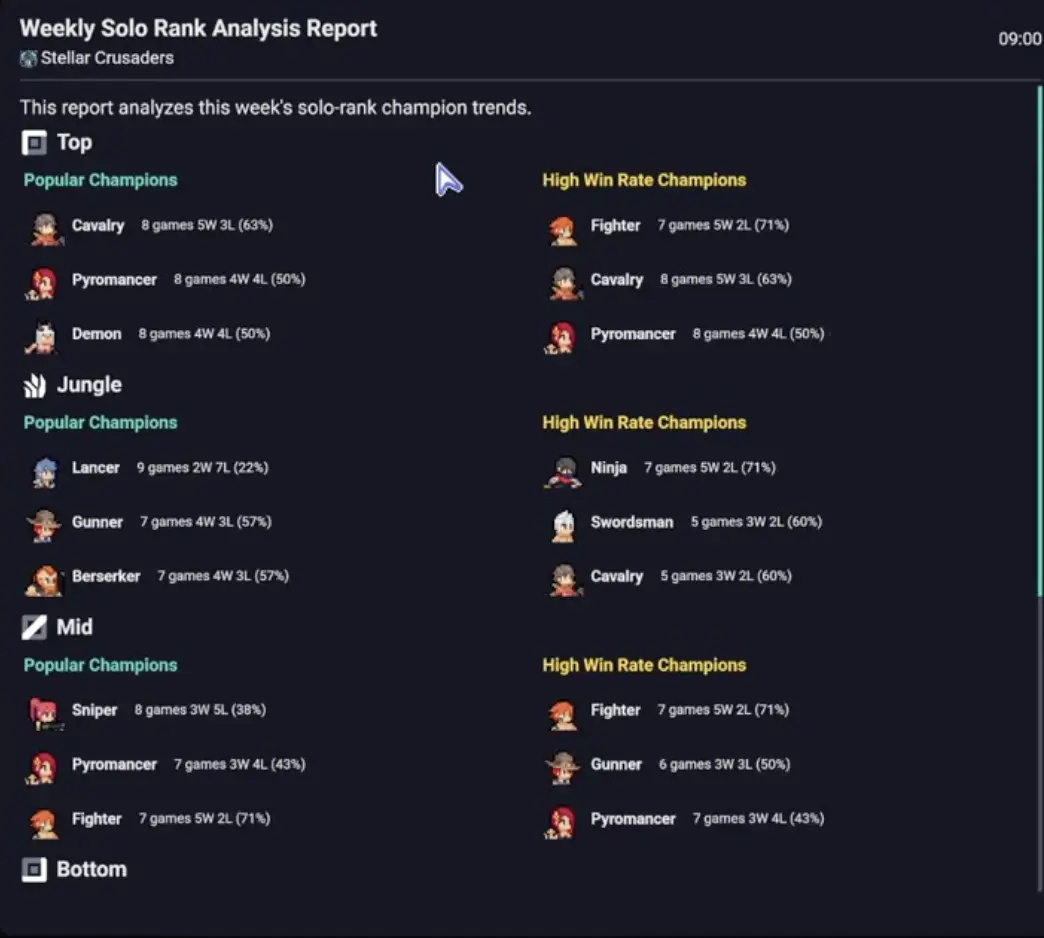
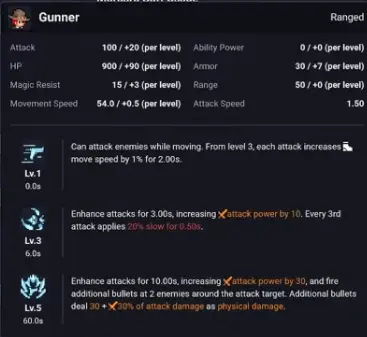
| Gunner | Pub Meta Report watchlist pick. In early report-style examples, Gunner appears as a priority damage champion, but the report alone does not explain whether the strength comes from jungle tempo, lane pressure, or late fights. | Treat Gunner as a test target, not an automatic S tier. Check the role, damage timing, and whether your roster can support the way it wins. |
| Bomber | Rising lane and tower-pressure candidate. Early match notes point to strong damage, waveclear, and structure pressure when used in lane. | Test as a lane pressure pick. Be careful if the first impression came from the wrong role. |
| Plague Doctor | Synergy pick, not a blind safe pick. Looks scary with Sniper, Berserker, or fast attackers, but can waste value if the AI targets buffs poorly. | Pick with a clear partner. Do not draft it just because the kit looks powerful on paper. |
This snapshot is meant to give readers a starting point. Recheck it after every patch and after your own league starts adapting.
Read the Pub Meta Report Like a Scout, Not a Fan
The Pub Meta Report is most useful when it tells you what to test next. It is not enough to see one champion near the top and copy it into your next official match.
| Report signal | What it usually means | Your next action |
|---|---|---|
| High win rate + high pick rate | The champion is winning even when many players use it. This is the strongest public signal. | Test it soon. If your roster can use it, move it toward A or S. |
| High win rate + low pick rate | The champion may be a niche counter, hidden OP, or just a small-sample outlier. | Test in a specific comp before trusting it. Do not first-pick blindly. |
| High ban rate | The league fears the champion, even if you have not seen it carry yet. | Ask whether you can answer it. If not, keep banning it. |
| High pick rate + low win rate | Popularity may be ahead of real strength. | Mark as possible trap pick and punish opponents who overvalue it. |
| Sudden rise after patch | A buff, nerf, or new matchup may be resetting the meta. | Recheck the champion before your next official match. |
| Role-specific spike | The champion may be strong in one role but bad elsewhere. | Track the role, not just the champion name. |
Use these triggers when reading the Pub Meta Report. Adjust the exact thresholds if your save uses different sample sizes or display columns.
A simple trigger system:
- 55%+ win rate with meaningful pick rate: test immediately.
- 60%+ win rate with tiny pick rate: label as suspicious, not proven.
- Top ban rate for multiple match days: treat as real draft pressure.
- Big movement right after a patch: pause your old tier list and retest.
- Same champion winning in several roles: check whether it is a flex priority.
Run the Three-Layer Check With a Real Example
The old version of this guide introduced three meta layers, but the useful part is applying them in draft.
Imagine this draft state:
- The AI bans Archer again.
- Sniper is still open.
- Your best player is your bot-side carry.
- Your support has good peel or control.
- The enemy has not drafted enough dive yet.
Now run the three layers.
| Layer | What you check | Example decision |
|---|---|---|
| 1. Pub / AI meta | Archer keeps getting banned, so the league is respecting flexible damage. Sniper being open is a signal. | Consider Sniper as a punish pick instead of wasting the draft on a lower-impact comfort pick. |
| 2. Your roster meta | Can your carry actually play the comp? Can your support protect the Sniper? Is your jungler stable enough to avoid early collapse? | Pick Sniper only if your next picks add peel, frontline, or objective patience. |
| 3. Your result meta | Did Sniper deal damage in the actual fight, or did she die before Morgard/Serpen started? | If she died early, do not drop Sniper immediately. First test whether the draft lacked protection. |
This is how you avoid both mistakes: blindly copying public meta and ignoring a strong open pick because one game went badly.
Patch Response Is the Real Early Access Meta Skill
In Early Access, the best meta player is often the one who updates first. A patch can change champion priority before the AI, public reports, or guide pages catch up.
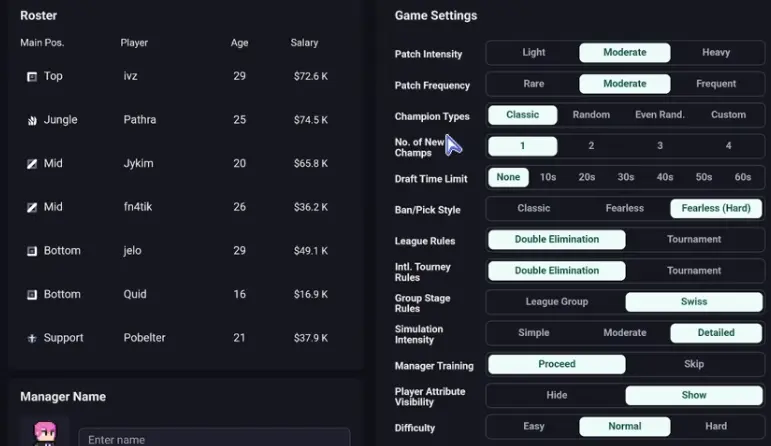
When a patch arrives, separate the change into three types.
| Patch change type | Why it matters | How to react before the next match |
|---|---|---|
| Number change | Damage, cooldown, HP, range, or scaling changes can move a champion up or down quickly. | Recheck the champion’s role and item timing. Small changes matter most on already popular picks. |
| Mechanic change | Targeting, movement, CC, revive, dash, or summon behavior can change how a champion functions. | Treat the champion as partly new. Run a test before trusting old results. |
| New champion added | New matchups can buff or nerf existing picks indirectly. | Protect one ban slot or one test slot until you know what the new champion punishes. |
| AI / behavior change | A champion may become stronger or weaker if AI uses abilities, items, or target selection differently. | Watch fights at half speed. Do not judge only by the final score. |
| Item or position change | A champion may stay the same but lose the build or role that made it strong. | Recheck role-specific win rate and build path before drafting it again. |
Use this patch checklist:
- Mark every changed champion in your personal tier list.
- Check whether the change affects the champion’s main strength or only a secondary number.
- Look at the Pub Meta Report after the next match day.
- Watch one fight at half speed if the change affects targeting, CC, movement, or ult timing.
- Move the champion only one tier at first unless the change clearly breaks the old identity.
Exploit AI Meta Lag
The AI can show meta habits through bans, first picks, and repeated comp patterns. Your edge is noticing when the AI is either following the meta too predictably or reacting too slowly after a patch.
Watch for these patterns:
| AI behavior | What it tells you | How to exploit it |
|---|---|---|
| Bans the same flexible pick every match | The AI or league values that champion highly. | Prepare the second-best version of that comp instead of relying on the banned pick. |
| Leaves a high-value carry open | The AI may not understand the current patch or your roster strength. | First-pick it if you can protect it. Do not wait for the AI to learn. |
| Keeps first-picking old comfort champions | The AI may be behind the patch. | Draft the newly buffed answer or punish with role counters. |
| Starts banning your last winning comp | Your pattern is becoming readable. | Rotate to a second comp before the AI forces you into bad backups. |
| Copies public high-win picks without support | The AI may value report strength over comp fit. | Let it take the trap, then draft the counter or deny the required partner. |
This is one of the biggest differences between a Teamfight Manager 2 meta guide and a normal MOBA tier list. You are not only reading champion strength. You are reading how fast each opponent updates their understanding of champion strength.
Your Meta vs Their Meta
Every opponent has a slightly different meta. Some teams chase the public report. Some overvalue comfort picks. Some keep using a pre-patch comp because it worked earlier in the season.
Before an important match, check the opponent’s last few drafts and ask:
- What do they ban first?
- What do they first-pick when left alone?
- Which champion do they keep forcing into bad matchups?
- Do they protect their carry, or do they draft damage without peel?
- Are they still banning a champion that was just nerfed?
- Are they ignoring a champion that just became stronger?
| Opponent meta read | Draft response |
|---|---|
| They still ban an old nerfed champion | Let them waste the ban and protect your real priority pick. |
| They first-pick a fragile carry | Draft dive, pick tools, or objective pressure before they add protection. |
| They overvalue one melee bruiser style | Add slows, kiting, range, or anti-engage control. |
| They ignore newly buffed ranged damage | First-pick it or force them to answer it with an uncomfortable draft. |
| They draft scaling every game | Attack early objectives and lanes before their carry timing arrives. |
| They draft engage without damage | Survive the first CC chain, then punish with reliable sustained damage. |
Turn Your Personal Tier List Into a 90-Second Patch Log
Do not use the personal tier list only as S/A/B/C labels. In Early Access, the reason behind the label matters more than the label itself.
After every meaningful match, take 90 seconds and update one note that can change your next draft. You do not need two separate systems: use the same review to update your personal tier list.
| Review question | Tier-list note to write | Example note |
|---|---|---|
| What pick changed the game? | Result note | “Sniper carried only after we added frontline.” |
| What public signal was confirmed or denied? | Pub-report note | “Gunner looked strong in report and won lane again; retest once more before A tier.” |
| Was this a role issue, not a champion issue? | Role-lock note | “Strong bot, weak jungle. Do not flex blindly.” |
| Did the champion need a specific partner? | Partner requirement | “Only pick with peel, shield, or frontline support.” |
| What did the AI reveal? | AI behavior note | “AI banned Archer again but ignored Bomber pressure.” |
| Did a patch affect the result? | Patch reason | “Buffed this patch; old B-tier rating may be outdated.” |
| Was the opponent using an old idea? | Opponent-specific note | “Eternal Siege overpicks melee engage; answer with range and slows.” |
| What changes next draft? | Draft action note | “Keep Sniper high, but pair with peel or do not pick it.” |
Use this as one combined post-match tool: answer the review question, then write the note directly into your personal tier list or draft notebook.
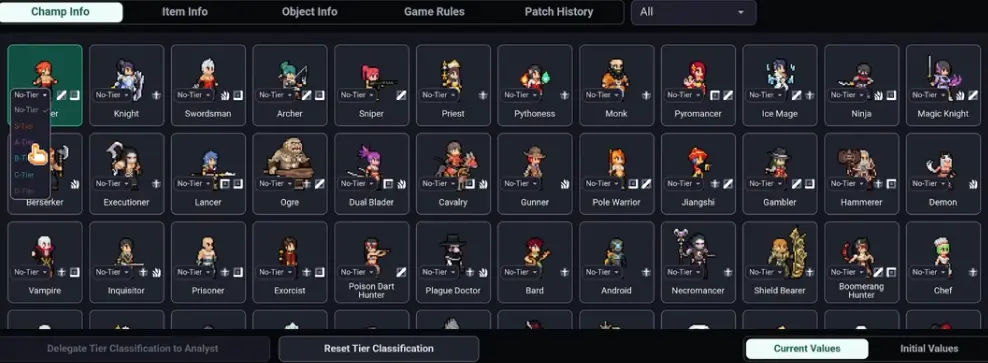
A good Early Access note is specific enough to change your next draft. “Good champion” is not useful. “Good only when we have peel and objective patience” is useful.
Early Access Meta Decision Table
Use this when you are unsure whether a champion is actually strong or just noisy.
| Situation | What it probably means | What to do |
|---|---|---|
| High win rate, high pick rate, and repeated AI bans | Real priority candidate | Test as first pick or keep banning if your comp cannot answer it. |
| High win rate but tiny pick rate | Possible niche or sample-size trap | Test only in the comp where it makes sense. |
| Champion was nerfed but AI still bans it | AI may be lagging behind the patch | Let the AI waste bans unless the nerf missed the champion’s real strength. |
| Champion was buffed but AI ignores it | Temporary player edge | Test it quickly before the league catches up. |
| Your strong pick fails twice | Could be roster, role, or comp problem | Review fight deaths and support structure before dropping it. |
| Opponent keeps forcing old comp | Opponent-specific meta gap | Draft the new counter rather than playing generic safe picks. |
| New champion changes lane matchups | Meta reset | Recheck old counters and old safe picks. |
| Patch changes targeting or movement | Old results may be unreliable | Watch fights directly before updating tiers. |
Common Early Access Meta Mistakes
Treating Post-Patch Data as Stable Too Quickly
The first few matches after a patch are noisy. Use them to create tests, not final rankings.
Ignoring Pick Rate and Sample Size
A 70% win rate on a tiny sample can be less useful than a 54% win rate on a large sample. Win rate needs context.
Updating Tiers Without Patch Notes
If you move a champion up or down, write why. Otherwise, the next patch will make your old tier list confusing.
Copying the AI’s Old Meta
If the AI keeps banning or first-picking a champion that was just nerfed, do not follow it automatically. Ask whether the nerf hit the champion’s real strength.
Calling a Pick Bad When the Draft Failed Around It
A carry dying before every objective may be a peel, frontline, or positioning issue. Do not blame the champion until you review the fight.
What to Read Next
If you need help turning this meta read into actual bans and picks, read the ban/pick guide next. If your issue is objective timing, jungle pressure, or failed Serpen and Morgard fights, read the jungle guide. If you want to make your own rankings stronger after every patch, read the personal tier list guide.
FAQ
Is the Teamfight Manager 2 Early Access meta solved? +
No. Treat the Early Access meta as a moving snapshot. Use the Pub Meta Report, patch notes, AI bans, your roster, and your own match results together instead of trusting one fixed tier list.
Which champions look important in the launch meta? +
Based on early gameplay signals, Archer is a high-priority versatile pick, Sniper is a high-ceiling carry when protected, Ice Mage is a stable control option, and Swordsman, Fighter, Cavalry, Lancer, Gunner, Bomber, and Plague Doctor are worth tracking depending on your save and patch state.
How should I use the Pub Meta Report? +
Use it to choose testing targets. High win rate plus high pick rate means priority test, high win rate plus low pick rate means possible niche pick, high ban rate means draft pressure, and sudden movement after a patch means the meta may be resetting.
What should I do after a patch? +
Separate number changes from mechanic changes. Recheck the Pub Meta Report, protect one ban slot for newly buffed or reworked champions, test the changed pick in a scrim or low-risk match, and update your personal tier list with the patch reason.
Does the AI follow the meta? +
The AI can show meta tendencies through repeated bans, first picks, and comfort comps. Watch whether it bans flexible champions, copies strong public picks, or keeps using outdated picks after a patch.
How do I know if an opponent is behind the meta? +
Look at their last drafts. If they keep banning nerfed champions, first-picking low-impact comfort picks, ignoring newly buffed threats, or forcing old comps into new counters, they may be playing an outdated meta.