How to Build Roller Coasters and Increase Thrill in Two Point Museum
Build working roller coasters, fix invalid tracks, use chains and boosters, improve Thrill, manage ticket prices, maintain rides, and earn Funfair Ribbons.
Updated:
Quick Answer
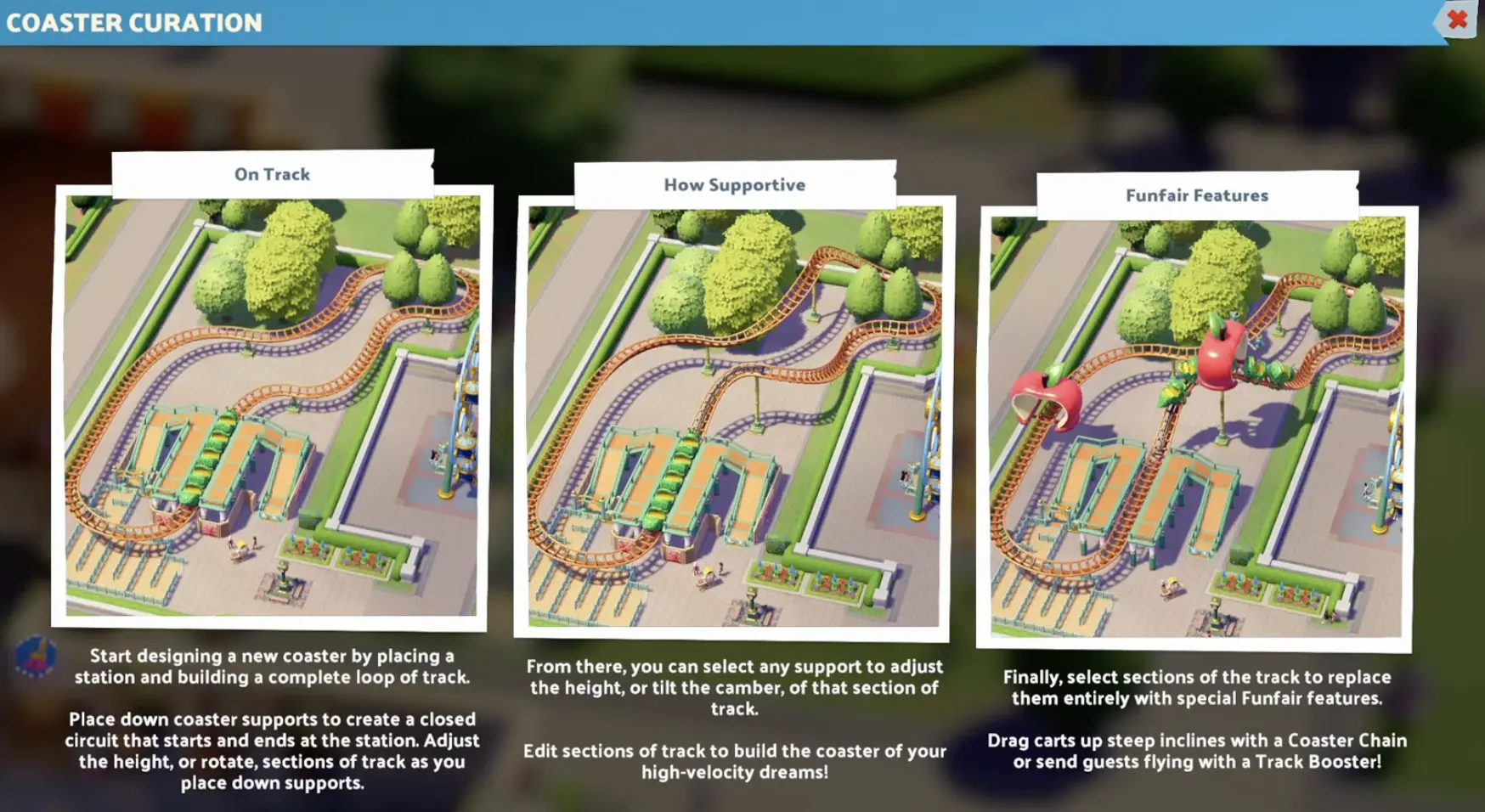
For your first Monobeast Metro, follow the Coaster Curation tasks: place and rotate a support, adjust a support’s height three times, add a Coaster Chain, complete a closed circuit, and build the ride. Connect its queue, let the Coaster run, then check the resulting Thrill.
Roller Coasters in Two Point Museum: Rides & Relics are built by positioning supports and shaping the track between them. You can create a working circuit with relatively few supports, but a large design can fail because of one invalid connection, insufficient acceleration, or a sharp transition that the train cannot complete.
The editor allows you to change height, direction, and tilt after the track has been placed. Coaster Chains and Track Boosters provide different ways to keep the train moving, while the finished attraction’s Thrill, Ferocity, and Nausea determine how it performs for visitors.
The first useful milestone is a reliable circuit that returns to its station. Once it operates, you can improve the ride without having to rebuild the entire attraction.
How to Build Your First Monobeast Metro
The first custom Roller Coaster introduced during Riquetti Gardens is the Monobeast Metro.
Its in-game tutorial, Coaster Curation, provides five construction objectives. Complete them in order instead of trying to build an elaborate track before learning the support controls.
Step 1: Place and Rotate a Monobeast Metro Support
Select the Monobeast Metro design and choose an outdoor construction area.
Place the station and begin extending the track by positioning a support. Rotate the support to change the direction of the connecting rails.
The editor provides these controls:
- Z / X: Rotate
- V / C: Adjust Height
- B / N: Adjust Tilt
A support controls the shape of the sections connecting it to neighboring supports. Changing one support can therefore alter more than one part of the track.
Begin with a broad, uncomplicated route around the station. Leave enough space to bring the final track section back to the start.
Step 2: Adjust a Support’s Height Three Times
The next tutorial objective requires three height adjustments.
Select a support and use the Height controls to raise or lower it. Repeat until the objective registers.
Raising a support creates an incline approaching it and changes the track’s descent afterward. A gradual climb is easier to manage than an extreme elevation change while the rest of the circuit is still incomplete.
You can return to these supports later to shape more ambitious hills and drops.
Step 3: Place a Coaster Chain Track Piece
The third objective introduces the Coaster Chain.
Select a suitable track section and replace it with the Chain feature. A Coaster Chain pulls the train up an incline, providing the height needed for a gravity-powered descent.
Place it on an uphill section rather than treating it as a general speed boost for the entire circuit.
You only need to satisfy the tutorial requirement at this stage. More complicated acceleration choices can wait until the first route is working.
Step 4: Create a Complete Circuit
Connect the remaining supports until the rails return to the station.
The track must form a valid closed circuit. An unfinished connection or a section rejected by the editor prevents the design from being completed.
A simple oval with a modest climb and descent is enough to learn the construction system. You can select supports and track sections again after the circuit closes.
Step 5: Build the Monobeast Metro
Once the circuit is valid, confirm the design and complete construction.
The final Coaster Curation objective is Build a Monobeast Metro. Merely drawing the track is not the same as finishing the exhibit.
After construction:
- Connect an accessible guest queue to the station.
- Make sure the attraction is open and properly staffed.
- Allow the train to run its circuit.
- Open the ride inspector and check Thrill, Ferocity, Nausea, and Maintenance.
If the track looks impressive but Thrill is still zero, confirm that the ride has actually completed its test before modifying the design.
How to Fix Invalid Track and Support Collisions
A red dotted track section indicates that the current construction is invalid.
The game can also display a more specific warning. For example, the Gearbox Glider editor can report Invalid collision Gearbox Glider Support.
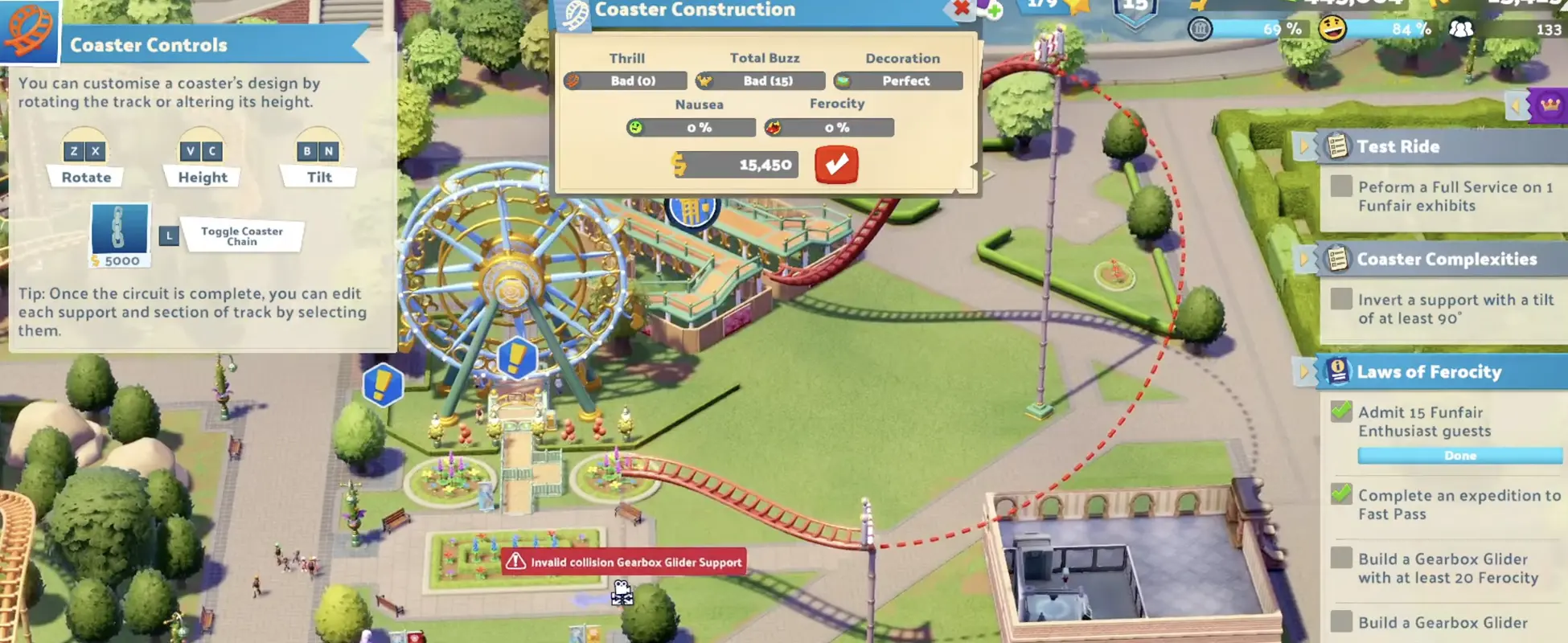
The warning matters because it identifies a construction conflict, not a lack of speed. Installing another booster does not solve a support colliding with the surrounding environment.
Fix the Section Without Rebuilding Everything
Select the supports immediately before and after the rejected section.
Try these adjustments in order:
- Check clearance. Look for nearby buildings, paths, decorations, or another attraction occupying the required space.
- Adjust support position. Move the affected support away from the obstacle.
- Reduce extreme transitions. Straighten the rotation or reduce the height difference between adjacent supports.
- Change the spacing. Give the track more room to complete a difficult bend.
- Add a support when needed. An additional control point can make a complicated transition easier to shape.
Check the connection after each adjustment. Once it becomes valid, continue with the remainder of the circuit.
A support may look unobstructed from one camera angle while still colliding with something behind it. Rotate the camera before moving an entire building.
If several sections are invalid, simplify the route temporarily. A working circuit gives you a stable point from which to rebuild the difficult part.
Why a Closed Track Can Still Fail
A valid circuit only confirms that the geometry has been accepted.
The train also needs enough momentum to complete its route. A very high hill, a large inversion, or repeated steep climbs can stop the train even when every track section is valid.
Watch how far the train travels during testing.
If it slows down before an incline, change the acceleration or reduce the climb. If the track becomes invalid during editing, fix the support geometry first.
These problems require different corrections.
Coaster Chains vs Track Boosters
A Coaster Chain and a Track Booster both help move the train, but they serve different purposes.
A Coaster Chain pulls the train up an incline. A Track Booster accelerates it along the selected section.
The choice depends on the type of Coaster and the shape of its route.
When to Use a Coaster Chain
Use a Chain on a climb that the train cannot complete through momentum alone.
A common arrangement is a Chain near the beginning of the circuit, followed by a descent that carries the train through the rest of the course.
The downhill section must still provide enough energy for later hills and turns. One Chain does not guarantee that a route containing several high climbs will work.
When the train repeatedly stalls at the same incline, identify that section before adding more track features.
How to Use a Track Booster
A Track Booster is useful when the train needs additional speed without being pulled up a conventional Chain Lift.
The Coaster Controls panel provides the Toggle Track Booster shortcut, using the L key.
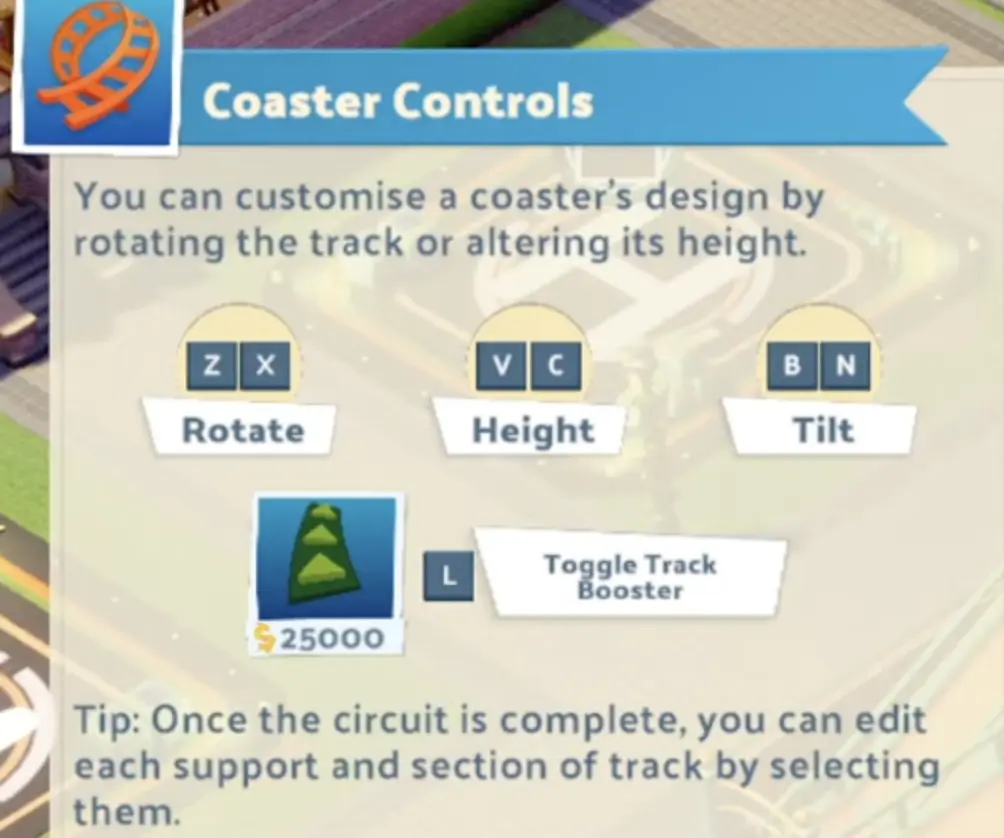
Place the Booster where acceleration is actually required, then test the circuit.
Extra acceleration affects more than completion time. Sending the train through a sharp turn or inversion at higher speed can change Ferocity and Nausea substantially.
A Booster placed at the wrong point may make an uncomfortable ride worse without solving the original momentum problem.
Steeper Chase: Use Boosters, Not Chains
Steeper Chase cannot use Coaster Chains. It relies on Track Boosters for acceleration.
This difference becomes important when the Riquetti Gardens campaign requires a Steeper Chase with at least 15 Thrill.
Build a valid route, add the appropriate acceleration, and check the attraction after its test. A compact Steeper Chase that reaches the required value satisfies the objective; an enormous track is not mandatory.
The Riquetti Gardens walkthrough covers when that construction target appears during the five-star campaign.
Other Coaster designs also have restrictions. Not every type supports the same inversions, heights, Chains, or Boosters, so check the available track options on the attraction you are building.
How to Build Loops, Corkscrews, and Banked Turns
The editor allows supports to rotate and change their tilt, enabling more complicated track shapes.
For a banked turn, select the relevant support and adjust its Tilt so the rails lean into the bend. This creates a different transition from a flat turn.
Loops require more work because the track must rise, invert, and return to the normal orientation while remaining valid.
Building a Loop With Support Rotation
One construction approach is:
- Raise a support to create the climb into the inversion.
- Move the following support forward to provide enough room for the loop.
- Rotate the higher section approximately 180° and invert the track orientation.
- Rotate the next support back toward the returning direction.
- Lower the returning section and reconnect it to the rest of the circuit.
The final shape depends on support spacing, elevation, and the Coaster’s permitted geometry.
A very large loop may require more speed than the preceding descent provides. If the train stalls, reduce the inversion’s size or adjust acceleration where the Blueprint permits it.
Corkscrews use similar rotation and tilt adjustments, but they also introduce rapid changes in direction.
The resulting Ferocity and Nausea can increase even when the circuit remains mechanically valid.
Changing Track Appearance
Track customization is not limited to geometry.
Select an individual track section to access its available appearance options, including track colour and decorative features. Some decorations can be moved along a section using their adjustment control.
These options are useful after the ride is functioning. They do not replace the need for a working circuit, and an elaborate decoration layout is not a solution to insufficient train speed.
How to Increase Roller Coaster Thrill to 100
Thrill measures the exciting experience provided by the attraction. It also contributes to the wider Funfair visitor experience, with Thrill helping guests remain interested in the museum for longer.
For a numerical Thrill target, use the actual value displayed in the ride inspector.
Track length alone is not a reliable shortcut. A long, nearly flat circuit can produce a different result from a shorter design with meaningful climbs, drops, turns, and acceleration.
Improve an Existing Coaster
Start with a completed circuit that reliably returns to its station.
Then make controlled changes:
- Add a meaningful climb followed by a descent.
- Adjust support height to change the approach into a turn.
- Introduce banking or an inversion when the Coaster supports it.
- Use acceleration where the train needs additional speed.
- Run the ride again and compare the displayed values.
You do not need to make all these changes at once.
A single adjustment may be enough to reach a smaller target. For a high-Thrill ride, progressively improving the existing design makes it easier to recognize which change helped and which introduced a new problem.
Why Thrill Sometimes Shows Zero
During construction, the editor may show a low or zero Thrill value even when the track contains substantial hills and drops.
Check whether the circuit has been completed and the attraction has finished testing.
A construction preview is not always equivalent to the operating ride’s final statistic.
If an operating Coaster still shows unexpectedly low Thrill, inspect its actual movement. A train that cannot complete the planned route is a different issue from a completed attraction that simply lacks exciting track features.
A Working Example With 123 Thrill
The Gearbox Glider shown below has:
- 123 Thrill
- 100% Ferocity
- 53% Nausea
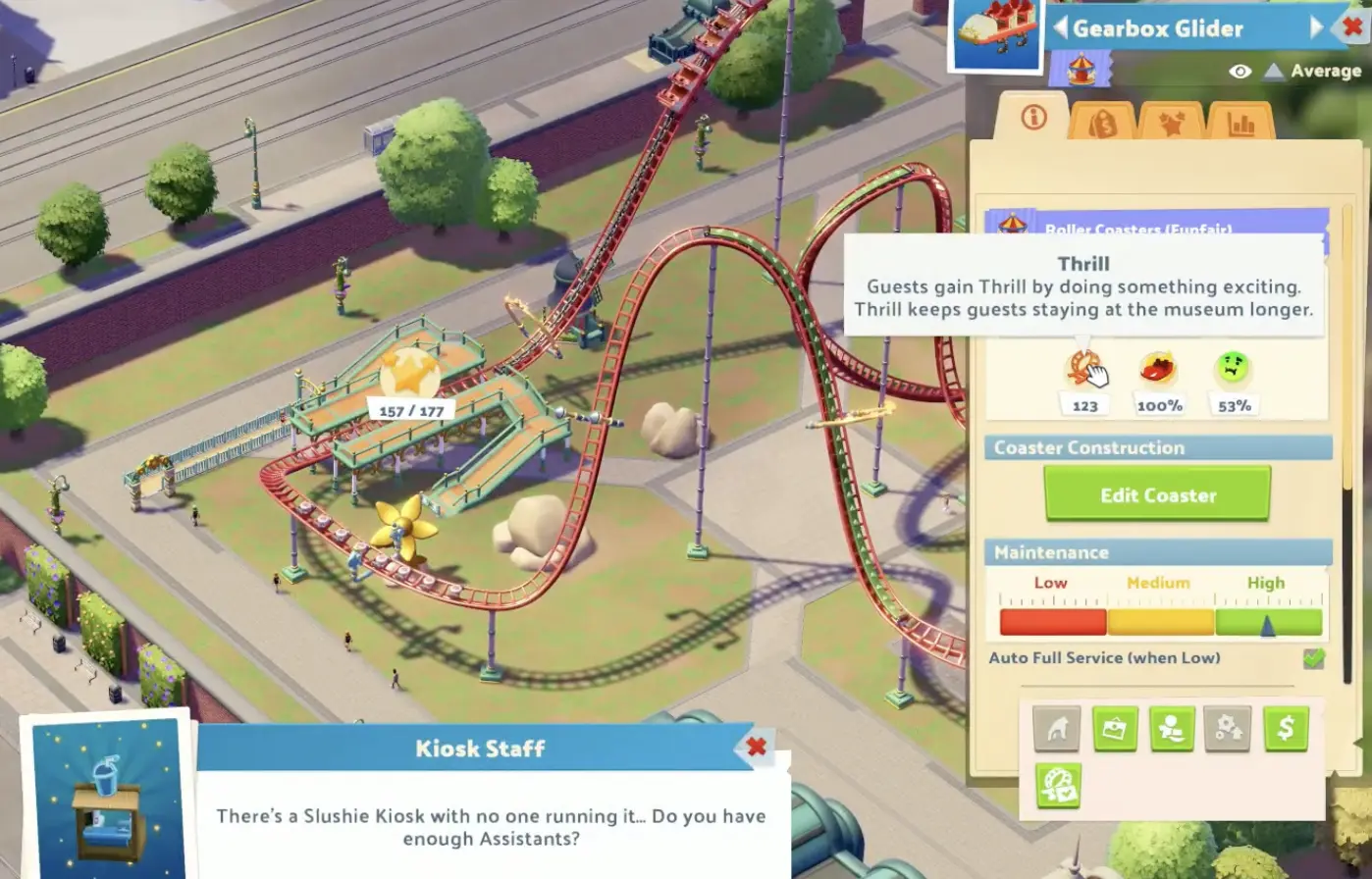
The values demonstrate that 100 Thrill is achievable, but also show why maximizing excitement does not necessarily produce the most accessible attraction.
You can pursue the high-Thrill goal with one Coaster while keeping other rides suitable for less adventurous visitors.
For Coaster with the Most-er, the requirement is one Roller Coaster with at least 100 Thrill. Achievement completion and troubleshooting are covered in the Rides & Relics achievements walkthrough.
Ferocity and Nausea — Why Guests Avoid or Get Sick on Rides
Thrill, Ferocity, and Nausea describe different aspects of the same attraction.
Ferocity measures how intimidating the ride is. Visitors have different tolerances for intense experiences, so a highly ferocious Coaster may attract fewer suitable riders.
Nausea reflects the risk of guests feeling sick after using the attraction.
A ride can have high Thrill without being comfortable for every visitor.
Check Who Can Tolerate the Ride
The Sticker Book provides information about guest types and their preferences.
Funfair Enthusiasts are better suited to intense attractions than some other visitors. A museum also serving families and less adventurous guests benefits from offering rides with different intensity levels.
When a completed Coaster has a consistently empty queue, check whether its Ferocity is suitable for the guests currently visiting your museum.
Increasing the Thrill further will not necessarily make that ride more attractive to visitors who already consider it too intense.
Reduce Nausea Before Adding More Speed
Review the ride’s Nausea and Maintenance values.
Anti-Nausea Perks can help reduce the problem without forcing you to remove every exciting part of the track. Install a suitable Perk through the attraction’s available controls using the required Funfair staff.
The Gearbox Fairgrounds expedition guide covers where these rewards are obtained.
After installation, recheck the attraction’s statistics rather than assuming the problem has disappeared.
If the ride is also in poor condition, address Maintenance before undertaking another major track redesign.
Persistent sickness creates extra cleaning work and can affect the experience of guests elsewhere in the Funfair.
Funfair Maintenance — Restoration vs Full Service
Funfair exhibits use three Maintenance levels: High, Medium, and Low.
Their condition affects the experience and safety of the attraction.
The game’s maintenance instructions explain that rides at Low Maintenance become more thrilling but also more dangerous. Guests are more likely to experience Nausea or accidents.
That does not make low maintenance a suitable strategy for developing a high-Thrill museum.
When Ordinary Restoration Is Not Enough
A Funfair Expert can perform ordinary Restoration, but that work cannot raise an attraction above its current Maintenance level.
To return a ride to a higher Maintenance level, close the exhibit and order a Full Service.
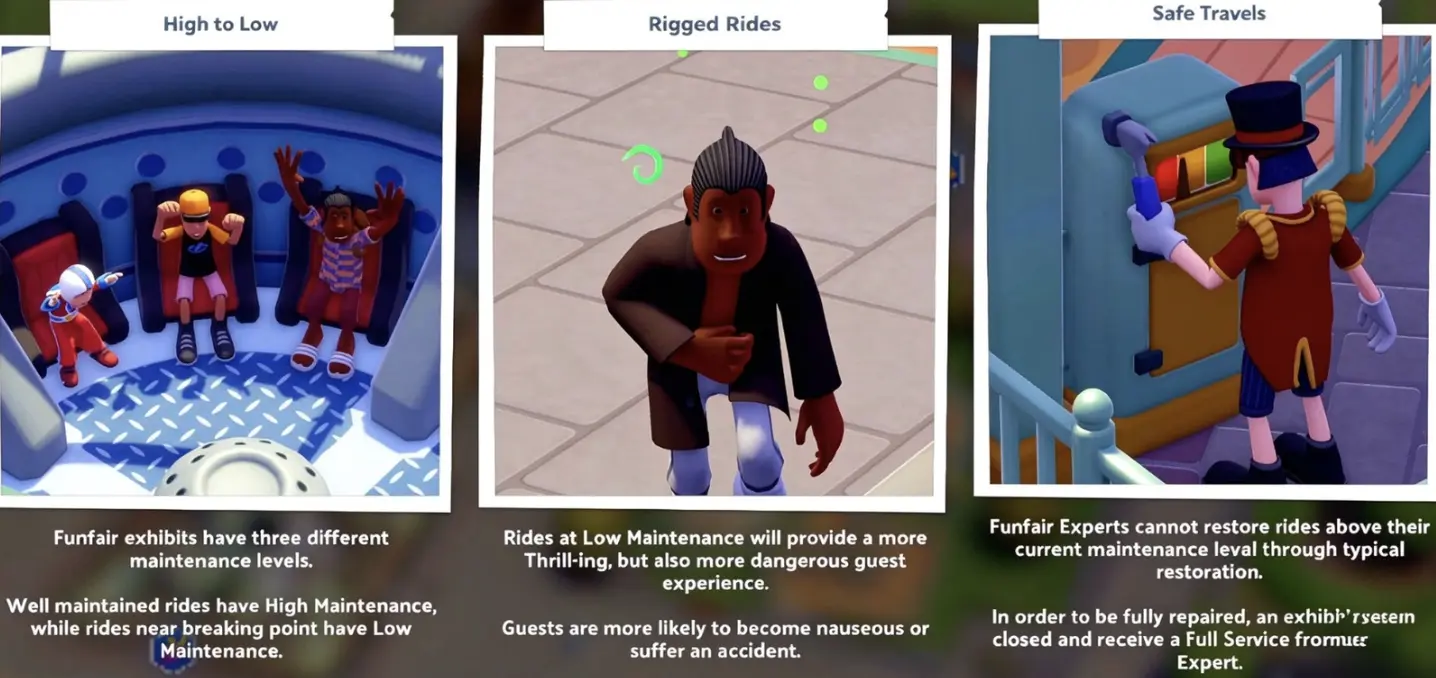
The distinction matters when a ride keeps deteriorating despite repeated ordinary Restoration.
Check the current Maintenance tier, close the attraction if necessary, and have a qualified Funfair Expert perform Full Service.
Reopen the ride after the service is complete and inspect its condition before returning to ordinary operation.
Maintenance and Staffing Decisions
Large Coasters can place additional demands on your maintenance and cleaning teams.
If visitors are repeatedly becoming sick around one attraction, inspect that ride’s Nausea and condition before hiring a large number of additional Janitors.
Extra cleaning staff may be necessary when messes are accumulating, but there is no universal employee-to-ride ratio that every museum must follow.
Watch where problems actually appear, then increase coverage where it is needed.
Why Guests Are Not Riding Your Roller Coaster
When a completed attraction has few or no riders, diagnose the problem before changing its entire design.
Check these in order:
- Track: Is the circuit valid, and can the train return to the station?
- Queue: Can visitors reach the boarding area through an accessible queue?
- Operating state: Is the ride open, completed, and free of a maintenance closure?
- Guest suitability: Does the Coaster’s Ferocity match the tolerance of your visitors?
An inaccessible queue is not fixed by installing a Track Booster. A guest-tolerance problem is not solved by constructing a second identical Coaster.
If the train operates normally and visitors can reach the attraction, look at the guest experience before making costly construction changes.
How to Upgrade an Existing Roller Coaster Without Rebuilding It
When you unlock a higher-quality Funfair Blueprint, you can upgrade an existing attraction instead of demolishing it.
This is particularly valuable for custom Coasters, where the track, queue, landscaping, and surrounding layout may have taken considerable time and money to construct.
Use the Ride’s Upgrade Option
After recovering a better-quality Blueprint:
- Select the existing Funfair attraction.
- Check its available Upgrade option.
- Confirm that the newly unlocked Blueprint quality is available.
- Apply the upgrade to the existing ride.
The improvement does not require you to start a completely new track simply because a better design has been discovered.
Blueprint quality tiers are unlocked through Gearbox Fairgrounds progression. If the required quality is not yet available, complete the relevant Gearbox Blueprint progression before trying the upgrade again.
Upgrade or Buy Another Coaster?
Upgrade the existing attraction when you need higher exhibit quality and the current layout works.
Build another Coaster when you need a different ride type, want to serve another guest group, or have a specific objective requiring an additional attraction.
For example, the Riquetti Gardens campaign eventually asks for three Epic-quality Roller Coasters. That is a count of qualifying attractions, so upgrading just one Coaster cannot substitute for having three.
The complete star requirements are in the Riquetti Gardens walkthrough.
One additional caution: selling or deleting a ride also removes the Perks installed on that attraction. Check its equipped Perks before replacing a working exhibit. Upgrading or relocating it can preserve work you would otherwise lose.
Funfair Ticket Prices — How to Find Good Value
Unlike ordinary exhibits that primarily depend on donations, Funfair attractions charge individual ride tickets.
Open the museum’s Prices controls and select the Funfair category to manage those prices.
You can change the ticket price for each attraction separately. The panel also shows how guests judge the current price.
That Value judgement is useful when deciding whether a ride can earn more money without making visitors feel overcharged.
Good Value vs Bad Value
The pricing interface distinguishes between several reactions:
- Good Value: Guests consider the current price worth the money.
- Fair Value: Guests are comfortable with the price.
- Bad Value: Guests do not consider the current price worthwhile.
- Awful Value: Guests strongly reject the price.
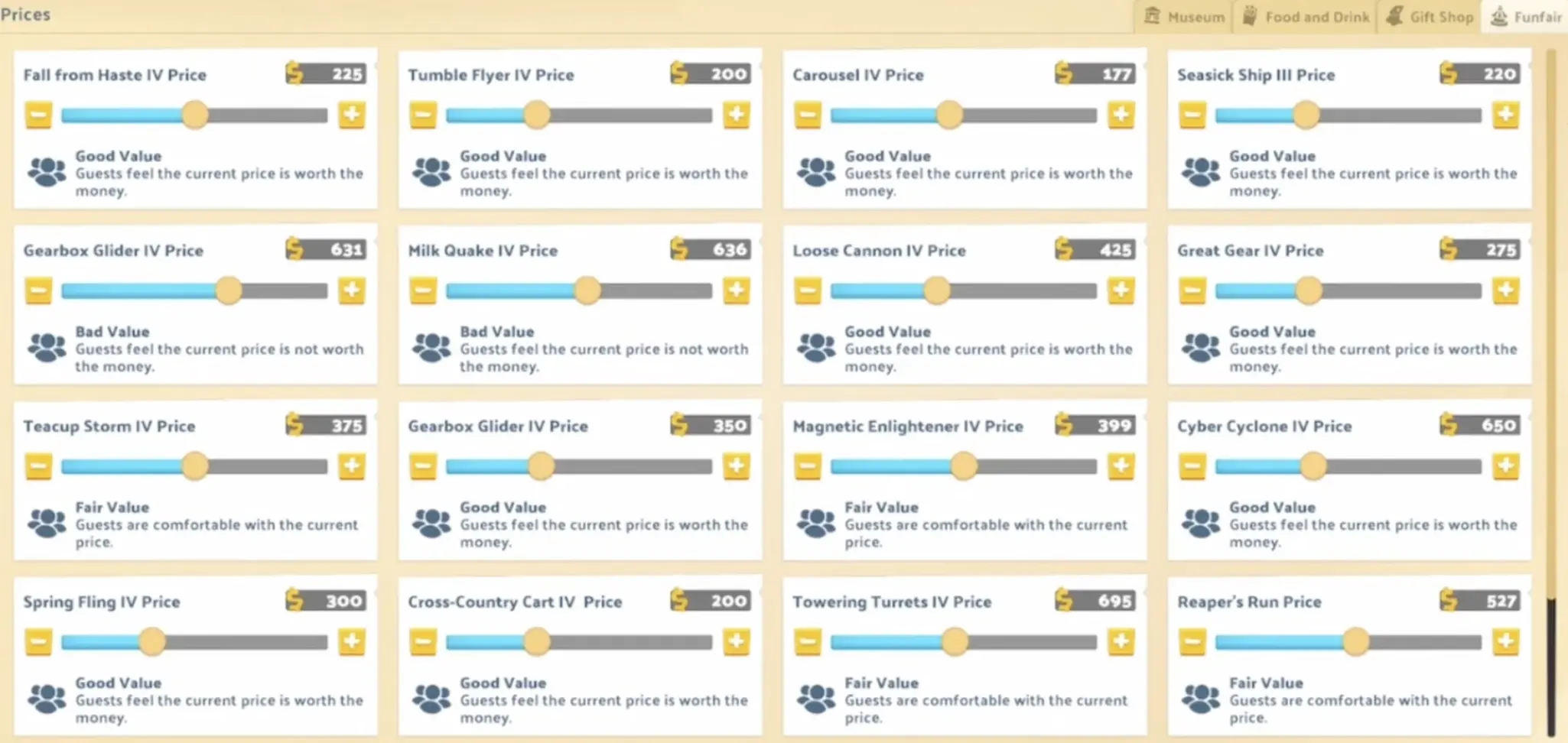
The two Gearbox Glider IV entries demonstrate why a price copied from another attraction or museum may not work for yours.
One is charging $631 and receiving Bad Value. Another is charging $350 and receiving Good Value.
These are examples of the displayed conditions, not permanent recommended prices for every Gearbox Glider IV.
The same screen also shows a Rocket Launcher III priced at $1,500 with Awful Value. A high ticket price does not automatically produce a useful operating result.
Raise Ticket Prices Without Losing Value
Start with a functioning attraction and increase its price in small steps.
After each change:
- Check the displayed guest Value judgement.
- Watch whether visitors are still using the attraction.
- Compare the resulting income with the ride’s running costs.
- Stop increasing the price when the additional income no longer justifies the worse guest reaction.
This is useful during Riquetti Gardens’ monthly profit objectives, especially when you already have several rides generating income.
There is no need to apply the same price increase to every exhibit. Adjust each attraction according to its own quality, effects, and visitor response.
Pricing Perks can alter the situation, but they do not eliminate the need to inspect the current judgement.
Funfair Ribbons — How to Earn Knowledge and Enlightenment
Funfair Ribbons are awarded by the Department of Amusement when an attraction meets its individual conditions during a Funfair inspection.
Winning a Ribbon improves the exhibit’s Knowledge and provides additional benefits, including Buzz and Thrill.
This makes Ribbons important beyond their awards. Funfair Knowledge contributes to the Funfair Enlightenment progression used throughout Riquetti Gardens.
Check Each Ride’s Ribbon Conditions
Open the attraction inspector and examine its Ribbon slots.
Requirements vary by exhibit. They can involve Decoration, Maintenance, completion, guest preferences, pricing, or other ride-specific conditions.
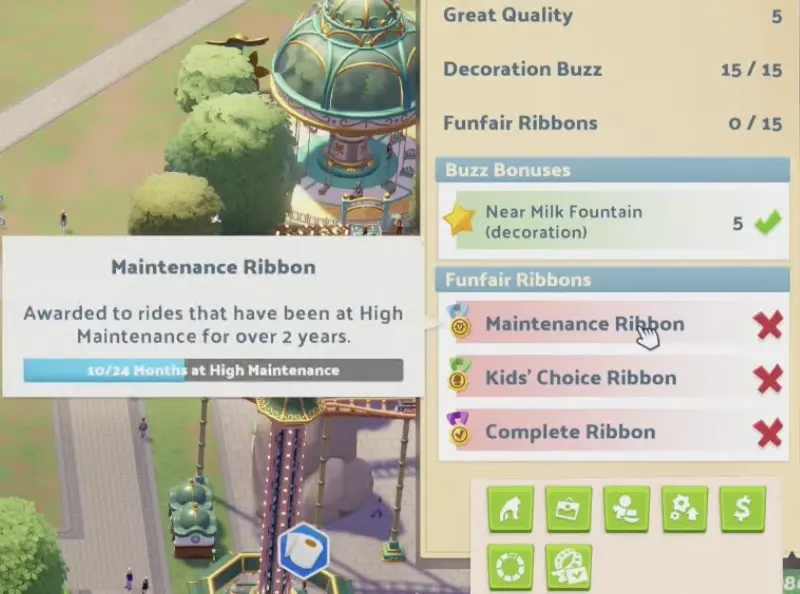
An incomplete Ribbon is not awarded simply because the attraction has been placed. The displayed condition must be met, and the Department of Amusement must evaluate the ride.
The Ribbon inspector provides the exact requirement and any tracked progress.
Maintenance Ribbon — Stay at High Maintenance for 24 Months
The Maintenance Ribbon requires an attraction to remain at High Maintenance for 24 months.
For example, 10/24 Months at High Maintenance means the ride has accumulated ten qualifying months toward the requirement.
Keep it serviced and check the progress counter as the museum operates.
Ordinary Restoration and Full Service can help maintain or recover the ride’s condition, but neither replaces the required duration.
After the counter satisfies the requirement, check the next applicable Funfair inspection for the award.
This makes an established, well-maintained attraction a useful candidate for long-term Ribbon progress.
Decoration and Other Ribbons
A Decoration-related Ribbon requires the relevant exhibit to meet its displayed Decoration condition.
Improve the attraction’s surrounding decoration until its inspector confirms the requirement.
Other Ribbon types, including Kids’ Choice, Complete, Safety, and Money, have their own conditions. Use the specific attraction’s inspector to determine which awards are available.
Do not assume that meeting a requirement on one attraction grants the corresponding Ribbon to every other ride.
Gold Value Ribbon — Why Good Value Alone Isn’t Enough
Gold Value is more demanding than simply selecting an affordable ticket price.
The Ribbon checks its own pricing requirement in addition to how guests judge the value of the attraction.
A ride showing Good Value in the general Prices screen has not necessarily satisfied Gold Value.
Before changing prices, open the attraction’s Ribbon inspector and read the exact current condition.
Then compare the requirement with the ride’s ticket price and Value judgement.
Lowering the ticket price can improve how guests view the attraction, but it can also prevent you from meeting a requirement involving a higher ticket price.
Conversely, raising the price too far can cause the attraction to be considered Bad Value or Awful Value.
Perks affecting price or guest reactions may alter these judgements, but Price Warp alone is not a guaranteed Gold Value solution.
If the inspector continues to show a failed pricing condition, return the ride to a reasonable operating price instead of repeatedly raising it without progress.
Gold Value and Money Ribbons are separate awards, so earning one does not automatically satisfy the other.
Ribbons and Funfair Enlightenment
Riquetti Gardens requires Funfair Enlightenment Level 5 during the second-star campaign and Level 19 during the final chapter.
The practical route is to earn additional Ribbons on Funfair exhibits that still have available awards.
Working toward several achievable Ribbon conditions while the museum operates gives you more opportunities to increase Funfair Knowledge through inspections.
Once an attraction has earned a Ribbon, repeating its already-completed requirement does not create a new Ribbon award.
The five-star campaign objectives are covered in the Riquetti Gardens walkthrough.
For Honourable Invention, three Ribbons must be awarded to the same Funfair exhibit; Ribbons spread across different rides do not satisfy the achievement. See the Rides & Relics achievements walkthrough for its completion condition.