Star Wars Galactic Racer Guide: Campaign, Modes & Podracing
Start in Campaign, learn when Arcade, Scenarios, or multiplayer are worth playing, compare vehicle types, and understand how Podracing changes by mode.
Start with Campaign. It opens the vehicles, Parts, Favors, Abilities, and
other systems that make the rest of the game easier to use.
Move to Arcade when the goal is learning a track or beating a medal time,
and use Scenarios when the listed reward is more useful than another
Campaign run.
For online racing, Quick Race provides the shorter option while
Multiplayer Tour adds betting and build progression. Podracing also appears
in Campaign, Arcade, and multiplayer, but each mode handles Podracer selection
differently.
Star Wars Galactic Racer has several racing modes, but they solve different
problems. Campaign handles the main progression, Arcade is useful for repeated
track practice, Scenarios package fixed challenges around specific rewards, and
multiplayer turns the same vehicle systems into competitive races.
The easiest way to choose a mode is to decide what is blocking the next step:
Campaign progress, track knowledge, vehicle performance, resources, or another
player.
What Should You Play First?
Start with Campaign.
The opening exhibition leads into qualifying and then into three acts built
around branching Tours. The event paths can change between runs, so trying to
memorize one exact sequence is less useful than understanding which choices can
cost a League Token and which races actually move the act forward.
If the problem is qualifying, League Tokens, Eliminators, Sebulba, Kestar Bool,
the Act 3 Podracer transition, or the final Championship, follow the
Campaign Guide.
If the route is already clear but the same crash, heat problem, or handling
issue keeps ending races, the next change should be the vehicle rather than the
route. Vehicle choice, Parts, Tuning Points, Faults, Favors, and Ramjet Redline
are covered in the
Best Builds and Upgrades Guide.
Which Mode Should You Use?
The main single-player and multiplayer options serve different purposes:
Campaign — advance Shade through the Galactic League and unlock more of
the game’s systems.
Arcade — repeat individual events, learn tracks, and chase medal times
without risking a Campaign Tour.
Scenarios — race with a fixed character and setup for a specific
challenge and reward.
Quick Race — jump into a shorter standard multiplayer race.
Multiplayer Tour — race through a longer online competition with betting,
Parts, and upgrades affecting the run.
Quick Pod Race — enter a single multiplayer Podrace.
Pod Racing Tour — take a selected Podracer through a longer online
Podracing competition.
Campaign is still the best starting point because it introduces the core vehicle
systems and opens more single-player options. Arcade and Scenarios become more
useful once there is a specific reason to step away from the current Tour.
What Vehicle Types Are in Galactic Racer?
There are three regular speeder classes plus Pod Racers:
Landspeeders — more forgiving when stability and durability matter;
Speeder Bikes — faster and more agile, with less protection from
collisions;
Skim Speeders — slower to accelerate and more dependent on maintaining
momentum;
Pod Racers — dramatically faster machines with individual pilot traits
and a more demanding handling model.
Regular speeders can use visual options such as models, liveries, colours, and
patina. Those changes are cosmetic. Actual racing performance comes from
systems such as Parts, Abilities, Tuning Points, Racer Styles, Favors, and Tour
upgrades.
That distinction matters when a familiar vehicle suddenly stops working well.
A different paint or livery will not fix overheating or poor cornering; the
current build needs to change.
The
Best Builds and Upgrades Guide
covers when to use each regular class and how to change a setup when crashes,
heat, Faults, or lack of pace become the problem.
Pod Racers Have Their Own Traits
The playable Podracer lineup includes:
Dud Bolt
Gasgano
Teemto Pagalies
Ody Mandrell
Sebulba
Ben Quadinaros
Their differences affect how each machine rewards jumps, Afterburner use,
clean driving, contact, recovery, or maximum speed. The fastest-looking option
is therefore not automatically the easiest one for every circuit.
Use Arcade When the Track Is the Problem
Arcade turns a course into a repeatable medal target without attaching the
result to a Campaign Tour.
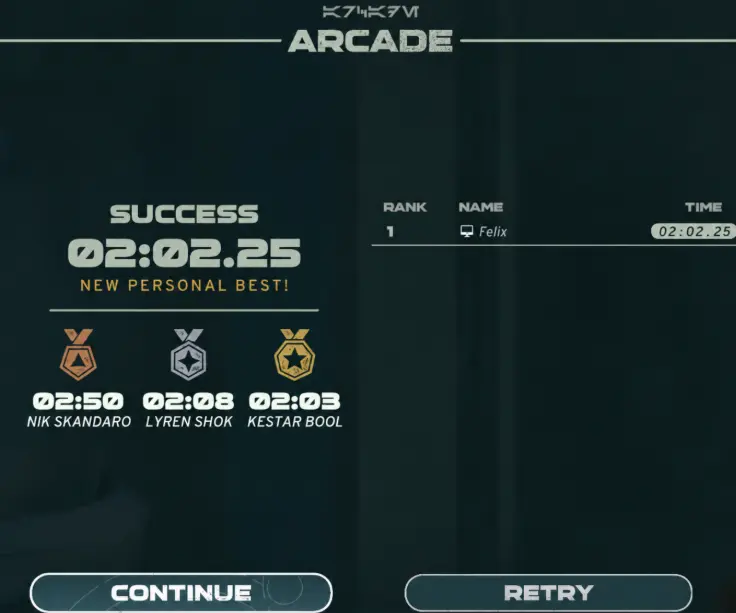
One event used these times:
Bronze — 2:50 Silver — 2:08 Gold — 2:03
The completed run finished in 2:02.25.
This run beat the 2:03 Gold target with a 2:02.25 finish. When the margin is this small, one cleaner corner, landing, or shortcut can matter more than another minor upgrade.
When Gold is still far away, both the route and the setup may need work. When
the miss is only a second or two, check the lap first:
one shortcut was missed;
a wall hit interrupted the line;
a landing lost speed;
braking started too early;
a corner exit forced unnecessary acceleration afterward.
Rebuild the vehicle only after those obvious time losses are already under
control.
Run Scenarios for the Reward, Not Just Another Race
Scenarios use fixed racers, builds, and objectives. That makes the reward a good
reason to choose one instead of simply adding another Campaign run.
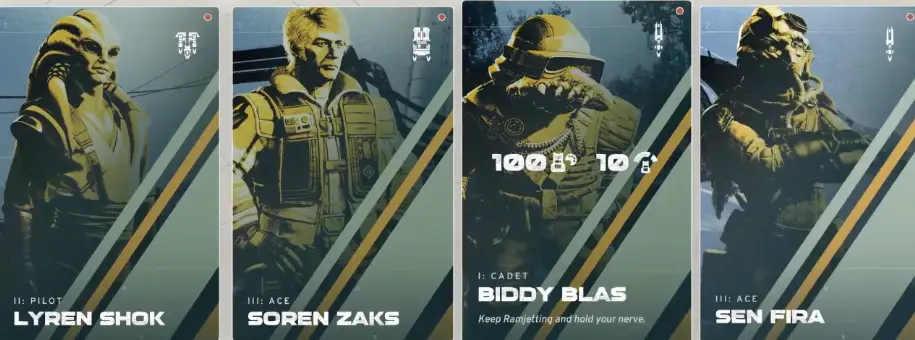
One Scenario offered:
100 Kit Parts
10 Tuning Points
This Scenario offers 100 Kit Parts and 10 Tuning Points. Run it when those resources solve something the current vehicle actually needs.
A Scenario still needs to be completed successfully. Entering the mode does not
award the resources automatically.
The choice is therefore straightforward: stay in Campaign when progression is
the goal; run a Scenario when its reward has an immediate use.
How Multiplayer Works
Standard online races and Podracing are separated into shorter races and longer
Tour formats.
Quick Race
Quick Race is the simpler choice when the goal is one standard multiplayer
event rather than a longer build cycle.
Standard online races can include up to 12 racers, so traffic, contact, and
position changes are much more important than in a quiet time-trial attempt.
Multiplayer Tour
Multiplayer Tour uses a condensed Tour structure. Betting on the expected finish
adds another decision before the race, while successful results feed Parts and
upgrades back into the vehicle during the competition.
That changes how aggressively a race should be approached. A risky prediction
can return a stronger reward, but it also asks the current build to produce the
required finishing position.
Progress in multiplayer is not simply the same vehicle state carried over from
the single-player Campaign, so entering the mode with a strong Campaign build
does not remove the need to develop the multiplayer setup.
Podracing Online
Quick Pod Race provides a single Podracing event.
Pod Racing Tour extends that into a longer competition and lets the
Podracer be selected directly. Online Podracing supports up to 8 racers.
The game supports cross-platform multiplayer, while local split-screen is not
available.
How Podracing Changes by Mode
Podracing appears in several parts of Galactic Racer, but the way the racer is
chosen depends on the mode.
Campaign
Podracing becomes part of the story later in the Campaign. Shade eventually
needs a Podracer to answer Kestar’s machine, and the final Galactic League
Championship uses that progression.
Single-player Arcade ties the Podracer to the selected event rather than
providing a free menu where any racer can be paired with any track and race
setup.
Additional Podracing events can open as medal progress advances, which makes
Arcade useful for learning individual machines without putting a Campaign Tour
at risk.
Multiplayer
Pod Racing Tour gives you direct control over which Podracer to use, so the
racer choice can be matched to the circuit and preferred driving style.
The practical difference is:
Campaign — Podracing appears through progression;
Arcade — choose the event associated with the Podracer;
Multiplayer — choose the Podracer directly.
Tales of Podracing is a separate 12-event sequence rather than another Arcade
checklist. If you are trying to complete the full set, use the
Tales of Podracing Guide for
all 12 events in order and the conditions that need extra attention.
When Should You Start Trophy and Achievement Cleanup?
PC has 49 achievements. PS5 has 50 trophies, including the Platinum.
Do not turn the opening Campaign Tours into a checklist for every long
requirement. Many challenges become easier after more Racer Styles, Favors,
Abilities, Parts, Podracing events, and game modes have opened.
One exception matters before leaving Act 2: Clandestine Aid cannot be
equipped in Act 3, so players going for full completion should use it for its
required Galactic Gauntlet win while it is still available.
The
Achievements and Trophies Guide
covers the completion order, Champion difficulty, Kestar Bool, Arcade Gold,
Faulty Parts, and Galactic Gauntlet requirements.