How Do You Build and Upgrade a Ship in Once Human?
Build a working ship in Isles of Abyss, improve speed and handling, fix sails and anchors, manage onboard facilities, and position cannons for naval combat.
Updated:
Quick Answer
Enter Ship Build Mode and install a working hull, steering wheel, anchor, and Small Sail. Leave Build Mode, raise the anchor, and test the ship’s movement before adding extra decks or onboard facilities.
A ship in Isles of Abyss can be a small combat vessel or an elaborate floating home. Both can sail, but they behave very differently when you need to turn around a Calamity Tower, escape an enemy ship, or reach an island without wasting fuel.
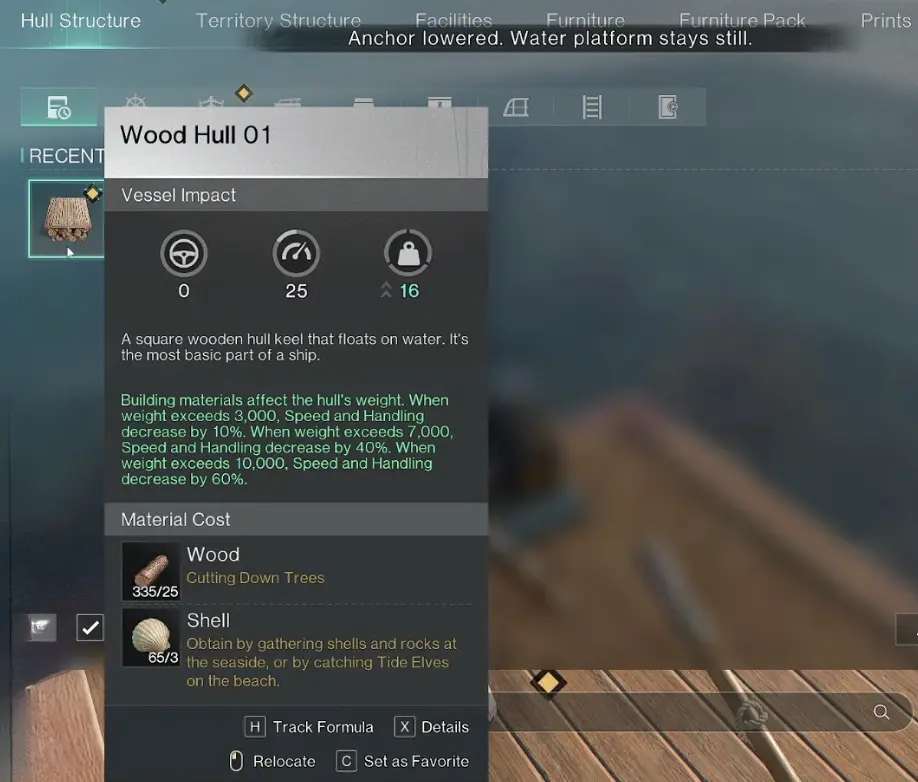
Wood Hull 01 has three weight thresholds, with Speed and Handling penalties reaching 60% above 10,000 weight. Shipboard crafting, production, planting, and storage also have separate placement limits, so expanding the deck does not necessarily let you install more facilities.
A bigger deck therefore does not automatically give you a better ship. Extra floors, walls, equipment, and storage must justify the weight they add. The same applies to cannons: filling the deck with weapons accomplishes little if your mast blocks their firing angles or you cannot turn quickly enough to face a moving target.
A practical build starts by making the vessel move, then keeping the equipment you actually need accessible. The decorative structure can come later.
How to Build Your First Working Ship
Start with the water-territory construction objective and enter the ship’s Build Mode. Place the hull sections within the available construction area, then arrange the functional parts before enclosing them with floors, walls, or additional decorations. The basic Wood Hull 01 piece requires 25 Wood and 3 Shell. These materials cover one hull piece, not the entire ship. Gather enough for the number of sections you intend to place before spending additional resources on walls or furniture.
For a basic sailing vessel, the important components are:
- Hull: Establish the ship’s floating structure and usable deck.
- Steering wheel: Position it where you can operate the vessel and see ahead.
- Anchor: Keep the anchor accessible, or learn how to operate it from the helm.
- Small Sail: Provide wind-powered propulsion so the ship can actually move.
- Working access to the deck: Avoid enclosing vital ship equipment before testing it.
The sail is particularly easy to overlook when concentrating on the hull’s appearance.
One early construction attempt included repeated changes to the engine position, floors, and steering equipment. The ship remained stationary until the missing sail was installed. Once the sail was placed, it began moving, although slowly.
The immediate lesson is to test the simplest working vessel before investing in a complicated layout. A second floor and a larger cabin will not fix a missing propulsion component.
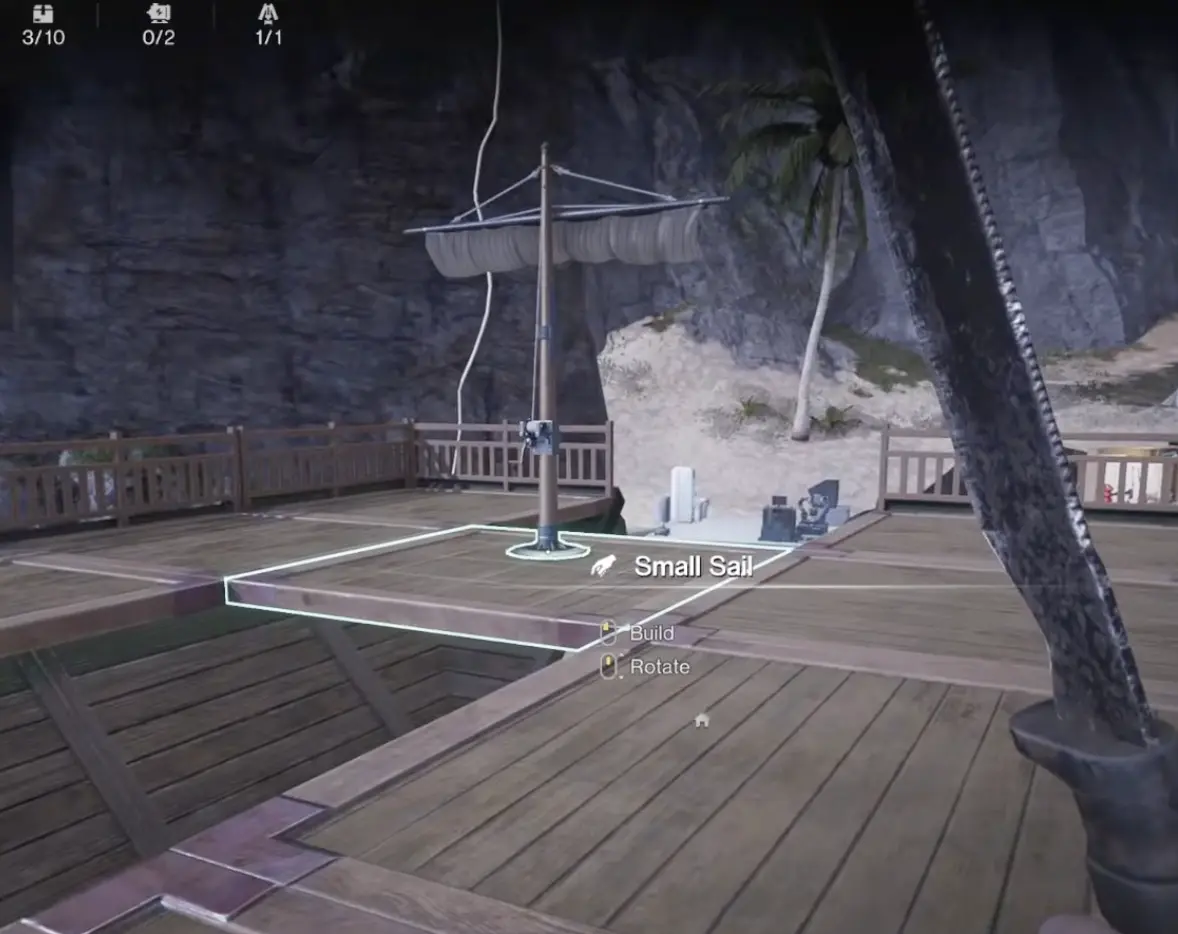
After installing the sail, leave Build Mode, operate the steering wheel, and check the anchor state. A successful first test should establish that the vessel moves under its available propulsion and can change direction.
Only then is it worth spending more materials enlarging the ship.
Why Won’t Your Ship Move?
A ship that refuses to move is not necessarily broken. Several controls and construction conditions can leave an otherwise complete vessel stationary.
The Anchor Is Still Lowered
The game can display the message:
“The vessel cannot move. Raise anchor.”
Raise it before attempting to sail. This is the first thing to check when the steering wheel responds but the ship stays in place.
Entering Build Mode can lower the anchor automatically. After changing the ship’s construction, return to the helm and check its anchor state before sailing. If the game displays “The vessel cannot move. Raise anchor,” raise it through the normal controls rather than rebuilding the ship.
The reverse problem also matters. A vessel left unsecured can drift while you are away exploring. One ship moved from its original position while its owner was completing another objective, making it difficult to find upon returning.
Anchor before leaving for an island or underwater objective, then raise it again before departing.
The Sail Has Not Been Installed
Open Build Mode and confirm that a Small Sail is still installed. A completed hull and steering wheel cannot provide wind-powered movement without one. If you removed the sail while rearranging the deck, reinstall it before returning to the helm.
The Fuel Propeller Has No Fuel
Check the propeller’s fuel supply before changing the hull or installing another engine. A fuel-powered propeller cannot provide its intended propulsion when its fuel is exhausted.
Refill it and test the vessel again. Keeping a working sail available gives you another way to move when fuel runs low.
The Ship Moves, but Barely
Slow movement has several possible explanations: insufficient propulsion, a poorly performing sail setup, excess hull weight, or a ship that has grown much larger than its original design.
Check the current speed and load before adding another engine or sail. There is little reason to purchase an upgrade blindly when removing unnecessary structures might solve the immediate performance issue.
One early vessel accelerated noticeably after its propulsion setup was improved. That makes testing each change useful: install the component, sail a short distance, observe the result, and only then decide whether further expansion is worthwhile.
Speed, Handling, and Load: What Matters Most?
The ship interface provides three important attributes: Speed, Handling, and Load.
Speed determines how quickly you travel between islands and across open water. Handling affects how readily the vessel changes direction, particularly when turning during combat or navigating around obstacles. Load reflects the weight carried by the ship’s construction and equipment.
These attributes affect different parts of your journey.
A faster ship reduces time spent traveling, but poor handling can make combat more dangerous. A heavily built vessel may have ample room for facilities, yet struggle to turn away from the red area attacks that appear during naval encounters.
The Wood Hull 01 construction screen gives three weight thresholds that affect both Speed and Handling:
- Above 3,000 weight: Speed and Handling decrease by 10%.
- Above 7,000 weight: Speed and Handling decrease by 40%.
- Above 10,000 weight: Speed and Handling decrease by 60%.
The higher penalties make a major difference to a warship that needs to turn during combat. Check the hull’s current weight before adding an extra floor or a heavy set of facilities. Crossing 7,000 is a much more serious setback than the initial 3,000 threshold.
Before expanding, check whether the existing deck can accommodate the facilities you need. Rearranging equipment may free enough space without adding another row of foundations. Removing unused walls or redundant structures can also help keep the hull below its next weight penalty.
Should You Build a Small or Large Ship?
A compact ship is generally easier to operate early because it has less structure to carry and fewer obstacles between the steering position and its weapons.
A larger ship becomes more attractive when you need space for additional facilities, cannons, crew positions, or a more permanent onboard setup.
The distinction is practical rather than cosmetic:
- Early exploration: A compact deck with propulsion, steering, supplies, and a usable weapon offers enough functionality for most immediate tasks.
- Longer resource trips: Extra storage and onboard crafting may save repeated returns to your land territory.
- Naval combat: Additional weapons can provide useful firing angles, but excess structure and poorly positioned sails can obstruct attacks.
- Multiplayer sailing: A larger working deck makes it easier for other players to access equipment while someone controls the helm.
Large vessels can perform well, but their added size needs to contribute something useful. A huge hull with poor propulsion or inaccessible weapons is an expensive way to make ordinary journeys slower.
How Many Facilities Can You Put on a Ship?
Shipboard building has stricter limits than constructing a normal land territory.
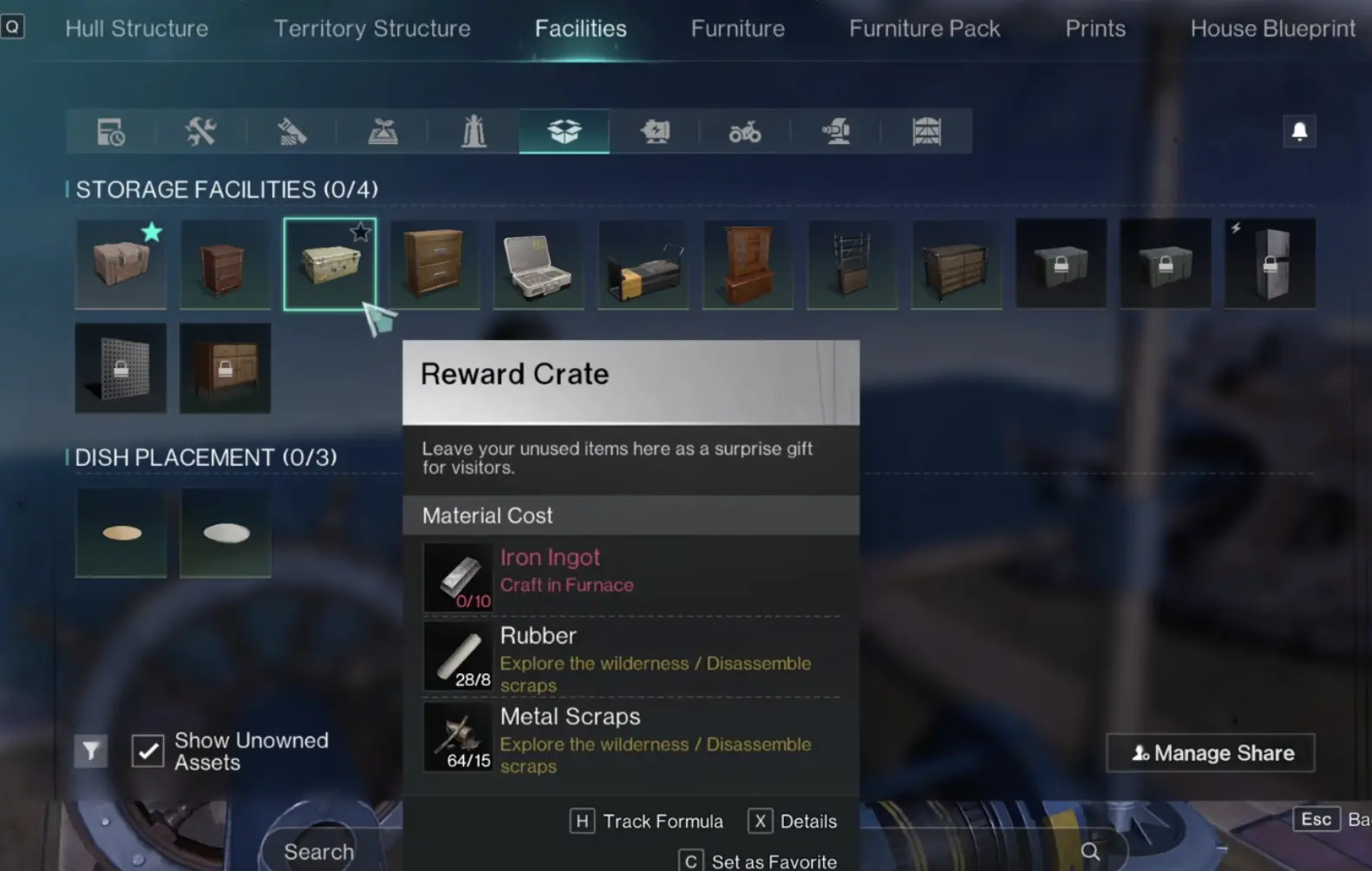
The displayed facility categories allow:
- 4 Crafting Facilities
- 2 Production Facilities
- 2 Planting Facilities
- 4 Storage Facilities
These are separate categories. Increasing the size of your deck does not automatically increase the number of facilities permitted in each one.
The Storage category deserves particular attention because more than ordinary crates can occupy its allowance.
Why Does Adding a Fridge Reduce Your Storage Slots?
A Fridge counts toward the ship’s storage facility limit.
For example, installing one Fridge leaves room for only three other facilities in a category capped at four. Two Storage Crates and a Storage Transfer Terminal would then fill the remaining allowance.
That can surprise players who assumed refrigerators, transfer terminals, and ordinary crates had independent building limits.
The best layout depends on what you plan to keep aboard.
A ship used primarily for exploration may benefit from more conventional storage. A vessel supporting long resource-gathering trips might justify a Transfer Terminal. Food storage is useful when you regularly carry ingredients or prepared meals, but it has to compete with those other storage functions.
Decide which four storage facilities you need before building the interior around them. Discovering that you have filled the allowance after furnishing the ship can force you to demolish or relocate equipment.
What Should You Craft on Board?
The ship does not need to reproduce every facility in your land territory.
For most early journeys, carrying materials, repairing equipment, and preparing supplies are more valuable than dedicating every available slot to production.
A Disassembly Bench can be useful when returning with scavenged items, while appropriate crafting facilities allow you to prepare supplies without traveling home for every small task.
The benefit depends on the materials you carry. A workstation does not remove its crafting requirements, so an empty onboard bench offers little help when you run out of the resources needed for ammunition or repairs.
There is also a reason to keep a land base. The ship’s facility limits prevent it from replacing unrestricted territory construction.
Use the boat for the equipment needed while traveling and reserve larger-scale production or storage for your main territory.
When Should You Upgrade the Sail or Propeller?
The first working sail is enough to begin sailing, but early story progression introduces further ship upgrades.
The water-territory upgrade objective requires Ship Upgrade II and the Large Sail. Check the Archipelago Tech Tree for the required unlocks before replacing your existing sail.
Once both are available, return to Build Mode and fit the Large Sail without covering the cannon positions you intend to use. The Tech Progression guide covers the research costs and unlock order.
A Large Sail is a sensible upgrade when you are traveling greater distances and your current ship struggles to maintain useful speed. One early upgrade sequence involved demolishing the original sail, installing the larger version, and keeping the hull compact rather than immediately filling the newly available building space.
The timing matters. Completing the required ship upgrade does not mean every newly available building area needs to be occupied.
Small Sail, Large Sail, or Fuel Propeller?
Each option serves a somewhat different purpose.
Small Sail: Suitable for getting a basic vessel moving without building an elaborate engine setup. It is the natural starting point when your immediate goal is to explore and complete the first ship objectives.
Large Sail: An upgrade for a more developed warship. It requires the corresponding unlock and enough space to place it without making the deck difficult to use. Consider it when longer journeys or the next ship objective justify the investment.
Fuel Propeller: Provides powered propulsion but requires fuel management. It can improve the usefulness of a slow ship, although you must continue obtaining Portable Mixed Fuel.
An electric propeller is also available through later technology. That creates another propulsion option once the necessary electrical systems are available, but its unlock and supporting power requirements must be considered before switching.
There is no need to spend scarce Tech Points on every propulsion option at once. Upgrade the component that addresses the limitation you are currently experiencing: inadequate speed, lack of reliable power, or difficulty handling your existing hull.
Where Should You Place Cannons on Your Ship?
Cannon placement becomes important as soon as you begin fighting Voyagers and Calamity Towers.
A ship can carry weapons at different positions, including its sides, bow, and stern. However, mounting several cannons does not mean the pilot can fire all of them simultaneously.
From the steering position, you can select and operate an available cannon while controlling the ship. Other crew members may operate additional weapons during multiplayer combat.
For a solo player, a clear firing arc is more useful than a large collection of cannons pointing in awkward directions.
Start by placing a weapon where it has an unobstructed view of the water. Check whether the steering wheel provides access to it, then move the vessel to verify that you can aim toward targets off the bow or alongside the hull.
Keep Sails and Walls Out of the Firing Arc
A Large Sail can obstruct your weapon’s view even when the cannon itself is correctly installed.
During one Calamity Tower encounter, the sail interfered with the firing angle as the player tried to track the tower’s moving targets. The useful adjustment was to move the sail toward the rear of the ship, leaving the attacking position less obstructed.

This is a layout issue that becomes more expensive to correct after adding walls, upper decks, and extra equipment.
Before finalizing a large build, operate each weapon from its intended position. Turn the ship, aim across the likely engagement angles, and watch for any structure that blocks the target.
A cannon that cannot fire through your own ship is wasted capacity, regardless of how powerful it is.
Which Cannon Should You Install First?
Begin with the weapon already available through your current technology and progression.
There is no requirement to delay your first naval encounter until you have unlocked every advanced cannon type. Basic ship weapons have been used successfully against early sea targets, including the first Calamity Tower.
More specialized options include Rapid Fire Cannons, Ice Cannons, and different harpoon or turret configurations. These become worth considering as your options expand and you encounter more demanding enemies.
For a solo vessel, the immediate priorities are:
- A weapon you can operate from the steering position.
- A clear angle toward moving targets.
- Enough ammunition for the intended encounter.
- A ship that can keep moving while you aim.
The controls allow aiming and firing while steering, with right-click aiming used successfully during naval combat. Available weapon-selection controls also let you switch between installed cannons.
Practice switching weapons before entering a fight. On a ship with guns mounted on both sides, selecting the wrong cannon can leave you aiming away from the enemy while the vessel continues taking damage.
Once your warship can maintain a clear firing angle, the Calamity Tower guide covers the specific tentacle attacks, exposed weak points, and post-battle rewards.
How to Keep Your Ship Supplied During Long Voyages
A useful ship is not merely one that survives a short crossing. It should be able to continue after collecting resources, fighting enemies, and traveling between islands.
The most common supply shortages involve propulsion fuel, cannon ammunition, and equipment repairs.
Can a Trawl Net Collect Fish While You Sail?
As more ocean-related ship technology becomes available, a Trawl Net can give your vessel a chance to catch fish automatically during travel. An upgraded version can improve fishing results and collect supplies floating on the water’s surface.
This is useful on longer journeys because gathering can happen while you are already sailing between islands. Check the required technology before installing one, and make sure the equipment does not interfere with the propulsion or cannon positions your ship needs.
For a compact early warship, reliable movement and usable weapons still take priority. The Trawl Net becomes more attractive once those essentials are working and you regularly travel across larger stretches of ocean.
Keep Portable Mixed Fuel Available
Fuel-powered propulsion creates a recurring resource requirement. Fish-related crafting at a furnace provides a way to produce Portable Mixed Fuel, while exploring vehicles can supply additional fuel.
Collecting some fuel before each long journey is safer than depending entirely on finding it after the ship begins slowing down.
A sail also gives you another propulsion option. Keeping wind-powered movement available can reduce dependence on a single fuel-consuming component.
Do Not Use All Your Storage on Building Materials
It is easy to return from an island with large amounts of ore, scrap, gravel, wood, and other materials.
Those supplies are useful, but limited onboard storage quickly becomes crowded. Separate what you need for the next voyage from what should return to your main base.
Ammunition, propulsion fuel, repair materials, and immediate crafting supplies deserve accessible storage. Resources you are unlikely to use before returning home can remain in your land territory.
This also makes it easier to find cannonballs or fuel when an encounter begins unexpectedly.
Repair Before the Next Naval Encounter
A damaged ship can still travel, which makes it tempting to postpone repairs. That becomes dangerous when the next encounter forces repeated turns or exposes the hull to area attacks.
Inspect its condition when returning from combat and replenish ammunition before moving into another hostile area.
The same applies after fighting a Voyager. Winning one ship battle does not guarantee that you have enough supplies or hull durability for the next target.
How to Use Auto Cruise Without Losing Your Ship
Auto Cruise allows the vessel to follow a marked sailing route instead of requiring constant manual steering during ordinary travel.
It is particularly useful when crossing larger stretches of water between islands, especially once you have established a route and know where you want to go.
Set the destination and check that the ship begins following the intended course. Keep watch when approaching hostile waters, other vessels, or a place where you need precise positioning.
Auto Cruise removes much of the routine steering; it does not make the ship immune to enemies.
The scenario also provides ship travel and return features that reduce the time spent crossing previously explored areas. When returning to a known island or your territory, check the available teleportation options rather than assuming you must sail the entire distance again.
For short exploration stops, lower the anchor before leaving the vessel. That prevents a frustrating return to shore when your ship is no longer where you left it.
When Is Your Ship Ready for a Major Upgrade?
Before expanding the hull, take the ship on a short sailing test. Confirm that it accelerates, turns reliably, and responds correctly when you raise or lower the anchor. Then operate each installed cannon to make sure its view is not blocked by sails, walls, or another structure.
Check your remaining facility allowances and the hull’s next weight threshold. An additional deck is worthwhile when it provides space for equipment you will actually use, but crossing a major handling penalty for an unused room makes the ship less effective.
Once the vessel can travel, fight, and carry the supplies needed for your next journey, larger construction becomes a matter of useful capacity rather than simply making the ship bigger.