How to Open Radio Bunkers in DayZ Badlands
Tune into Nasdara's nighttime radio broadcasts, decode bunker coordinates and door codes, and get inside before the access window closes.
Updated:
Quick Answer
Put a battery in your Handheld Transceiver, switch it on, and tune to 80.0 MHz. Listen for a nighttime Morse transmission, record the six-digit grid reference and its matching four-digit door code, then travel to that bunker and enter the password while access is active.
Three bunker locations are announced during the night. Check which one is closest before leaving your position.
A locked bunker in Nasdara does not need a conventional key. It needs the correct four-digit password from a radio transmission, and that password must match the location you are trying to enter.
The difficulty is getting those pieces of information together before access closes. A transmission may point toward a bunker several kilometres away, and a wrong digit can send you searching the wrong part of the map. Even reaching the correct entrance does not guarantee that the valuable equipment inside is still available.
During one attempt, a player headed toward a bunker near the airfield but lost too much time working out the location and travelling there. Later attempts successfully opened two shelters, although neither contained the valuable equipment the player had hoped to find.
Getting inside is therefore a timed navigation task as much as a radio puzzle.
Tune Your Radio to 80.0 MHz
Nasdara has 23 radio-linked bunker locations. Their entrances occupy fixed positions, but only three locations are selected for broadcasts during a night.
A working Handheld Transceiver, also called a Personal Radio, is enough to receive the messages. Insert a battery, switch the device on, and set its frequency to 80.0 MHz.
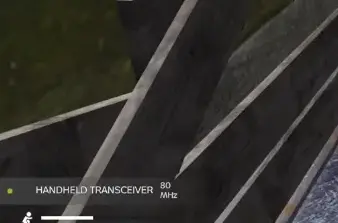
The messages are transmitted between sunset and sunrise, with three bunker broadcasts spread across the night. One generally occurs around sunset, another during the night, and a later message closer to dawn.
You can wait through a long stretch of daylight without hearing anything useful. There is no reason to keep changing frequencies when the radio is already configured correctly; wait for the nighttime transmission instead.
Battery condition also matters. In one decoding attempt, the battery ran out while the player was still trying to reconstruct the numbers. The interruption made it harder to determine which digits belonged together.
For a planned bunker run, carry a spare battery if you have one. It is also worth choosing a waiting position with reasonable access to several parts of the map. You cannot know which bunker will be announced, but starting near the centre of your intended travel area can leave you with more reachable options.
How to Decode the Morse Code and Find the Right Bunker
The radio message gives you two pieces of information for each announced location:
- Six digits: the bunker’s map grid reference, divided into two groups of three.
- Four digits: the password for that bunker’s keypad.
The six-digit number tells you where to go. The four-digit number opens the door.
Do not enter the first four digits of the grid reference into a keypad. Those are location coordinates, not a shortened password.
Morse numbers use combinations of short and long signals. For example, 1 is .----, while 0 is -----. The message repeats, allowing you to check digits that were difficult to hear the first time.
Keep the entire sequence together before deciding which bunker to visit.
Read the Six-Digit Grid Reference on the Map
A grid such as 077 058 consists of two three-digit coordinates. Find the first group along the map’s horizontal grid and the second along its vertical grid.
The point where the coordinates meet identifies the area you need to examine.
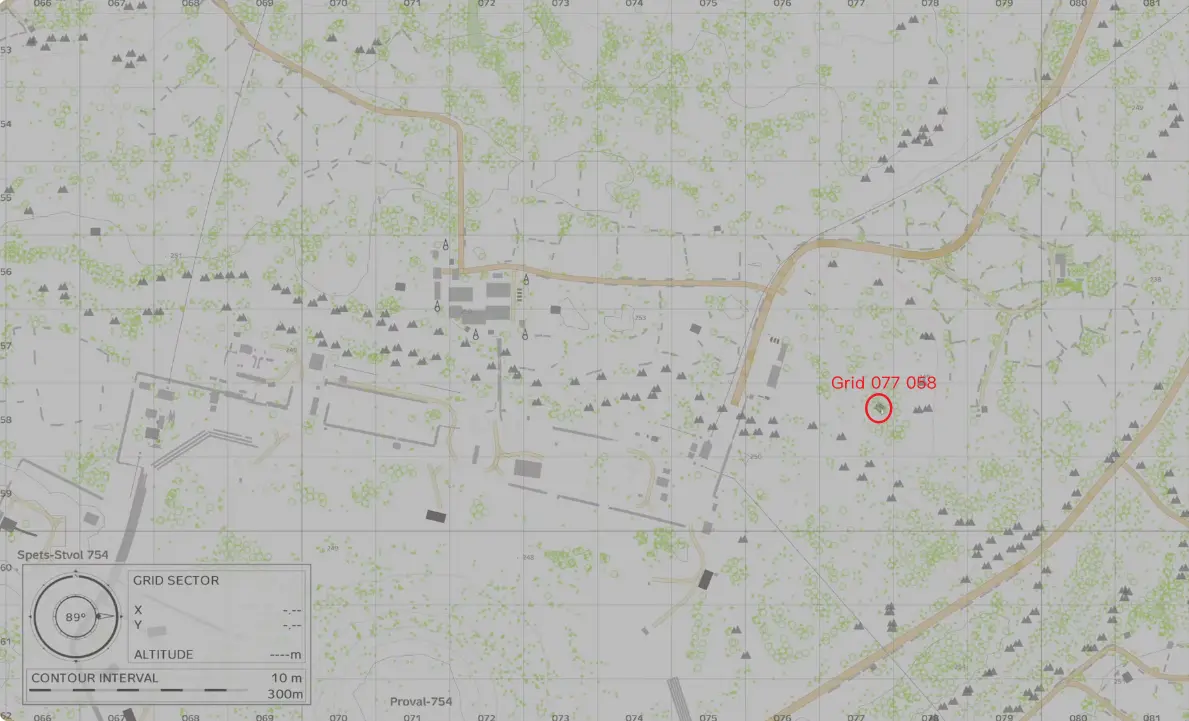
This is a useful distinction because the bunker entrance may be inside an ordinary-looking structure rather than a large standalone military building.
Finding the correct grid narrows the search. You still need to inspect the buildings and access points within that area.
When recording a broadcast manually, keep the information in this order:
- Write down the first three grid digits.
- Add the next three digits to complete the location.
- Record the following four-digit password alongside that location.
- Repeat the process for the next announced bunker.
During one attempt, several groups of numbers were confused with password fragments. The player then tried codes that did not belong to the entrance being inspected.
Keeping each location and its password together avoids that mistake, especially when several messages are received during the same night.
Can You Decode the Broadcast Without Learning Morse Code?
Yes. The Nasdara radio decoder can translate the game’s audio into bunker coordinates and associated door codes.
On PC, select the DayZ window and enable audio sharing when using the decoder. If the first attempt produces incomplete digits, listen through another repetition rather than immediately travelling toward a doubtful location.
You can also decode the signal manually using the in-game Morse Code Leaflet.
Manual decoding is useful when you already know the symbols, but it becomes costly when several digits need repeated checking. Completing the message before leaving is generally better than trying to finish decoding while navigating across the desert.
Which of the Three Bunkers Should You Visit?
Choose the bunker you can realistically reach before its access window closes, not necessarily the first location announced.
One unsuccessful attempt illustrates the cost of making that decision too early.
The player identified a possible bunker location near 114 053, in the direction of the airfield, and began travelling toward it. The journey required several navigation corrections, including checking the surrounding terrain and nearby solar farms.
At one stage, the target was still approximately 4 km away.
The player later realized that another location from the night’s transmissions had been much closer to the original position. By the time the distant entrance was reached, the opportunity to enter had been lost.
The bunker event provides a limited access window of approximately 30 minutes. That makes travel time part of the puzzle rather than something you can deal with after decoding the password.
Before setting off, compare the announced grids with your current position. A location on the opposite side of Nasdara may be a poor choice even if you have decoded its password perfectly.
There are three practical reasons to prefer a nearby bunker:
- Less time is lost reaching the correct grid.
- You have more time to identify the entrance and correct a mistaken keypad entry.
- A failed attempt is less likely to leave you stranded far from your supplies.
Water becomes important during these longer journeys. Running several kilometres across exposed desert terrain with an almost empty container can turn a bunker attempt into a survival emergency.
If you cannot safely reach the intended location, refill first or postpone the attempt. The Nasdara water survival instructions cover where to obtain drinking water before another long crossing.
How to Recognize a Bunker Entrance
Not every bunker entrance resembles a large military blast door.
Some are integrated into small access structures or buildings within a town. One player found a target near industrial structures by the airfield, while another entrance was located in a city near a police station.
The city entrance was easy to overlook because it was associated with an otherwise ordinary-looking building.
Once you reach the correct grid, inspect nearby structures for a descending passage and keypad. Look around the sides of buildings and check whether an entrance leads below ground.
The grid gets you into the correct area, but the final approach still requires identifying the actual access point.
How to Enter the Four-Digit Bunker Code
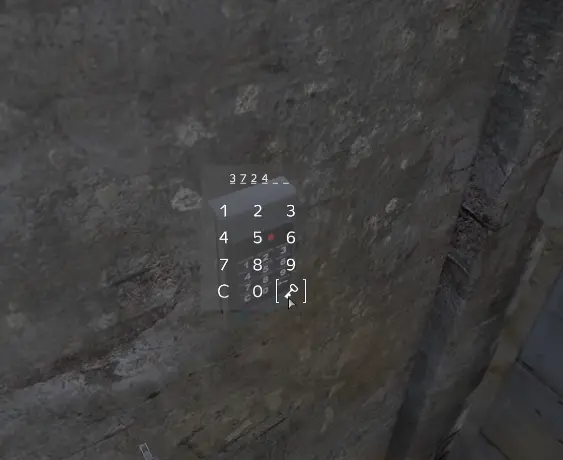
At the keypad, enter the four-digit password paired with that specific bunker and confirm the entry.
One successful attempt used 3724. The keypad accepted the entry, and the player entered the underground shelter to search its equipment.
The important detail is that 3724 is an example of a successful code, not a universal solution. The bunker passwords belong to their respective broadcasts.
A code that opened a door during an earlier event should not be assumed to work again.
Why Won’t the Bunker Door Open?
If you can interact with the keypad but the door remains closed, check what happened before entering the numbers.
You reached the wrong bunker. The grid may have been misread, or you may have paired the password with a different announced location. Compare the six-digit coordinates again before repeatedly entering the same code.
The password was decoded incorrectly. A missed Morse signal can change a digit. When there is still time to receive the transmission, check the repeated message instead of guessing combinations.
The access window may have expired. A keypad can remain visible and interactable after a useful access opportunity has passed. During the failed airfield attempt, reaching the entrance too late prevented successful entry.
You have an incomplete message. A four-digit sequence copied from the middle of several coordinate groups is not necessarily the password for your current location.
There is no benefit in repeatedly entering a doubtful code without correcting the underlying information.
Likewise, an inactive radio installation elsewhere on the map does not mean you should begin searching for a truck battery or generator. The bunker entry process depends on receiving the radio message and reaching the matching keypad.
If the window has already closed, save your supplies and wait for another broadcast rather than spending the remaining night guessing passwords.
What Loot Can You Find Inside Radio Bunkers?
Opening a bunker gives access to underground storage containing military equipment, weapons, ammunition, and other supplies.
One of the more valuable finds associated with the shelters is a Rifle Case, which can contain a firearm and equipment.
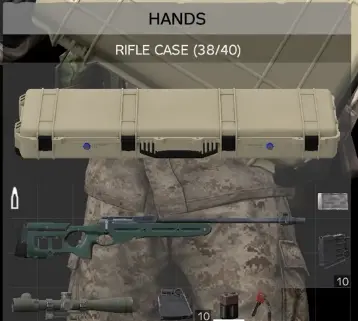
A successful entry does not guarantee that the valuable equipment is still waiting for you.
In two opened shelters, the player found considerably less than expected. One contained ordinary clothing, boots, and ammunition. Another offered ammunition and a magazine but little else worth carrying.
The player suspected that other survivors might have searched the locations earlier, although the missing equipment could not be conclusively attributed to another player.
The practical distinction is between a failed entry and a successful entry with disappointing loot.
When the keypad will not open, you need to check your coordinates, password, or timing. When the door opens and the storage is nearly empty, entering the code again will not improve the available equipment.
Search the accessible containers and loose items before deciding whether the visit was worthwhile. A magazine or useful ammunition may still justify the journey, particularly when it matches a weapon you already carry.
If your main objective is finding a particular rifle, you can compare the available alternatives in the Nasdara weapons and loot locations rather than relying entirely on bunker rewards.
Should You Try Another Bunker During the Same Night?
That depends on whether you already have a complete coordinate-and-password pair for another announced location.
If the second bunker is nearby and enough time remains to reach it, another attempt can make sense. This is especially true when the first shelter was accessible but offered little equipment.
However, travelling toward a distant second location with only a partially decoded message repeats the same mistake that caused the failed airfield run.
The decision becomes easier once you separate the problems:
- The first bunker was empty: Check whether another announced bunker is close enough to justify the journey.
- The first password failed: Resolve the coordinate or password mismatch before moving again.
- The access window has ended: Stop trying expired codes and wait for the next opportunity.
- Your supplies are running low: Prioritize reaching safety instead of chasing another uncertain reward.
A bunker is only worth another trip when you have a realistic chance of reaching it and returning with whatever you find.
What to Do After Opening the Bunker
Once the door opens, move inside and inspect the available storage before spending time sorting ordinary supplies. Check whether any weapon case or military equipment is worth taking, then decide what should be left behind.
An empty-looking room does not necessarily mean the radio puzzle was solved incorrectly. The successful entrances that produced little loot still confirmed that the coordinates and passwords had worked.
If the shelter has already been searched, take what is useful and leave while you can still travel safely.
For the next attempt, the most valuable preparation is knowing your current position before the broadcast begins. That gives you a better chance of choosing a reachable bunker instead of losing the access window on the road.