Single Player, Bots and Orders Guide
Set up a useful bot match, choose the right AI difficulty, understand Commander tasks, and keep squads moving toward active objectives.
Updated:
Quick Answer
Open Custom Game, set Server Mode to Single Player, and choose the map, mode, match length, AI Skill Level, AI Rank Cap, and bot count. AI Skill ranges from 1 to 5, while a match can contain up to 64 combined human and AI slots, depending on the scenario. During the match, separate the team’s main objective from your squad’s current task. If the HUD says Freelance, no specific order is assigned, so reinforce the active objective instead of waiting at spawn.
Data snapshot: July 15, 2026, during the Angels Fall First 1.0 launch window. Maps have different slot counts and objective layouts, while larger bot matches place more pressure on the host CPU.
Single Player at a Glance
Angels Fall First can be played alone, but Single Player is not a separate scripted campaign.
It uses the same combined-arms scenarios found across the rest of the game:
- Ground infantry and vehicle battles.
- Spacecraft and capital-ship combat.
- Incursion attack and defense chains.
- Territories capture-point battles.
- Station and ship boarding.
- Squad Leader and Commander roles.
Bots fill player slots and carry out the objectives alongside or against you.
| System | What it controls | What to check first | Common mistake |
|---|---|---|---|
| Server Mode | Whether the Custom Game runs as Single Player | Confirm Single Player is selected | Looking for a separate campaign menu |
| AI Skill Level | Bot combat difficulty from 1 to 5 | Start at 1–3 according to experience | Raising difficulty before learning the objective |
| AI Rank Cap | The equipment progression available to bots | Lower it when enemy loadouts feel too advanced | Treating it as another accuracy setting |
| AI Per Team | The number of bots assigned to each side | Use fewer bots while learning a map | Filling every slot before understanding the routes |
| Match slot limit | Combined human and AI population | Check whether the scenario uses 32 or 64 slots | Assuming 64 means 64 bots plus humans |
| Main Objective | What the team must complete to win | Read the phase objective | Following the nearest capture icon |
| Commander Task | The specific assignment given to your squad | Check Attack, Defend, Dock, or Capture | Continuing toward an obsolete task |
| Squad Order | The local order placed by a Squad Leader | Use one reachable active target | Placing markers on inaccessible geometry |
There Is No Traditional Story Campaign
Single Player is built around replayable battle scenarios rather than a linear story route.
You do not progress through:
- A fixed sequence of narrative missions.
- A named player character’s story.
- Scripted campaign checkpoints.
- A separate campaign save.
Instead, you choose a map and mode, configure the AI, and play the same large-scale objective structures with bots.
That makes Single Player useful for:
- Learning maps.
- Practicing infantry and vehicles.
- Testing loadouts.
- Learning flight controls.
- Practicing boarding.
- Learning Squad Leader orders.
- Trying the Commander role.
- Completing achievements.
It is less suitable for someone looking specifically for a cinematic story campaign.
How to Start a Single-Player Bot Match
From the main menu:
- Open Custom Game.
- Set Server Mode to Single Player.
- Choose a map and mode.
- Set the Match Length.
- Choose an AI Skill Level.
- Set the AI Rank Cap.
- Choose the number of AI players.
- Select ULA or AIA.
- Start the match.
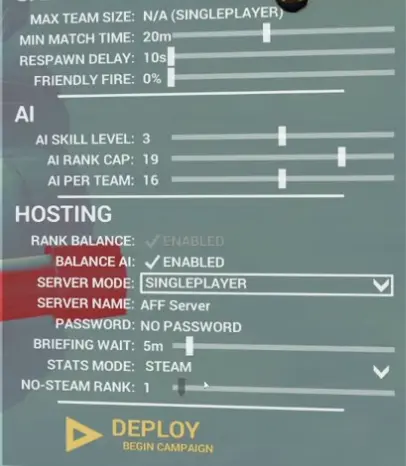
The pictured setup uses:
- 20-minute minimum match time
- 10-second respawn delay
- 0% friendly fire
- AI Skill Level 3
- AI Rank Cap 19
- 16 AI per team
- Single Player server mode
That creates a populated mid-difficulty match. It is not the easiest setup for learning an unfamiliar map.
AI Skill Level 1–5 Explained
AI Skill Level ranges from 1 to 5.
Level 1 is the easiest and Level 5 is the most difficult.
| AI Skill | Difficulty | Best use | When to move higher |
|---|---|---|---|
| 1 | Easiest | Learning controls, deployment, vehicles, flight, and objective icons | You can navigate the map without combat interrupting every test |
| 2 | Easy | Learning a new map while keeping some combat pressure | You can complete objectives consistently |
| 3 | Middle | Normal bot matches and realistic first practice | The map and mode already make sense |
| 4 | Hard | Familiar maps, stronger combat practice, and improved positioning | Skill 3 no longer punishes poor routes or exposure |
| 5 | Most difficult | Challenge matches and experienced solo play | You want the maximum AI combat pressure |
I use Skill 2 when learning an unfamiliar map and Skill 3 when I already understand where the objectives and deployment points are.
Skill 4 and 5 are more useful after the map is familiar. Raising the difficulty before understanding the objective can make a routing problem look like a combat problem.
AI Skill and AI Rank Cap Are Different
AI Skill controls how difficult the bots are to fight.
AI Rank Cap controls how advanced their available equipment can become.
A lower Rank Cap can limit access to:
- Weapon attachments.
- Specialist ammunition.
- Heavier armor.
- Additional utility.
- More expensive loadout combinations.
That creates four different practice setups:
| Skill | Rank Cap | Result |
|---|---|---|
| Low Skill + Low Rank Cap | Easier combat with simpler equipment | Best for learning controls and objectives |
| High Skill + Low Rank Cap | Faster and more accurate reactions with simpler gear | Useful for testing positioning without maximum equipment pressure |
| Low Skill + High Rank Cap | Less aggressive bots carrying more complete loadouts | Useful for learning how advanced equipment changes fights |
| High Skill + High Rank Cap | Strong combat behavior and advanced equipment | Best reserved for familiar maps and challenge matches |
If the bots kill you before you can read the HUD, lower Skill.
If their equipment feels too advanced while their reactions feel fair, lower Rank Cap.
Do not lower both automatically—the result will not tell you which setting caused the difficulty.
AI Per Team and the 64-Player Limit
Angels Fall First supports up to 64 combined human and AI player slots, depending on the scenario.
This does not mean:
- 64 bots plus human players.
- 64 bots on each team.
- Every map always uses 64 slots.
On a full two-team 64-player scenario, the maximum population is normally divided across both sides.
The pictured Single Player setup uses 16 AI per team, creating a 32-bot battlefield before any other relevant slot behavior is considered.
| Goal | AI population | Recommended Skill | Why |
|---|---|---|---|
| Learn controls | Low population | 1–2 | Leaves time to test movement, menus, vehicles, and deployment |
| Learn a map | 8–12 AI per team | 2 | Keeps objectives active without filling every route |
| Normal solo battle | 12–16 AI per team | 3 | Creates a populated combined-arms match |
| Practice Squad Leader | 12–16 AI per team | 2–3 | Provides enough squad members to test orders |
| Practice Commander | High population within the scenario limit | 2–3 | Gives the command layer several squads and active fronts |
| Challenge match | High population within the scenario limit | 4–5 | Combines battlefield density with harder combat |
More bots change more than the number of enemies.
They also increase:
- Vehicle traffic.
- Capture-point pressure.
- Number of active squads.
- Frequency of air and ground threats.
- Congestion inside stations and capital ships.
- CPU load on the machine hosting the match.
Sixty-four slots are the upper scale, not the recommended beginner setting.
Bots Can Also Fill Server Matches
AI is not limited to private Single Player matches.
The server browser can show human players and AI filling the remaining slots.
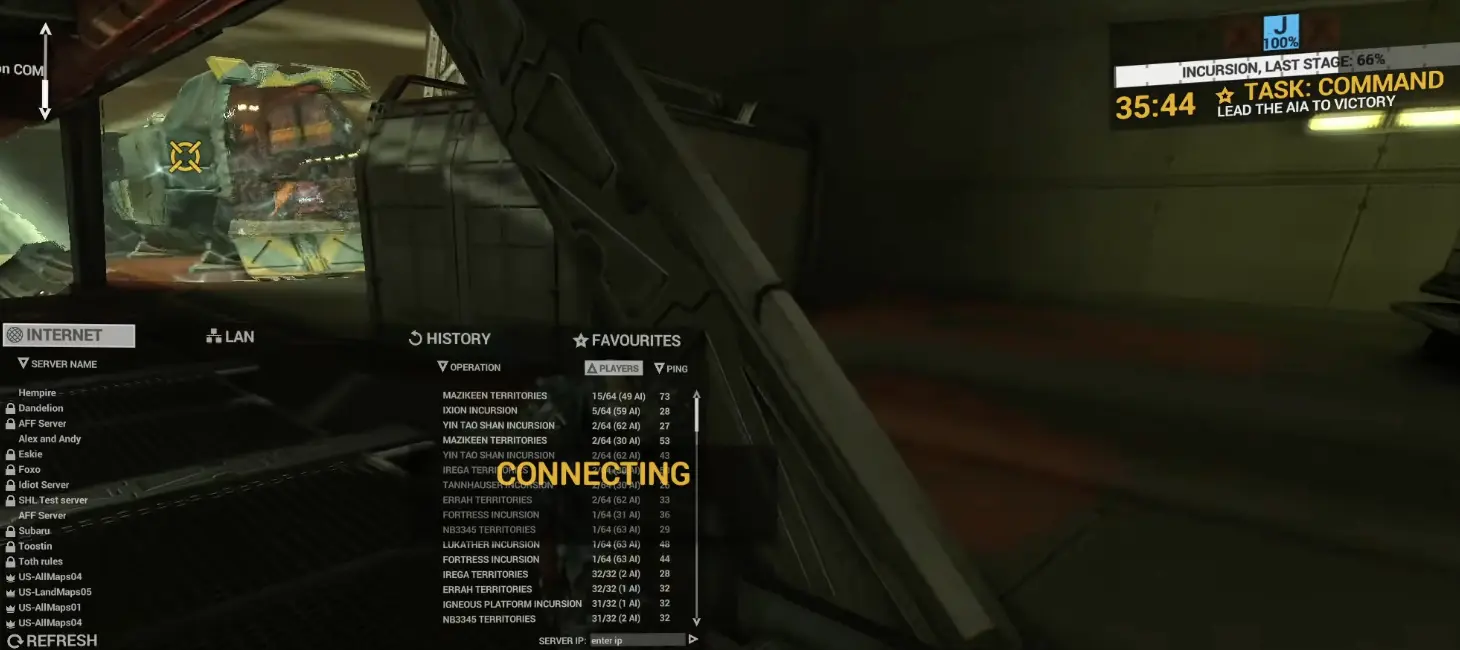
Examples visible in the server browser include:
15/64human players with49 AI.5/64human players with59 AI.31/32human players with1 AI.
Those numbers describe the listed matches at that moment. They are not fixed server presets.
Check the Human and AI values before joining when you want:
- Mostly human players.
- A mixed human-and-bot match.
- A heavily AI-filled battle.
- A lower-population environment.
How to Identify Bots
Bot names are marked with (AI) in the player list.
The team header can also show separate Human and AI totals.
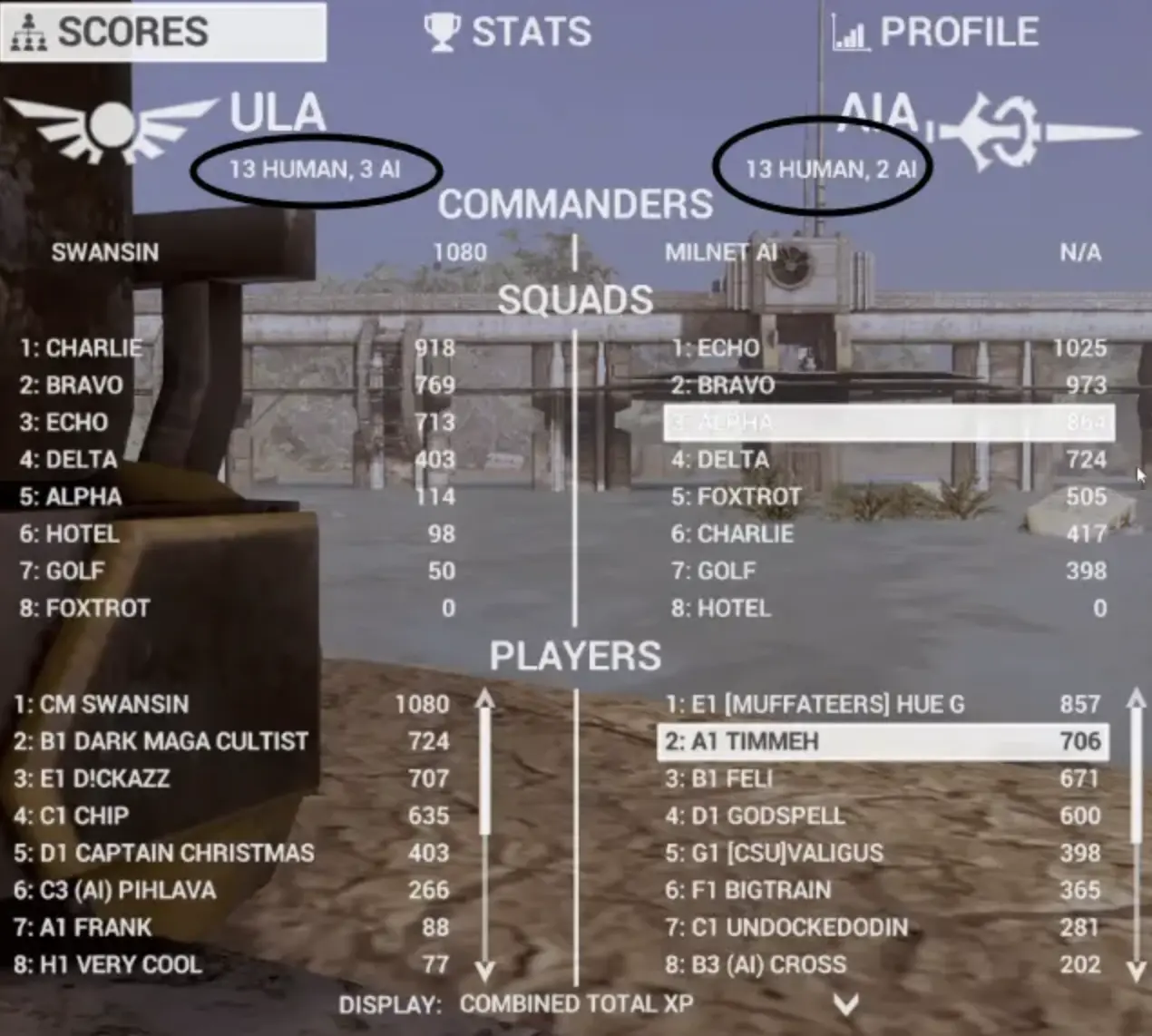
This matters when a teammate appears to ignore the local fight.
That unit may be:
- A human following another plan.
- A bot following the Commander task.
- A bot trying to rejoin its squad.
- A unit moving toward a vehicle.
- A bot navigating to another elevation.
Check the name and current task before assuming the AI is broken.
MILNET and Infantry Bots Are Different
MILNET is the AI command presence.
It does not need to occupy one of the normal infantry bot slots.
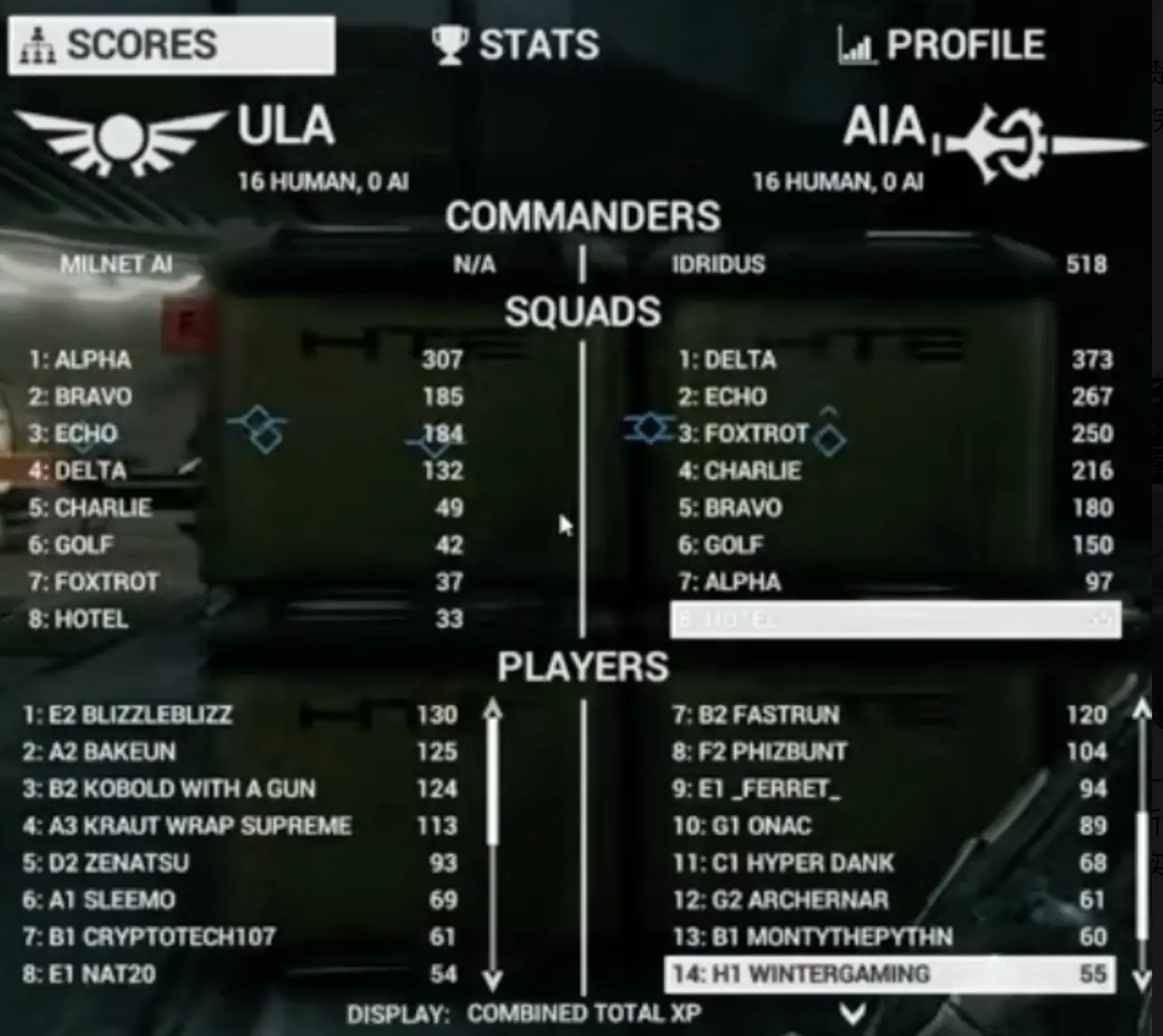
This scoreboard shows:
- ULA: 16 Human, 0 AI.
- AIA: 16 Human, 0 AI.
- ULA Commander: MILNET AI.
So these are separate systems:
- AI infantry: occupies normal player and combat roles.
- MILNET: occupies the Commander role and assigns tasks.
The Programmed for Success achievement requires winning 10 matches with MILNET’s help.
Main Objective Versus Commander Task
The main objective and current task are not the same thing.
The main objective explains how the team advances or wins the current phase.
The Commander task tells your squad what it should do now.
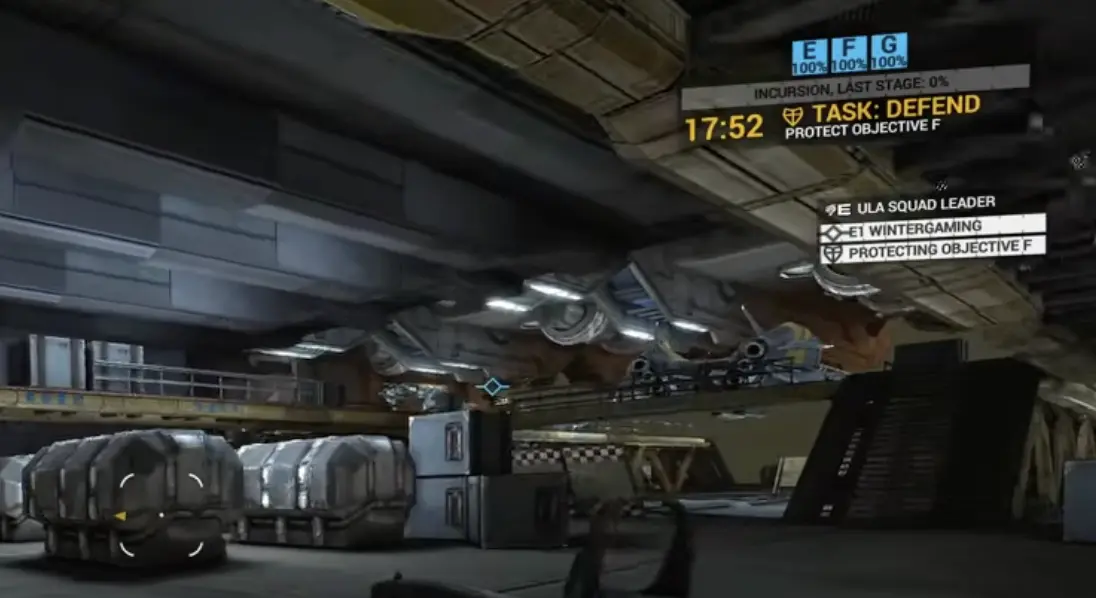
The main objective may involve:
- Capturing territory.
- Defending a station.
- Destroying a structure.
- Escorting dropships.
- Boarding a vessel.
- Protecting a deployment point.
- Advancing an Incursion phase.
The squad task may be narrower:
- Attack Objective C.
- Defend Objective F.
- Dock with a structure.
- Capture a Landing Zone.
- Move to a specific area.
- Protect an internal objective.
I read the HUD in this order:
- Check the current match phase.
- Check whether the squad task is Attack or Defend.
- Find the assigned objective.
- Open the Tac Map when the route is unclear.
- Choose a class or vehicle suited to that task.
This prevents a common mistake: fighting around a nearby capture point while the squad is assigned somewhere else.
What Freelance Means
Freelance means the squad does not currently have a specific Commander assignment.
It does not mean:
- The match has no objective.
- You should wait at spawn.
- Every capture point has equal value.
- The command system has stopped working.
When I am Freelance, I do one of these:
- Reinforce the main objective.
- Defend a threatened deployment point.
- Join the nearest active squad push.
- Repair or resupply teammates.
- Take a vehicle that fills a missing role.
- Prepare for the next objective change.
How the AI Commander Assigns Tasks
An AI Commander can assign squads to changing objectives.
The current task can change when:
- An objective is completed.
- An Incursion phase advances.
- A capture point comes under attack.
- A new Landing Zone becomes available.
- A ship or station enters another stage.
- The Commander rebalances attack and defense.
Use the assignment as the destination and the Tac Map as the route.
The Commander can choose a sensible strategic target without knowing which nearby doorway, lift, ramp, or vehicle is the best route from your exact position.
What to Do When a New Command Arrives
A task change appears through the New Command Received message.
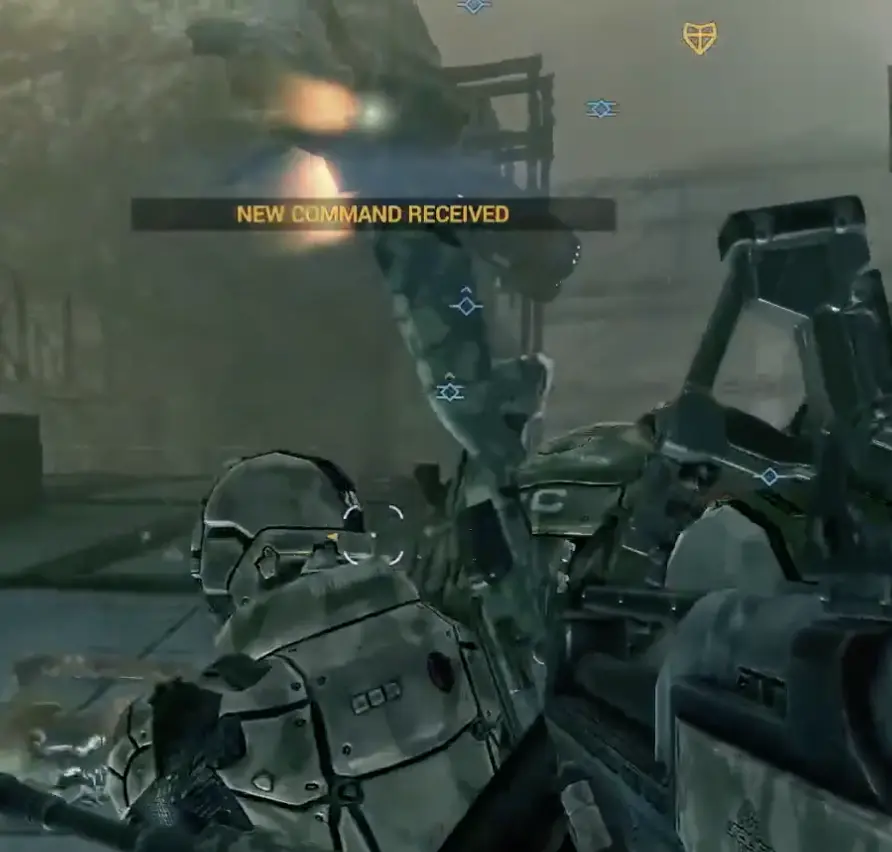
When a new command arrives:
- Stop following the old marker automatically.
- Check whether the task is Attack, Defend, Dock, Capture, or Move.
- Open the Tac Map when the target is unclear.
- Check whether redeploying is faster than continuing.
- Change class or vehicle only when the new role requires it.
- Move with nearby squad members.
I do not rebuild my loadout for every small reassignment.
I change roles when the objective itself changes—for example:
- Open-ground attack to interior defense.
- Infantry capture to anti-vehicle defense.
- Fighter combat to dropship interception.
- Exterior battle to ship boarding.
Commander and Squad Leader Roles
The Commander and Squad Leader work at different scales.
| Role | Main responsibility | Useful order size | Common mistake |
|---|---|---|---|
| Commander | Direct squads across the whole battlefield | Strategic objective or mission phase | Micromanaging one doorway while another objective collapses |
| Squad Leader | Convert the Commander task into a reachable local order | One door, console, capture zone, or nearby position | Placing a marker without checking the route |
| Squad Member | Follow the task and support the assigned role | Move with the squad and respond to tags | Chasing kills away from the objective |
| Freelance squad | Reinforce the current phase without a specific assignment | Nearest useful active objective | Treating Freelance as downtime |
A good Commander assignment tells the squad what strategic target matters.
A good Squad Leader order tells the squad where to move and fight locally.
How to Issue an Attack Order
Select or tag an active objective, then use the squad-order controls to assign it.
Controls can be rebound, so use the HUD prompts shown by your current setup.
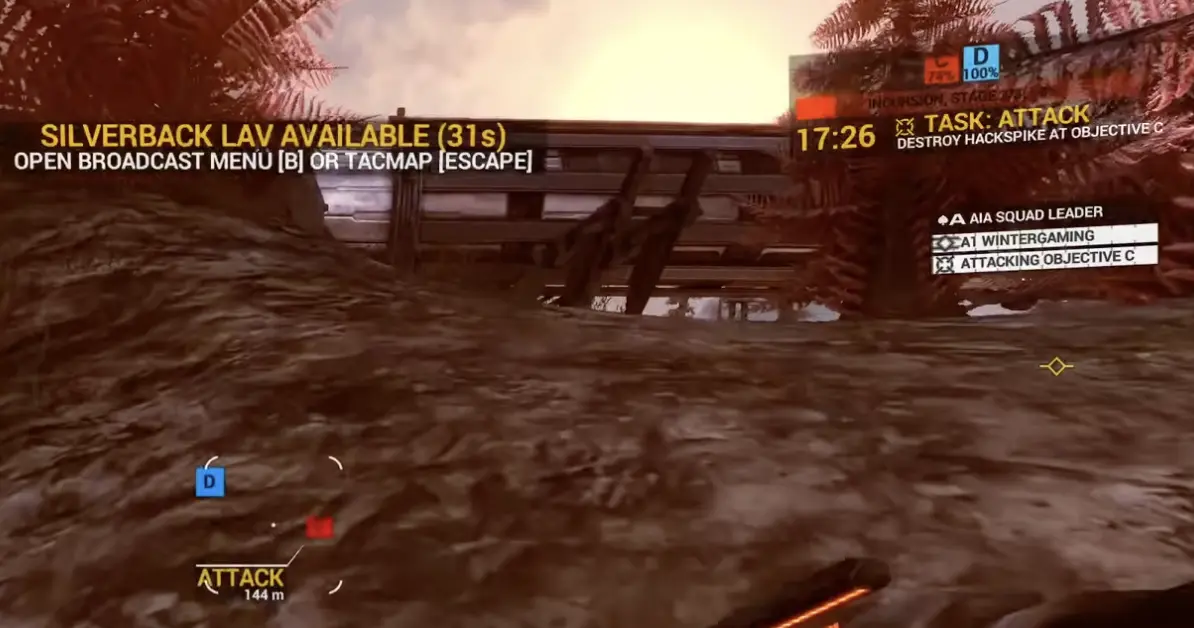
A good attack order:
- Uses an active objective.
- Points to the correct elevation.
- Has a reachable route.
- Still matches the current phase.
- Does not conflict with a newer assignment.
A weak order usually targets:
- The wrong floor.
- A blocked route.
- An inactive objective.
- An area bots cannot enter.
- A marker that completed before the squad arrived.
How to Use Defend Orders
Place a Defend order where the fight must happen.
Useful defensive positions include:
- A capture zone.
- A Breach Point.
- A Landing Zone.
- A Core Lockout room.
- A station bay.
- A corridor leading to the objective.
Do not place the marker too far behind the active area.
Bots may remain near the order while leaving the actual doorway or capture zone unprotected.
I place the order on the position that must remain under team control, not on the safest nearby floor.
Tags and Pings
Tags help both human players and AI understand threats.
Useful targets include:
- Enemy infantry near the objective.
- Vehicles approaching a capture point.
- Dropships moving toward a station.
- Turrets covering the route.
- A defender repeatedly using the same doorway.
- A priority target already engaging the squad.
Tag the threat before committing to the fight when it can stop the objective.
Even if you lose the engagement, the squad has a clearer target.
Commander Vehicle Offers
The Commander can offer a vehicle when it may help the current task.
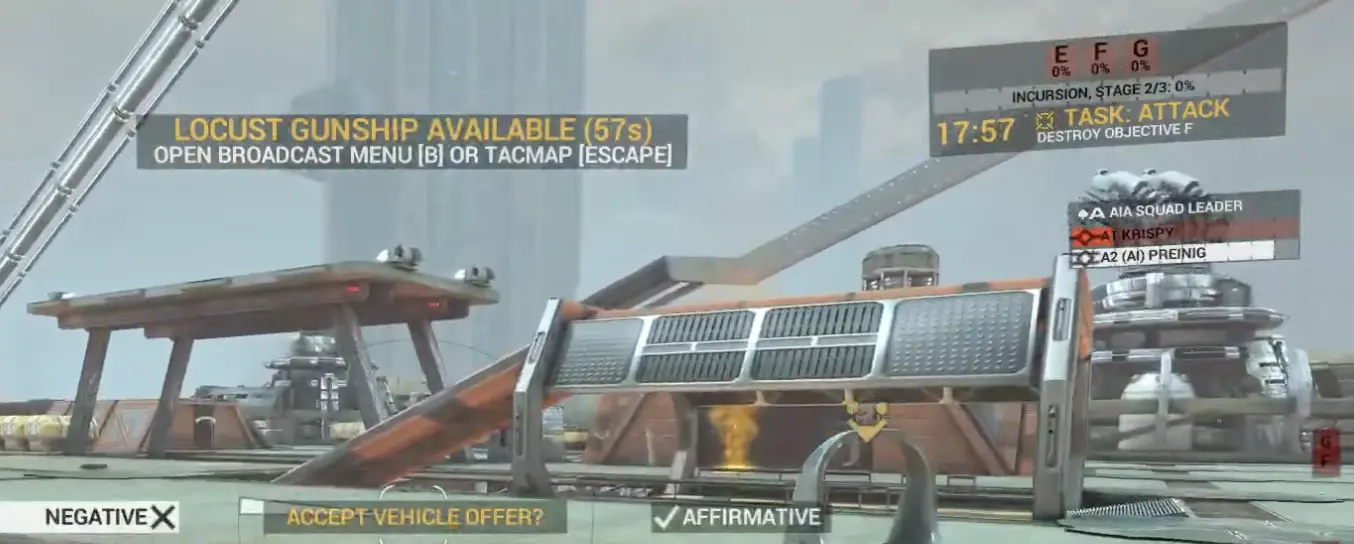
Vehicle offers use a visible countdown, so decide before the offer expires. The pictured Locust Gunship offer has 67 seconds remaining.
Accept when:
- The target is far away.
- The squad needs transport.
- Enemy vehicles block the approach.
- The task is in open terrain or space.
- The offered vehicle fills a missing role.
Decline when:
- The objective is already indoors.
- Infantry must stand inside a capture zone.
- The vehicle cannot reach the target.
- Taking it would leave a Breach Point undefended.
- Another player already fills that role.
A free vehicle is still a bad choice when it pulls you away from the objective.
Why Bots Are Not Following the Order
You are dead
Redeploy before trying to issue another order.
Confirm that you still hold the Squad Leader role.
The task changed
The squad may already be moving toward the newest Commander assignment.
Check the current task before placing the same order again.
The objective completed
A capture, hack, destruction, or boarding objective may become inactive before the whole squad arrives.
Move to the next task.
The bots are respawning
A dead squad member will not appear beside you immediately.
Wait for the next deployment wave.
The route is too complicated
Ships, stations, lifts, narrow doors, and multi-level interiors can delay pathfinding.
Move closer and place a more local order.
The marker is on another elevation
A target can look nearby while sitting above or below the squad.
Use the Tac Map to find the connecting route.
The bots entered vehicles
Vehicles can split a squad and create a longer route to the same objective.
Wait for them to arrive or issue a closer local order.
The order targets an inactive objective
A marker cannot make an inactive point advance.
Use the current objective rather than the closest visible icon.
You are no longer Squad Leader
Leadership can change after death, team changes, or squad reorganization.
Confirm your role before troubleshooting the order controls.
Best Bot Setup for Learning Orders
Use a simpler ground map before practicing command on a complicated multi-stage station or capital-ship route.
A straightforward map makes it easier to see whether:
- The squad reached the order.
- The route was valid.
- The bots defended the correct zone.
- The task changed their behavior.
- The failure came from the order or the fight.
For Squad Leader practice:
- AI Skill: 2 or 3
- AI Rank Cap: moderate
- AI per team: 12–16
- Match length: 20–30 minutes
For Commander practice:
- Use a map you already understand.
- Keep AI Skill at 2 or 3.
- Use enough bots to create several active squads.
- Avoid maximum difficulty while learning the Tac Map.
- Start with one clear assignment per squad.
Practical First Commander Routine
Use this routine instead of changing every order every few seconds:
- Read the phase objective.
- Identify the active attack and defense points.
- Give each squad one clear job.
- Keep a defensive squad when the map requires one.
- Protect important deployment points.
- Watch for the phase to change.
- Replace obsolete tasks.
- Use vehicles where they solve an actual problem.
- Recheck the battlefield after every major objective.
Bot and Command Achievements
The Steam global completion rates below were captured on July 15, 2026.
| Achievement | Requirement | Steam completion |
|---|---|---|
| Bossin’ Around | Issue your first order | 16.8% |
| Personal Grudge | As Commander, task the whole team with killing one enemy and succeed | 1.7% |
| Programmed for Success | Win 10 matches with MILNET’s help | 0.8% |
| Leading by Example | As Squad Leader, complete 50 assigned objectives | 0.3% |
| Master and Commander | Reach maximum Command Rank | 0.3% |
| Hackerman | Hack 25 deployables with the Commander HACK power | 0.2% |
The difference between 16.8% for issuing one order and 0.3% for completing 50 Squad Leader objectives reflects the real learning curve:
- Opening the command interface is easy.
- Choosing a valid target takes more awareness.
- Keeping an order relevant through a changing phase is harder.
- Completing 50 objectives requires consistent map and role knowledge.
Fast Single-Player and Orders Checklist
Before the match
- Set Server Mode to Single Player.
- Use AI Skill 1–2 for learning or 3 for a normal match.
- Lower Rank Cap when equipment pressure is the problem.
- Use fewer than the maximum bots while learning a map.
- Keep the first match around 20–30 minutes.
- Remember that the 64-slot limit includes humans and AI.
During the match
- Read the main objective.
- Check the current squad task.
- Use the Tac Map when the route is unclear.
- Treat Freelance as permission to reinforce the current phase.
- Check AI labels before assuming a unit is human.
- Respond when a New Command Received message appears.
- Tag threats near the objective.
As Squad Leader
- Assign one reachable active objective.
- Place Attack orders on targets the squad can enter.
- Place Defend orders where the fight must happen.
- Replace orders after a phase change.
- Move closer when the route is too complicated.
As Commander
- Give squads strategic jobs rather than vague markers.
- Keep enough defenders on active objectives.
- Protect deployment points and Landing Zones.
- Offer vehicles only where they help.
- Replace obsolete assignments.
- Use the Tac Map from cover.
What to Read Next
- Read the Boarding Guide for dropships, Breach Points, Core Lockouts, and counter-boarding.
- Read the Loadout Budget and Progression Guide for exact budget caps, rank breakpoints, ammunition, vehicles, and Prestige.
- Read the Achievements Guide for MILNET wins, Squad Leader objectives, Command Rank, hidden tasks, and the complete checklist.
- Return to the Angels Fall First Guide Hub for the recommended tutorial order and first-match route.
FAQ
Can you play Angels Fall First in single player? +
Yes. Open Custom Game and set Server Mode to Single Player. You can choose the map, mode, match length, AI Skill Level, AI Rank Cap, and number of AI players.
Does Angels Fall First have a story campaign? +
No. Single Player uses the same scenario-based combined-arms maps and objective modes as the wider game, with bots filling player slots. It is not a linear story campaign with scripted missions.
What is the AI Skill Level range? +
AI Skill Level ranges from 1 to 5. Level 1 is the easiest and Level 5 is the most difficult. Level 3 is the middle setting and a useful starting point for a normal bot match.
What AI Skill Level should beginners use? +
Use Skill 1 or 2 while learning controls and maps. Move to Skill 3 once you can read objectives under pressure. Skill 4 and 5 are better for familiar maps and challenge matches.
What does AI Rank Cap do? +
AI Rank Cap limits the equipment progression available to bots. Lower values give them simpler loadouts, while higher values allow more complete weapons, attachments, armor, and utility.
How many bots can Angels Fall First support? +
A match supports up to 64 combined player and bot slots, depending on the scenario. That limit includes human players and AI rather than adding 64 bots on top of the humans.
Does 16 AI per team mean 16 total players? +
No. AI Per Team describes the bots assigned to each side in that setup. Human players can also occupy available slots, but the combined match population cannot exceed the scenario's slot limit.
How can you tell bots from human players? +
Bot names carry an AI label in parentheses. The team header and server browser can also show separate Human and AI counts.
What is the difference between MILNET and normal bots? +
Normal bots occupy infantry, vehicle, and spacecraft player slots. MILNET occupies the Commander role and can direct a team even when the scoreboard shows zero AI infantry players.
What is the difference between the main objective and the current task? +
The main objective explains what the team must accomplish to win the current phase. The current task is the more specific attack, defend, capture, dock, or movement assignment given to your squad.
What does Freelance mean? +
Freelance means your squad has no specific Commander assignment. The match still has active objectives, so reinforce the current fight instead of waiting for another order.
How do you issue orders as Squad Leader? +
Select a reachable active objective and use the squad-order controls to assign an attack, defense, or movement task. Controls can be rebound, so follow the current HUD prompts.
Why are bots not following my order? +
Check whether you are still Squad Leader, whether the objective remains active, and whether the route is reachable. Bots can also be delayed by respawning, vehicles, doors, elevation changes, or a new Commander assignment.
Which achievements involve bots and orders? +
Relevant achievements include Bossin' Around, Programmed for Success, Leading by Example, Personal Grudge, Hackerman, and Master and Commander.