Loadout Budget and Progression Guide
Understand every loadout slot, fix over-budget builds, choose useful ammo, and plan infantry, vehicle, fighter, rank, and Prestige progression.
Updated:
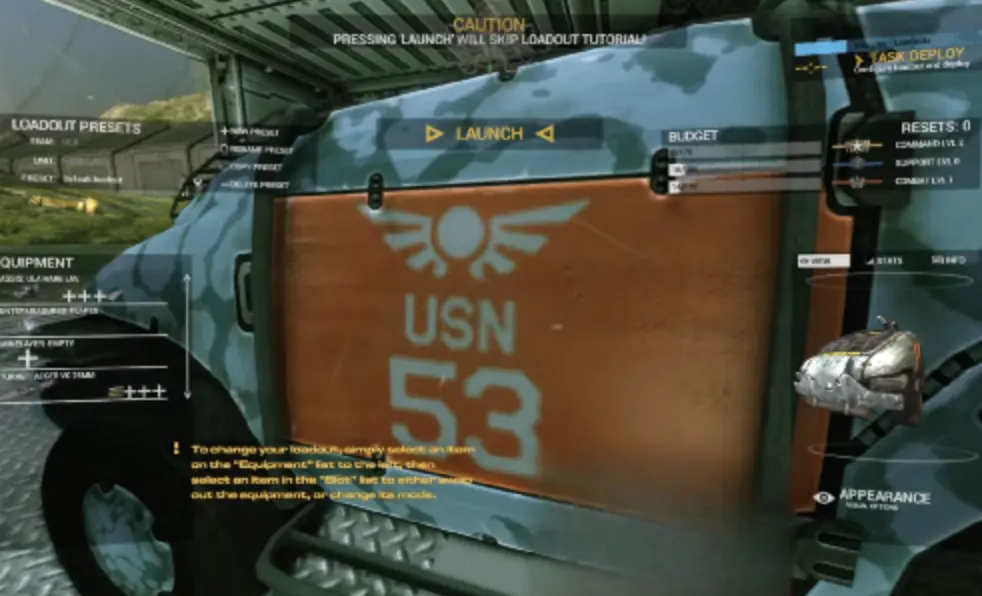
Quick Answer
Every loadout must fit within separate Combat, Support, and Command limits. Each category starts at 150 budget at rank 0 and reaches 550 at rank 25. When a build goes over budget, keep the weapon, tool, or vehicle system that defines its role, then remove optional Mods, specialist ammunition, extra armor, a second primary, or redundant utility from the exceeded category. Infantry has seven equipment slots, but filling every slot is not required.
Data snapshot: July 15, 2026, during the Angels Fall First 1.0 launch window. Equipment costs vary by weapon, armor, ammunition, attachment, and vehicle system.
Loadout Budget at a Glance
Angels Fall First gives you access to a wide equipment catalogue early.
Progression does not mainly decide whether a weapon appears in the menu. It decides how many expensive weapons, armor pieces, ammunition types, tools, and modifications can fit into one deployable configuration.
Every build uses three limits:
- Combat
- Support
- Command
If any one category exceeds its current cap, the build cannot deploy.
| Situation | What it means | Best first response | Common mistake |
|---|---|---|---|
| Combat is over budget | Weapons or offensive equipment exceed Combat capacity | Remove a second primary, offensive Mod, or expensive weapon option | Deleting a Support tool that does not reduce Combat cost |
| Support is over budget | Utility, armor, ammunition, or mixed-cost equipment exceeds Support capacity | Remove optional utility, specialist ammunition, or an armor choice | Assuming an offensive item cannot consume Support |
| Command is over budget | Tactical and mixed-cost specifications exceed Command capacity | Remove the least important tactical specification | Replacing every weapon before checking selected Mods |
| Several bars are nearly full | The build has little room for another expensive option | Save the valid version before testing additions | Changing several components at once |
| An item is visible but cannot deploy | Availability and affordability are separate | Compare its three budget costs | Assuming the item still needs to be unlocked |
| The build fits at a later rank | The required category needs more progression | Save a cheaper current-rank version | Waiting for another rank instead of deploying |
Exact Budget Caps and Rank Breakpoints
Each progression category follows the same budget curve.
You begin with 150 points at rank 0.
A normal rank adds 10 points. Every fifth rank adds 40 points.
| Rank | Available budget | Increase |
|---|---|---|
| 0 | 150 | Starting capacity |
| 1 | 160 | +10 |
| 2 | 170 | +10 |
| 3 | 180 | +10 |
| 4 | 190 | +10 |
| 5 | 230 | +40 |
| 10 | 310 | Five-rank breakpoint |
| 15 | 390 | Five-rank breakpoint |
| 20 | 470 | Five-rank breakpoint |
| 25 | 550 | Maximum capacity |
The larger increase at every fifth rank creates the important progression checkpoints.
A loadout that remains slightly too expensive at rank 4 may fit comfortably at rank 5. The same pattern repeats at ranks 10, 15, 20, and 25.
I keep two versions when an upgrade is close:
- A cheaper loadout that works at the current rank.
- A fuller version to restore at the next breakpoint.
How Combat, Support, and Command Progress
The three budgets grow independently.
Combat
Combat progression comes mainly from direct fighting and damaging enemy units.
It supports builds using:
- Infantry weapons.
- Anti-vehicle equipment.
- Offensive ground-vehicle systems.
- Direct-damage spacecraft weapons.
Support
Support progression comes from helping teammates and maintaining allied units.
It supports builds using:
- Repair tools.
- Medical equipment.
- Ammunition and resupply tools.
- Defensive equipment.
- Some armor and specialist ammunition combinations.
Command
Command progression comes from following useful assignments and issuing orders.
It supports builds using:
- Tactical specifications.
- Leadership-oriented equipment.
- Sensors and specialist options.
- Complex vehicle and spacecraft configurations.
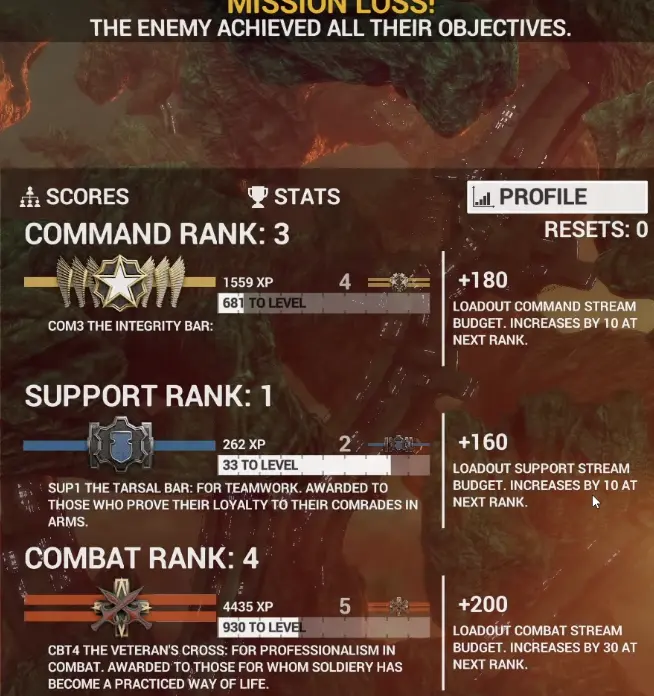
A high Combat rank does not fix a Support shortage.
A high Support rank does not add Command capacity.
When one category repeatedly blocks the same loadout, spend time performing actions that progress that track rather than spreading progression without a purpose.
The Seven Infantry Loadout Slots
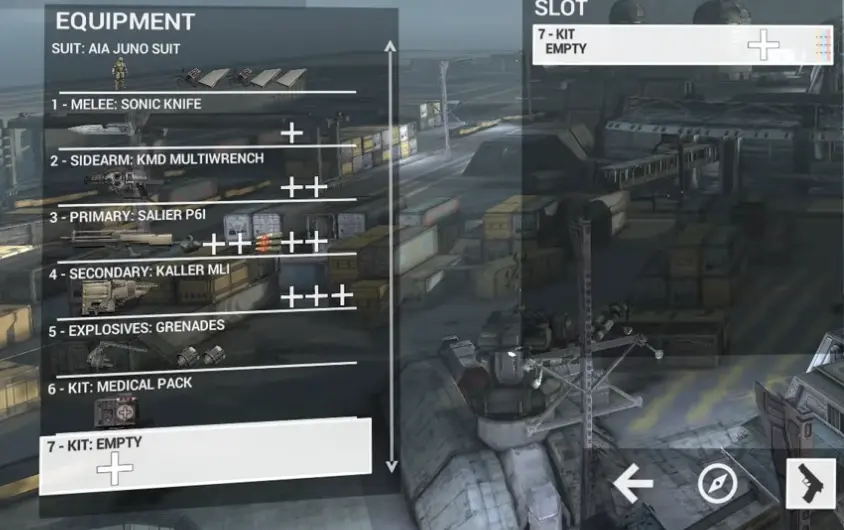
Infantry has seven equipment slots.
| Slot | Typical contents | What to protect |
|---|---|---|
| Melee | Sonic Knife or another melee option | Keep it unless another item replaces its function |
| Sidearm | Pistol, SMG, or Multiwrench | Keep the Multiwrench in repair or revive builds |
| Primary | Rifle, shotgun, machine gun, sniper weapon, or launcher | Usually the role-defining weapon |
| Secondary | A second primary-class weapon or compatible alternative | First major slot to cut when the build is too broad |
| Explosives | Grenades, mines, smoke, or another throwable | Keep only when it supports the objective |
| Kit 1 | Medical, ammunition, sensor, shield, turret, or utility equipment | Protect the main Support function |
| Kit 2 | A second compatible Kit item | Remove when it duplicates Kit 1 without adding a clear role |
Armor and armor specifications are configured alongside these equipment slots.
You do not need to fill every slot.
An empty Secondary or Kit slot is better than an invalid build full of equipment that has no clear job.
Recommended infantry build order
I build infantry loadouts in this order:
- Choose the Primary weapon.
- Choose the armor weight.
- Add the tool required by the role.
- Add a Sidearm.
- Choose ammunition or weapon Mods.
- Add Explosives when the objective benefits from them.
- Fill the Secondary or second Kit slot only when enough budget remains.
How Equipment Uses the Three Budgets
Every weapon, armor option, ammunition type, Kit item, and Mod displays a three-part cost.
An item that looks purely offensive can still consume Support or Command capacity.
My editing process is:
- Start from a valid build.
- Change one component group.
- Confirm the build still deploys.
- Test the role before adding another upgrade.
- Save the valid version.
How to Fix an Over-Budget Loadout
The editor allows you to compare equipment even when the resulting configuration is invalid.
When one category exceeds its cap:
- Identify the exceeded category.
- Keep the role-defining weapon or tool.
- Remove the newest optional Mod.
- Check specialist ammunition.
- Check extra armor.
- Check the Secondary slot.
- Check the second Kit item.
- Return to a preset only when the role itself is unclear.
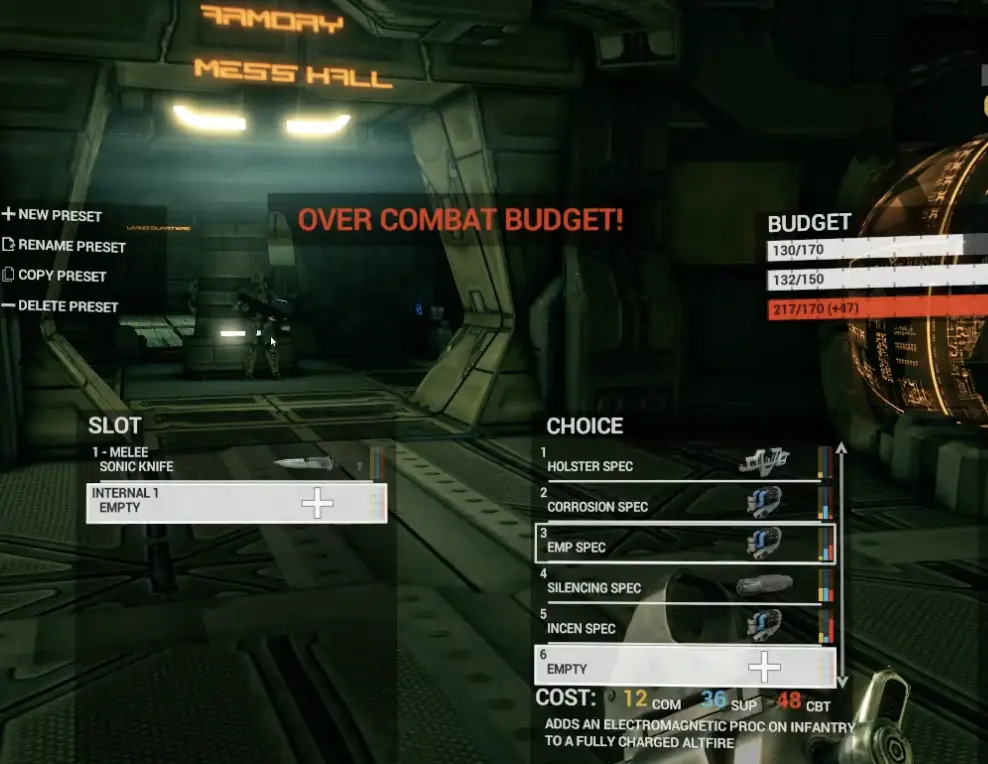
An Anti-Armour build without its launcher no longer performs its job.
A Support build without its repair or medical tool is no longer a Support build.
A boarding loadout without a close-range weapon has solved the budget problem by creating a role problem.
Real Example: Heavy Plating
Heavy Plating adds durability but also consumes budget and reduces movement speed.
Adding it can push a previously valid infantry configuration over budget.
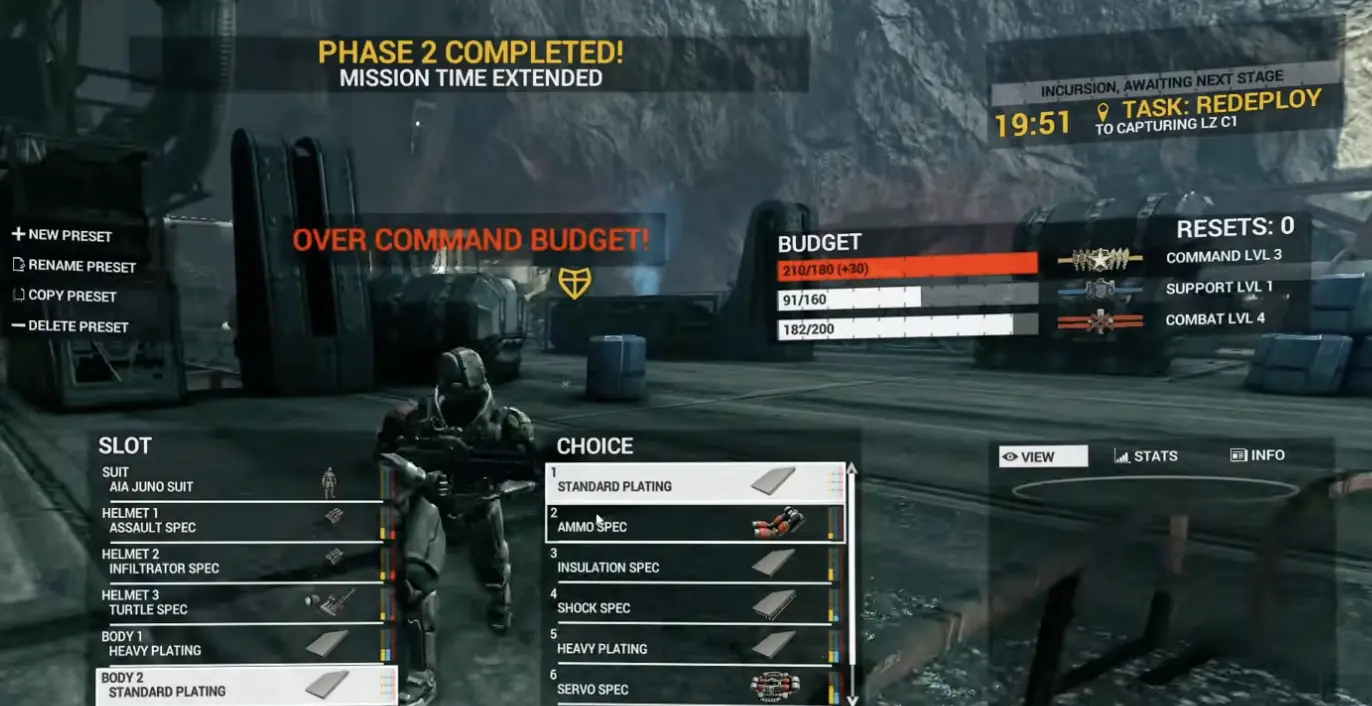
I keep Heavy Plating when:
- Defending a fixed objective.
- Holding a narrow doorway.
- Carrying a heavy weapon.
- Expecting repeated frontal pressure.
- The route between spawn and objective is short.
I remove it when:
- Attacking through several stages.
- Crossing a large map.
- Flanking.
- Moving between ship systems.
- It forces the removal of the weapon or tool needed for the objective.
The best armor is the heaviest option the role can afford without losing the speed or equipment needed to finish its task.
Shields, Armor, and Health
Infantry survivability is divided into three layers:
- Shield
- Armor
- Health

Shields recover after avoiding damage.
Armor protects the health layer and can be restored through suitable Support tools.
Health is the final layer before death or incapacitation.
I choose protection according to how the role survives:
- Lighter armor for movement, flanking, and multi-stage attacks.
- Heavier armor for corridors and fixed defense.
- Shield-focused protection for repeated short engagements.
- Mobility when reaching the objective matters more than absorbing another burst.
Ammunition Types
Special ammunition changes both the weapon’s role and its budget cost.
Do not treat any ammunition type as a universal upgrade. Compare the selected weapon, target, and current stat panel.
| Ammunition | Practical role | Use it when | Main tradeoff |
|---|---|---|---|
| Standard | General-purpose baseline | The enemy mix is unknown or the build is close to its cap | No specialist status effect |
| Shock / EMP | Shield and electronic pressure | Fighting shield users, deployables, turrets, or electronic systems | Less useful against targets that do not rely on those systems |
| Incendiary | Heat and damage-over-time pressure | Fighting infantry in cover, chokepoints, or heat-sensitive targets | Additional budget cost and less focus on immediate damage |
| Corrosive | Acid-type specialist ammunition | The current weapon stats and target role justify it | The value can differ between weapons |
| Hardpoint | Specialist direct-fire ammunition | Its displayed stats fit the range and target profile you need | Can consume budget without improving the complete role |
Standard Ammunition
Standard is the safest choice when:
- The build is close to a budget limit.
- The enemy mix is unknown.
- The weapon already performs well.
- Specialist ammunition would force you to remove armor or utility.
- You need one reliable fallback across several objectives.
Standard is the budget-efficient baseline, not a temporary beginner option.
Shock or EMP Ammunition
Use Shock or EMP when the target relies on shields or electronic systems.
Useful targets include:
- Shielded infantry.
- Deployables.
- Turrets.
- Electronic ship systems.
- Light vehicles with vulnerable systems.
The Shock Therapy achievement requires 200 kills with EMP ammunition, so save a dedicated EMP build when working on that counter.
Incendiary Ammunition
Incendiary ammunition adds heat and damage-over-time pressure.
It is useful when:
- Infantry retreats behind cover.
- Defenders hold a doorway.
- A target survives the first burst.
- Heat pressure matters more than immediate raw damage.
The Hearts on Fire achievement requires 200 kills with Incendiary Ammo.
Corrosive Ammunition
Corrosive is an acid-type specialist option.
Choose it by comparing:
- Damage.
- Range.
- Fire rate.
- Magazine behavior.
- Budget cost.
- The target you expect to fight.
Do not apply one Corrosive rule to every infantry, vehicle, and spacecraft weapon.
The Toxic Love achievement requires 200 kills with Corrosive ammunition, so a dedicated preset also makes the counter easier to track.
Hardpoint Ammunition
Treat Hardpoint as a weapon-specific direct-fire choice rather than an automatic damage upgrade.
Use it when the displayed stats improve the engagement you are building for. Leave it out when it consumes budget without improving the complete role.
Real Example: Incendiary Ammo Exceeds Support Budget
Adding Incendiary Ammo can push Support over its cap even though the weapon is being used offensively.
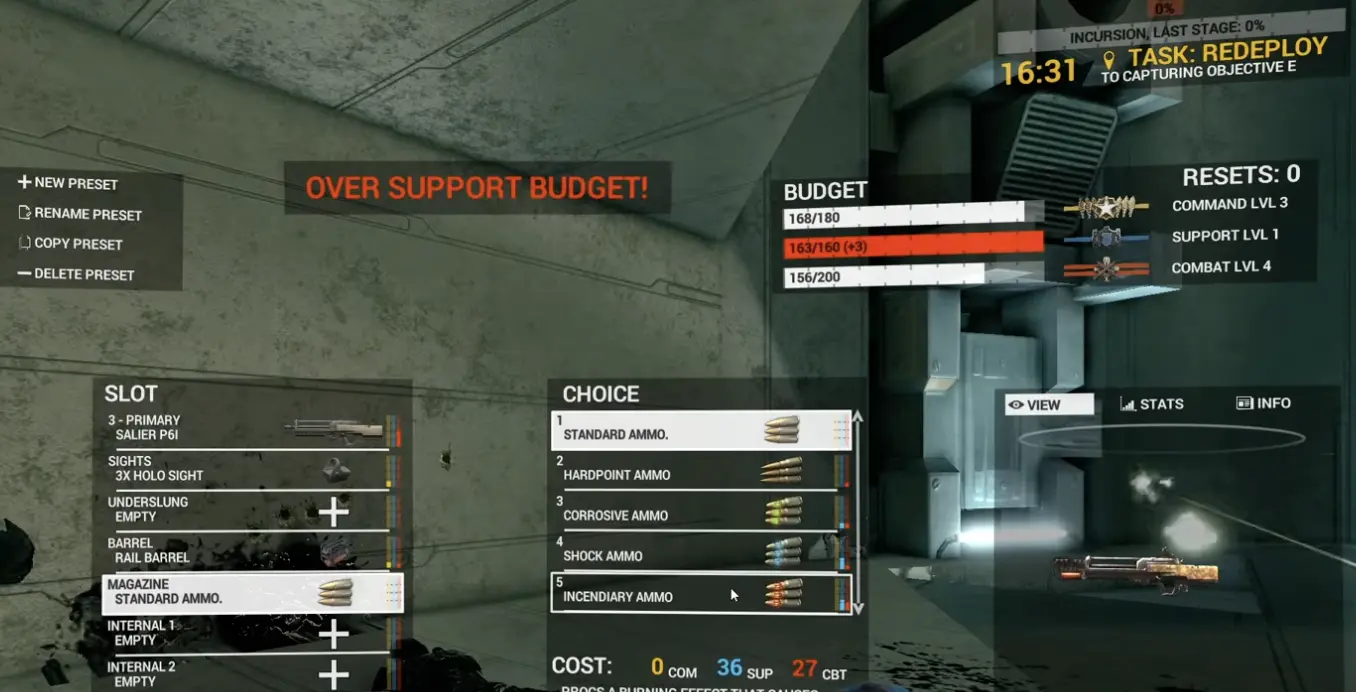
A better fix is:
- Keep the rifle.
- Decide whether Incendiary Ammo matters for the objective.
- Replace Heavy Plating with a cheaper option.
- Remove an unused Kit or secondary utility.
- Return to Standard Ammo when the effect is not essential.
Save both versions:
- A Standard Ammo build for mixed targets and tighter budgets.
- An Incendiary build for chokepoints, infantry pressure, and the Hearts on Fire achievement.
Use Presets as Valid Starting Points
Presets show complete roles that fit within the current budget.
Useful infantry presets include:
- Soldier
- Marine
- Specialist
- Infiltrator
- Anti-Armour
- Grenadier
- Fire Support
The Fire Support preset demonstrates a clear tradeoff: lower mobility in exchange for heavier protection and a frontal shield.
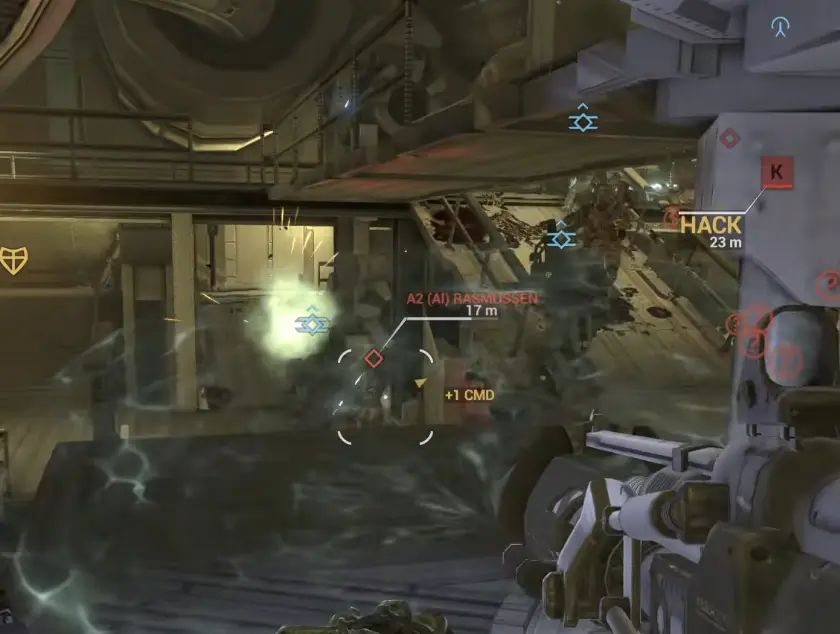
My preset workflow is:
- Deploy with the preset.
- Identify its main job.
- Notice which item solves the objective.
- Notice which item remains unused.
- Replace the unused component.
- Test the new version.
Presets are reference builds, not permanent classes.
Infantry Role Templates
| Role | Protect first | Add when budget allows | Remove first when over budget | Main mistake |
|---|---|---|---|---|
| General Infantry | Reliable Primary and basic protection | One useful ammo type or Kit item | Secondary weapon or luxury Mod | Preparing for every possible enemy |
| Anti-Armour | Launcher or anti-vehicle weapon | Rifle and enough protection to reach firing range | Extra armor or secondary Mod | Removing the launcher to keep unrelated upgrades |
| Boarding | Shotgun, SMG, or controllable rifle | Heavy weapon for internal systems | Long-range attachment or redundant Secondary | Entering corridors with only a sniper weapon |
| Fire Support | Sustained weapon and frontal protection | Ammunition and armor supporting a fixed position | Mobility or sensor luxury | Expecting heavy protection without a speed penalty |
| Infiltrator | Mobility and close-range pressure | Sensor concealment and movement Mods | Heavy armor | Spending enough budget to remove the role’s speed |
| Support | Repair, medical, ammunition, or defensive Kit | Reliable self-defense weapon | Extra offensive attachment | Removing the Support tool to preserve damage |
| Squad Leader | Reliable general weapon and survival | Sensor, smoke, or tactical equipment | Second Primary | Building for personal kills instead of reaching the task |
Ground Vehicle Loadout Templates
Ground vehicles also benefit from focused roles.
Their weapons, armor, countermeasures, and utility systems consume budget quickly.
| Vehicle role | Protect first | Add when budget allows | Remove first when over budget | Main mistake |
|---|---|---|---|---|
| LAV / Scout Vehicle | Mobility and one reliable anti-infantry weapon | Sensor, repair, or countermeasure utility | Heavy armor or second weapon system | Turning a scout into a slow front-line tank |
| IFV / APC | Main turret and enough durability to carry infantry | Countermeasures, repair, or secondary anti-infantry system | Range luxury or redundant weapon | Fighting at long range while infantry need transport |
| Tank | Anti-vehicle cannon and frontal survival | Countermeasures, armor, or a useful secondary turret | Mod that does not improve the main engagement | Spending everything on damage and having no defense |
| Mech | Main weapon and the mobility needed to use it | Armor, cooling, countermeasures, or specialist weapon | Duplicate damage system | Equipping several expensive weapons with no support systems |
| Ground Gunship | Weapon suited to the assigned target | Countermeasures, aim support, and survivability | Second offensive system | Hovering in one place with no defensive budget |
| Anti-Air Vehicle | Tracking or anti-air weapon | Sensor, range, or countermeasures | Anti-infantry luxury | Leaving the team without air defense to chase ground kills |
LAV and Scout Vehicles
A light vehicle is valuable because it reaches objectives quickly.
Protect:
- Mobility.
- One reliable turret.
- The utility needed for reconnaissance or transport.
Do not stack enough armor and weapons to remove the reason you selected a scout.
IFV and APC Builds
An IFV or APC should help infantry reach and hold objectives.
Protect:
- The main turret.
- Transport function.
- Enough armor to survive the approach.
- Countermeasures when missile or air pressure is expected.
Tank Builds
Choose the anti-vehicle cannon first, then add survival.
A tank with several expensive damage Mods but no defensive systems may lose before completing the engagement.
Mech Builds
Choose one primary target:
- Infantry.
- Vehicles.
- Mixed close-range pressure.
- Area denial.
Then support that role with mobility, cooling, armor, or countermeasures.
Small Spacecraft Loadout Templates
Fighters, interceptors, bombers, and other small spacecraft also benefit from focused configurations.
| Spacecraft role | Protect first | Add when budget allows | Remove first when over budget | Main mistake |
|---|---|---|---|---|
| Interceptor | Reliable anti-fighter weapon | Aim tolerance, countermeasures, or range | Twin Primaries | Trying to fight every ship class |
| Fighter | Weapon suited to the current target | Defense and one complementary utility system | Redundant second weapon | Selecting two weapons without supporting either |
| Bomber | Anti-capital or anti-structure damage | Countermeasures, armor, or escape utility | Anti-fighter luxury | Chasing interceptors instead of attacking the assigned target |
| Point Defense | Weapon capable of handling missiles or small craft | Range, tracking, and survivability | Heavy anti-capital option | Leaving the defended ship to pursue kills |
| Support Craft | Repair or defensive utility | One dependable self-defense weapon | Damage-focused secondary system | Filling weapon slots before the Support function |
Real Example: Twin Primaries
Selecting Twin Primaries can push a spacecraft over budget before range, armor, repair, aim support, and countermeasures are added.
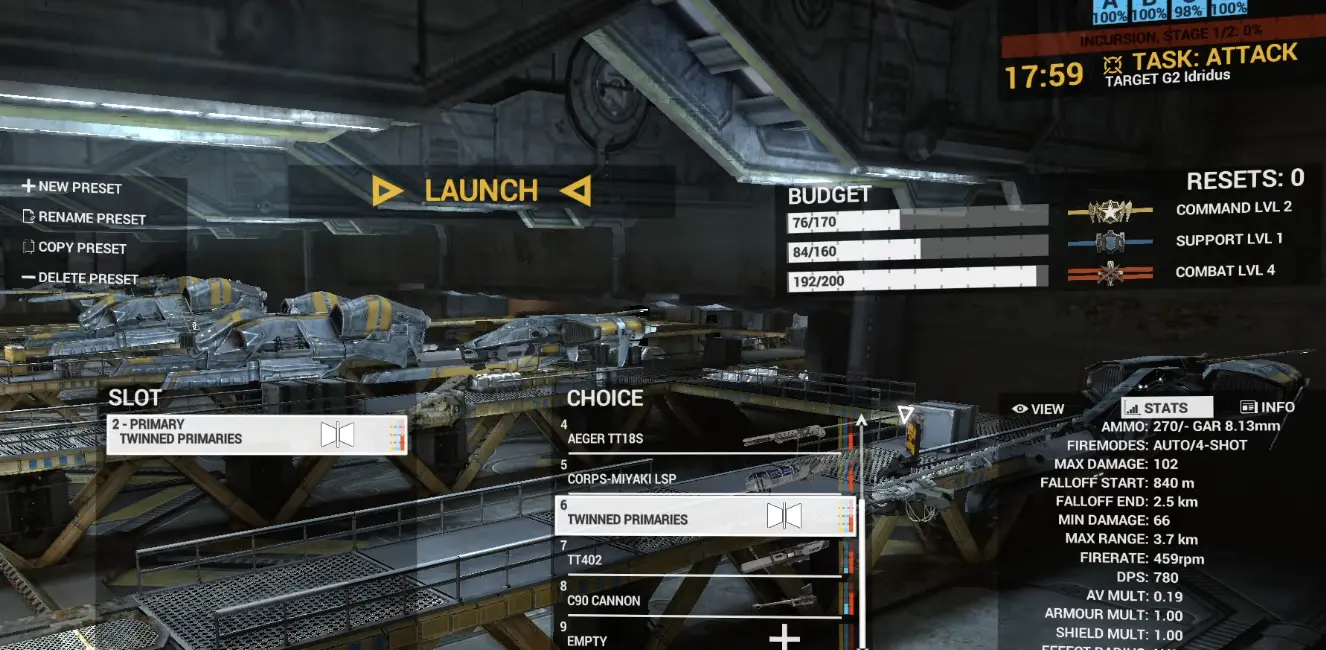
The useful question is not whether the craft can carry two weapons.
It is whether both weapons leave enough budget to make the craft functional.
For an interceptor, one supported anti-fighter weapon often performs better than two unsupported weapons.
For a bomber, anti-capital damage and enough survival to complete the run matter more than covering every target class.
Real Example: Command Budget Blocks a Specification
A spacecraft can fit its weapons within Combat and Support limits but fail because one tactical specification pushes Command over its cap.
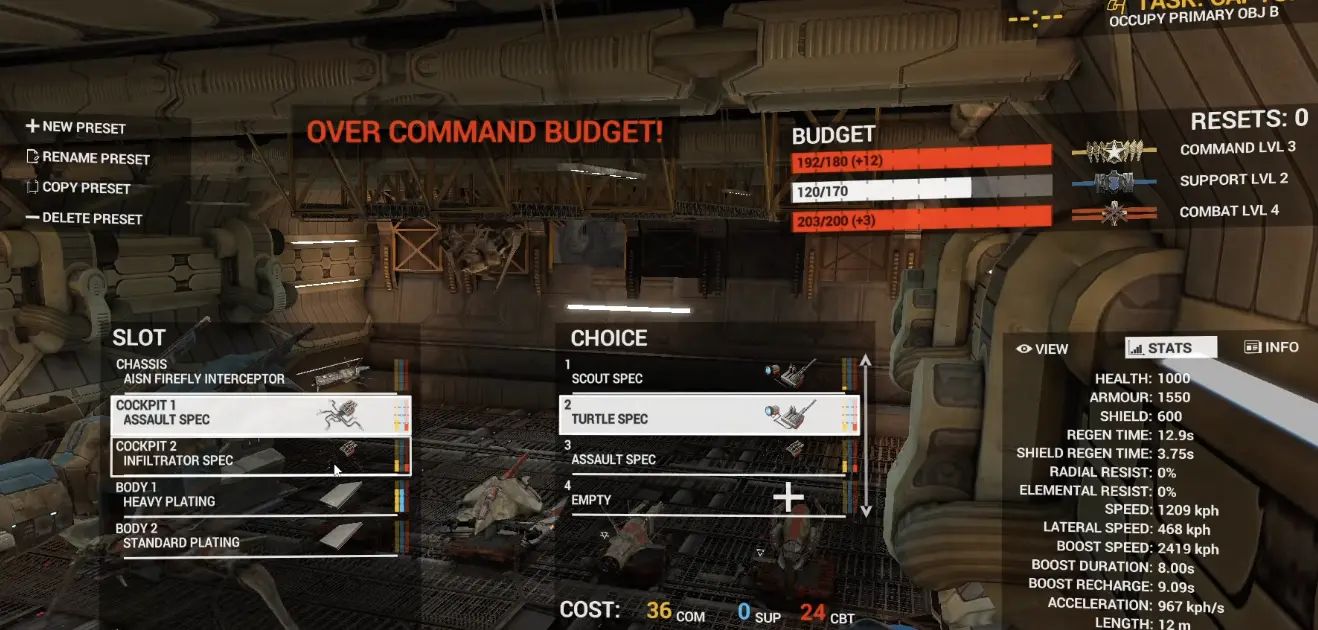
Possible fixes include:
- Remove Range Spec.
- Remove Twin Primaries.
- Delay Self-Repair until the next breakpoint.
- Replace another tactical Mod.
- Save a lower-rank fallback configuration.
Remove the item contributing least to the role from the category that is actually over budget.
Maximum Rank and Prestige
Each progression category reaches rank 25:
- Combat: 25 and 550 budget
- Support: 25 and 550 budget
- Command: 25 and 550 budget
Reaching 25/25/25 enables the first Prestige reset.
To activate it:
- Open Loadout.
- Select Appearance.
- Choose Prestige.
| Achievement | Requirement | Steam completion |
|---|---|---|
| Customized | Customize a loadout | 22.7% |
| Need More Minerals | Exceed a loadout limitation | 18.6% |
| Fleet Carrier | Reach maximum Support Rank | 0.3% |
| Lord/Lady of War | Reach maximum Combat Rank | 0.3% |
| Master and Commander | Reach maximum Command Rank | 0.3% |
| Loaded | Make use of the full 25/25/25 budget | 0.1% |
| Is That Actually a Promotion? | Reach 25/25/25 and activate first Prestige | 0.1% |
| Mamma Mia, Here We Go Again! | Reach fifth Prestige | 0.1% |
The progression curve is clear:
- Editing a loadout begins immediately.
- The first major breakpoint arrives at rank 5.
- Focused infantry builds become practical before maximum rank.
- Expensive vehicles and heavily modified spacecraft benefit more from later caps.
- Loaded and Prestige are long-term goals.
A Balanced Mixed-Threat Infantry Build
A practical mixed-threat build can combine:
- One reliable rifle.
- One ammunition type selected for the expected target.
- A launcher for vehicles.
- Enough armor and utility to remain deployable.
Each component has one job:
- Rifle for normal infantry combat.
- Ammunition for the expected target.
- Launcher for vehicles.
- Armor and utility within the remaining allowance.
It does not try to become a sniper, heavy defender, infiltrator, medic, and anti-vehicle specialist at the same time.
Common Loadout Mistakes
Filling All Seven Slots
The slots show what can be carried, not what must be carried.
Leave the Secondary or second Kit slot empty when filling it would weaken the main role.
Removing an Item From the Wrong Category
Check which budget is exceeded.
A Combat-cost weapon may not fix a Support or Command shortage.
Filling or Changing Too Many Slots at Once
Build around the Primary weapon and role tool first. Add ammunition, attachments, armor, and secondary equipment only after the core configuration can deploy.
Treating Special Ammunition as Free Damage
Special ammunition has a budget cost and target profile.
Use Standard when the specialist effect does not justify the tradeoff.
Assuming Heavy Plating Is Always Better
Heavy Plating costs budget and movement.
Use it for fixed fights, not automatically for every map.
Building a Vehicle for Every Target
Ground vehicles and spacecraft become expensive quickly.
Choose one main target and one secondary responsibility.
Waiting for Rank 25 Before Optimizing
Useful breakpoints arrive at ranks 5, 10, 15, and 20.
Build for the current cap instead of treating 550 as the only meaningful number.
Why the Loadout Is Still Not Deploying
The Same Equipment Fits Another Player
That player may have a higher rank in the budget category required by the item.
Compare the actual caps, not only the equipment list.
A Weapon Fit Until Ammunition Was Added
Ammunition has its own cost.
Return to Standard, remove another optional item, or save the specialist version for a later rank.
The Build Exceeds Support Even Though It Is Offensive
Armor, ammunition, and weapon Mods can have mixed costs.
Use the displayed values instead of judging an item only by its combat purpose.
The Vehicle Became Invalid After Adding Countermeasures
The main weapon may already consume most of the budget.
Remove a secondary weapon, range luxury, or duplicate system before removing the countermeasure needed to survive.
The Spacecraft Became Invalid After Twin Primaries
Choose which target the craft is expected to fight and keep the better weapon for that job.
Use the recovered budget for aim, range, repair, or defense.
Heavy Plating Fits but the Role Feels Worse
The build may be valid but too slow for the objective.
Budget validity is only the first test. Movement, range, and role execution still matter.
Fast Over-Budget Checklist
When deployment is blocked:
- Identify the exceeded category.
- Keep the role-defining weapon, tool, or vehicle system.
- Remove the newest optional Mod.
- Check specialist ammunition.
- Check extra armor.
- Check the Secondary slot.
- Check the second Kit or weapon system.
- Save a cheaper current-rank version.
- Restore removed options at the next five-rank breakpoint.
- Confirm that the valid build still performs its intended role.
What to Read Next
- Read the Boarding Guide to build for close-range interiors, Breach Points, Core Lockouts, and ship sabotage.
- Read the Single Player, Bots and Orders Guide to configure AI matches and raise Command through objective play.
- Read the Achievements Guide for Customized, Need More Minerals, Loaded, maximum ranks, 25/25/25, and Prestige.
- Return to the Angels Fall First Guide Hub for the recommended tutorials and complete first-match route.
FAQ
Why is my loadout over budget in Angels Fall First? +
Combat, Support, or Command has exceeded its current limit. Keep the weapon or tool that defines the role, then remove an optional Mod, special ammunition type, extra armor layer, second primary, or redundant utility item from the exceeded category.
What are the three loadout budgets? +
Every item can consume Combat, Support, and Command budget. Combat grows through direct fighting, Support through helping teammates, and Command through following objectives and issuing useful orders.
How much budget do you start with? +
Each progression category starts with 150 budget at rank 0. Normal ranks add 10 points, while ranks divisible by five add 40 points.
What is the maximum loadout budget? +
Combat, Support, and Command each reach 550 budget at rank 25. The main checkpoints are 230 at rank 5, 310 at rank 10, 390 at rank 15, 470 at rank 20, and 550 at rank 25.
How many infantry loadout slots are there? +
Infantry has seven equipment slots: Melee, Sidearm, Primary, Secondary, Explosives, Kit 1, and Kit 2. Armor and specifications are configured separately.
Do you have to unlock every weapon? +
A wide equipment catalogue is available early. Rank progression mainly increases how many weapons, armor pieces, ammunition types, tools, and Mods can fit into one valid build.
What is the best ammunition type? +
Standard is the safest general option. Incendiary adds heat and damage-over-time pressure, while Shock or EMP is useful against shields and electronic targets. Corrosive and Hardpoint should be selected by comparing the current weapon stats and target role.
Why does Incendiary Ammo use Support budget? +
Item costs are not determined only by whether an option appears offensive. Special ammunition can consume more than one budget category, so the displayed budget bars are the final authority.
Can vehicles use custom loadouts? +
Ground vehicles and small spacecraft can use customized weapons, armor, countermeasures, and specifications. Their expensive systems make focused roles especially important.
Should beginners use presets? +
Yes. Deploy with a preset once, identify the item that defines its role, then replace one component at a time while keeping the build deployable.
What are the maximum ranks? +
Combat, Support, and Command each reach rank 25. Reaching 25 in all three categories enables the first Prestige reset through Loadout Appearance.
How do you get Need More Minerals? +
Add equipment until one budget category exceeds its limit. After the achievement triggers, remove the optional item and restore a valid build.
What is the Loaded achievement? +
Loaded requires using the full budget available from a 25/25/25 progression profile. It is a late-progression achievement rather than an early over-budget challenge.