How to Board Ships and Defend a Breach
Use the right dropship, complete the boarding transfer, secure the Breach Point, clear the Core route, and stop enemy reinforcements.
Updated:
Quick Answer
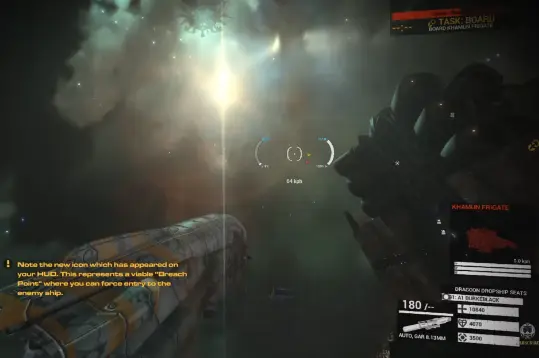
To board a ship in Angels Fall First, take a Dragoon or Cricket, target a valid vessel, and follow the door-shaped Breach Point marker. Begin the attachment, leave the cockpit at the next prompt, and move into the rear boarding module. Once inside, secure the Breach Point, complete the required internal objectives, destroy the exposed Core when applicable, and leave before the vessel is lost.
Data snapshot: July 15, 2026, during the Angels Fall First 1.0 launch window. Controls can be rebound, while dropship availability, boardable targets, internal layouts, and objective chains vary by map.
Boarding at a Glance
Boarding has three jobs:
- Deliver the dropship to a valid Breach Point.
- Complete the cockpit-to-rear-module transfer.
- Protect the internal spawn while the team finishes the objective.
| Phase | What matters | Success check | Common failure |
|---|---|---|---|
| Approach | Use the correct dropship, target the vessel, and follow the Breach Point marker | The boarding interaction appears | Flying around an unmarked hull section |
| Transfer | Leave the cockpit and enter the rear module | You arrive inside the target | Remaining in the pilot seat |
| Beachhead | Clear the pod entrance and protect the forward spawn | Teammates can keep deploying inside | Abandoning the Breach Point immediately |
| Objective | Follow the current ship or station task | The Core or next objective becomes available | Assuming every interior uses the same route |
| Finish | Destroy the final target or remove the enemy Breach Point | The phase completes or reinforcements stop | Chasing kills after the objective changes |
Where Boarding Is Available
Not every space battle includes boarding.
Ground maps stay focused on infantry and vehicles. Space maps can use exterior fleet objectives, station assaults, or boardable capital ships.
| Map type | Typical flow | Boarding relevance |
|---|---|---|
| Ground Incursion | Staged infantry and vehicle objectives | No capital-ship boarding |
| Ground Territories | Capture and hold ground positions | No ship boarding |
| Space Incursion | Staged fleet, station, or interior objectives | Can use dropships to enter a designated structure |
| Space Territories | Fleet combat around several control points | Can include boardable frigates and battleships |
A target is boardable when targeting it produces a Breach Point marker.
If no marker appears, move to another target or return to the exterior objective instead of circling the hull.
Boarding Dropships and Common Ship Names
A few names are useful when reading the target panel or deployment screen.
| Faction | Boarding dropship | Common frigate | Common battleship |
|---|---|---|---|
| United League / ULA | Dragoon | Ranger | Huginn |
| Antarean Empire / AIA | Cricket | Khamun | Anubis |
The Dragoon and Cricket are the dedicated boarding craft.
Frigates, battleships, and designated stations are the main targets with infantry interiors. Do not assume every large ship can be breached—the Breach Point marker decides whether the current target is usable.
Step 1: Find and Launch the Dropship
Look for a Dragoon on the United League side or a Cricket on the Antarean side.
Depending on the map, the boarding craft may be parked inside a friendly capital-ship hangar or another launch bay.
Enter the dropship module and approach the cockpit from inside.
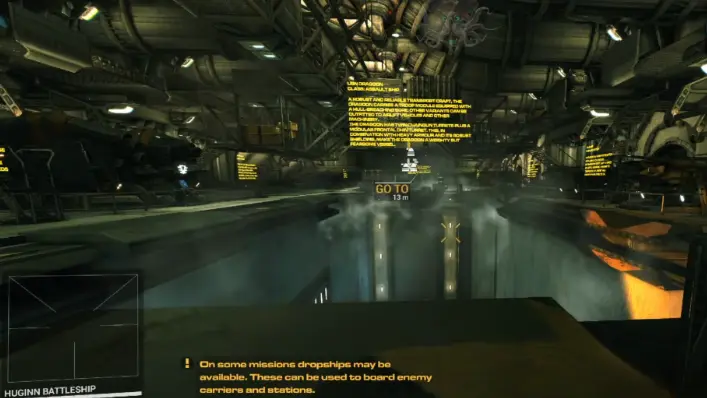
If the hangar is empty, return to the fight instead of waiting there. Come back when a Dragoon or Cricket is available.
I use the dropship for one job: delivering the boarding pod.
Do not turn the approach into a prolonged dogfight. Fly toward the assigned vessel and preserve enough health to reach the Breach Point.
You do not need to reduce the target’s hull before boarding. Destroying exposed turrets or clearing nearby fighters only makes the final approach safer.
Step 2: Target the Vessel
Aim at the intended frigate, battleship, or station and use the target command.
The default target key is G, although rebound controls can differ.
After selecting the vessel, follow the door-shaped Breach Point marker.
If the marker does not appear, stop searching that section of the hull. Try another designated target or return to the current battle objective.
Steps 3 and 4: Complete the Boarding Transfer
Fly toward the Breach Point and reduce speed as you approach.
Use the first interaction prompt to begin the attachment.
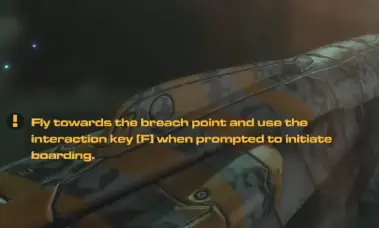
At the next prompt, leave the pilot seat, turn away from the cockpit, and move into the rear boarding module.
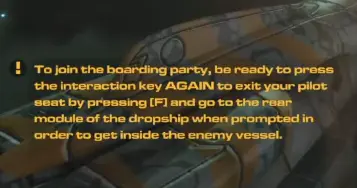
The boarding pod can launch without carrying the pilot if the rear module is missed.
Secure the Breach Point
A successful attachment creates a labeled ULA BREACH POINT or AIA BREACH POINT inside the target vessel.
This becomes the attacking team’s forward deployment position.
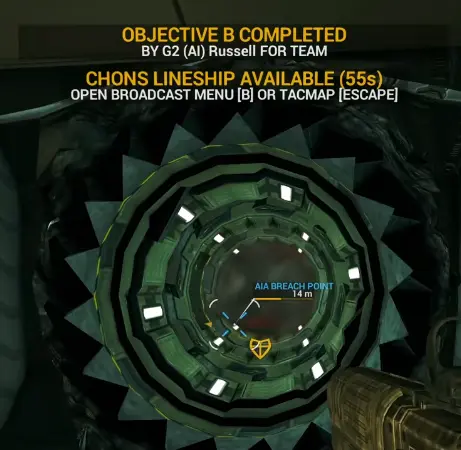
Do not sprint away immediately.
I first:
- Clear the nearest doorway.
- Check whether teammates are deploying.
- Stop defenders from reaching the pod.
- Mark the route toward the active objective.
- Move only after the entrance is stable.
The Breach Point removes the need to repeat the full dropship flight after every death. Losing it can end the internal attack before the team reaches the main target.
Follow the Current Internal Objective
A boarded frigate or battleship can use Core Lockouts and a main Core. A station can use security captures, shield controls, hacks, or another protected objective.
Follow the current task rather than assuming every interior has the same route.
The exterior door-shaped marker leads the dropship to the hull. Once inside, the required objective markers lead the infantry route. Other subsystem icons can identify optional systems that do not advance the main task.
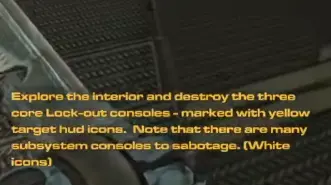
In the tutorial frigate:
- Enter the interior.
- Destroy the three marked Core Lockouts.
- Move to the exposed Core.
- Destroy the Core.
- Leave during the destruction sequence.
The number three belongs to that layout. Follow the actual markers when another target uses a different route.
Station Boarding Uses a Different Objective Chain
Some station missions continue through capture and security objectives instead of ship Lockouts.
One station route requires attackers to:
- Clear exterior defenses.
- Protect the dropships.
- Enter a station bay.
- Capture three security stations.
- Disable protection around the maintenance Core.
- Take the central objective.
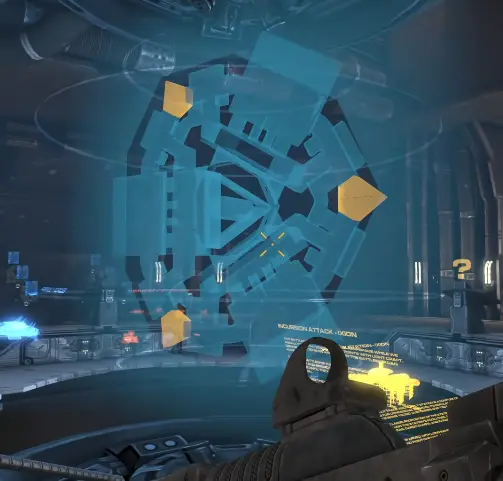
The flight and insertion are similar. The infantry task changes after entry.
How to Destroy Core Lockouts
Core Lockouts are internal consoles that protect the main Core.
Gunfire and melee attacks can damage them. Heavy weapons finish the job faster.
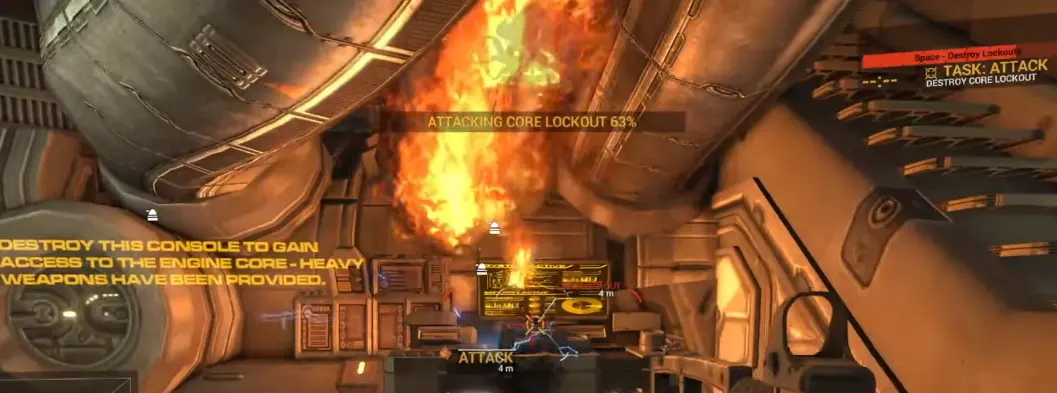
A practical boarding loadout should include:
- A shotgun, SMG, or controllable rifle for corridors.
- A heavy weapon when the loadout budget allows it.
- Enough ammunition for defenders and system damage.
- Enough mobility to move between objectives and escape.
| Loadout choice | Boarding value | Main drawback |
|---|---|---|
| Shotgun | Strong around doors and narrow corridors | Limited reach across large bays |
| SMG | Fast handling and strong close-range movement | Uses ammunition quickly against consoles |
| Assault rifle | Balanced against defenders and systems | Less specialized than a shotgun or heavy weapon |
| Heavy weapon | Faster Lockout and subsystem destruction | Higher budget cost and limited ammunition |
| Knife | Can damage consoles without spending ammunition | Slow and leaves you exposed |
| Sniper rifle | Useful across a large hangar | Poor as the only weapon in tight corridors |
Keep the close-range weapon that defines the role. If the build is over budget, remove an optional attachment, ammunition type, armor layer, or secondary item before removing the only weapon suited to the interior.
Optional Ship Systems
Optional systems can help the wider fleet even when they are not required for the current objective.
Useful targets include:
- Shield Generator: reduces external protection.
- Engines: limits movement.
- Weapon controls: reduces pressure on friendly ships.
- Core Lockouts: advances the Core route.
- Main Core: begins the destruction sequence.
I stop for an optional system only when the route is safe or teammates are already handling the required objective.
If the attack is losing time, I stay on the active task.
How to Defend Against Boarding
If you are piloting the boarded capital ship, the boarding alarm is the cue to check the interior and Tac Map immediately.
The first priority is removing the enemy forward spawn.
Use this order:
- Locate the Breach Point.
- Clear attackers around the entrance.
- Damage the attached boarding point.
- Stop reinforcements before chasing survivors.
- Protect or repair the required internal systems.
Killing individual attackers without removing their spawn only delays the next wave.
The boarding point can also be attacked from outside when the interior entrance is heavily defended. Destroying the attached pod removes the same forward deployment position.
The Pest Removal achievement tracks 15 destroyed attached boarding points.
Destroy the Core and Leave
After the required Lockouts are destroyed, move to the main Core.
Once the Core objective completes:
- Stop chasing defenders.
- Find the evacuation route.
- Move toward the exit or marked safe path.
- Leave time for doors and wrong turns.
Large interiors take longer to cross than the HUD distance suggests.
Boarding Achievements and Completion Rates
The Steam global completion rates below were captured on July 15, 2026.
| Achievement | Requirement | Steam completion |
|---|---|---|
| Do You Have a Moment to Talk About… | Successfully board a ship | 4.0% |
| Sinking Feeling | Escape a ship during self-destruct | 2.8% |
| Infiltration | Destroy a capital ship Core | 1.4% |
| Being a Real Nuisance | Board 20 ships or stations | 0.1% |
| Pest Removal | Destroy 15 attached boarding points | 0.1% |
The gap between 4.0% for boarding and 1.4% for destroying a Core shows where the harder part begins.
Getting inside is only the start. The full route also requires protecting the spawn, reading the objective, clearing the protection, and finishing the final target.
Why Boarding Is Not Working
No Breach Point Appears
Make sure the vessel is targeted and that you are using a Dragoon or Cricket. If the target still has no Breach Point marker, stop circling it and move to another objective.
The Interaction Prompt Never Appears
Follow the marked boarding position and continue approaching it. The prompt appears only inside the valid range.
The Dropship Reaches the Hull but I Remain Outside
The transfer was not completed from the rear boarding module. Repeat the approach or deploy from an existing team Breach Point.
The Breach Point Disappeared
Defenders may have destroyed the attached boarding point.
The Core Cannot Be Damaged
Check for remaining protection objectives before attacking the Core.
The Station Has No Core Lockouts
Follow the station’s objective markers. It may use security captures, hacks, shield controls, or another route.
I Die Immediately After Deploying
Clear the Breach Point entrance before pushing deeper and use a loadout suited to close-range interiors.
Enemies Keep Respawning Inside Our Ship
Destroy their Breach Point before chasing the remaining attackers.
Fast Boarding Checklist
Attack
- Take a Dragoon or Cricket.
- Target a vessel with a Breach Point marker.
- Complete the cockpit-to-rear-module transfer.
- Secure the internal spawn.
- Follow the current objective.
- Leave after the final target is destroyed.
Defense
- Respond to the boarding alarm.
- Locate the enemy Breach Point.
- Clear its entrance.
- Destroy the interior point or exterior pod.
- Protect the required internal systems.
What to Read Next
- Read the Loadout Budget and Progression Guide when a boarding weapon, heavy weapon, armor, or ship system pushes the build over budget.
- Read the Single Player, Bots and Orders Guide to create AI matches and coordinate boarding or counter-boarding objectives.
- Read the Achievements Guide for Infiltration, Sinking Feeling, Pest Removal, subsystem damage, and the complete 103-item checklist.
- Return to the Angels Fall First Guide Hub for the recommended tutorial order and complete first-match route.
FAQ
How do you board a ship in Angels Fall First? +
Take a Dragoon or Cricket, target a valid enemy vessel, follow the door-shaped Breach Point marker, begin the attachment, then leave the cockpit and enter the rear boarding module.
Why did pressing F not put me inside the ship? +
Reaching the hull only starts the attachment. Leave the pilot seat at the next prompt and move into the rear boarding module to complete the transfer.
Which dropships can board ships? +
The United League uses the Dragoon and the Antarean side uses the Cricket. These are the dedicated dropships used to attach a boarding pod to a valid target.
Which ships can be boarded? +
Frigates, battleships, and designated stations are the main boarding targets. A target is usable when it produces a Breach Point marker.
Can every space map have boarding? +
No. Some space battles include boardable ships or stations, while others stay focused on exterior objectives. If the target has no Breach Point marker, use another objective.
Where do dropships spawn? +
Look in a friendly capital-ship hangar or designated launch bay. If no Dragoon or Cricket is available, return to the fight and check again later instead of waiting in the hangar.
Do you have to damage a ship before boarding it? +
No. A valid target can be boarded without first reducing its hull. Destroying nearby defenses only makes the approach safer.
What does a Breach Point do? +
The attached pod creates a forward deployment point inside the target vessel. Attackers can keep spawning there until defenders destroy it.
How do Core Lockouts work? +
Core Lockouts protect the main Core. Destroy the marked Lockout consoles before attacking the Core.
Can normal weapons damage Core Lockouts? +
Yes. Gunfire and melee attacks can damage Core Lockouts. Heavy weapons destroy them faster but are not mandatory.
How do you defend against boarding? +
Clear attackers around the Breach Point and destroy the attached boarding point before chasing survivors deeper into the vessel.
Which achievements involve boarding? +
Boarding achievements include Do You Have a Moment to Talk About, Infiltration, Sinking Feeling, Being a Real Nuisance, and Pest Removal.