Tower of Babel Runes, Gems, Sockets, and Alchemist Guide
A practical Tower of Babel Survivors of Chaos guide explaining how runes, numbered runes, gems, sockets, jewels, gem powder transmutation, the Alchemist, and the Blacksmith work, including Floor 3 socket unlocks, legendary effect transfer, and when to spend materials.
Updated:
Quick Answer
Runes, gems, sockets, jewels, the Alchemist, and the Blacksmith are all part of Tower of Babel’s gear improvement layer. The Alchemist converts materials such as gem powder, jewels, runes, and legendary item resources. The Blacksmith improves equipment through enhancement, gems, jewels, runes, and sockets. Do not spend rare materials on low item level gear unless the legendary effect is worth saving.
Start Here
The crafting system looks confusing because several systems appear close together:
gem powder → gems → jewels → runes → numbered runes → sockets → item enhancement → legendary effects → Final Enhancement
The simple split is:
- Use the Alchemist when you want to convert materials or work with legendary item options.
- Use the Blacksmith when you want to improve equipment.
- Use the item bag when you want to check Equipment, Jewels, and Runes.
Do not start by asking, “What can I spend?” Start by asking:
Is this piece of gear worth improving?
Quick Crafting Diagnosis
| If you are trying to… | Go to | What to do first |
|---|---|---|
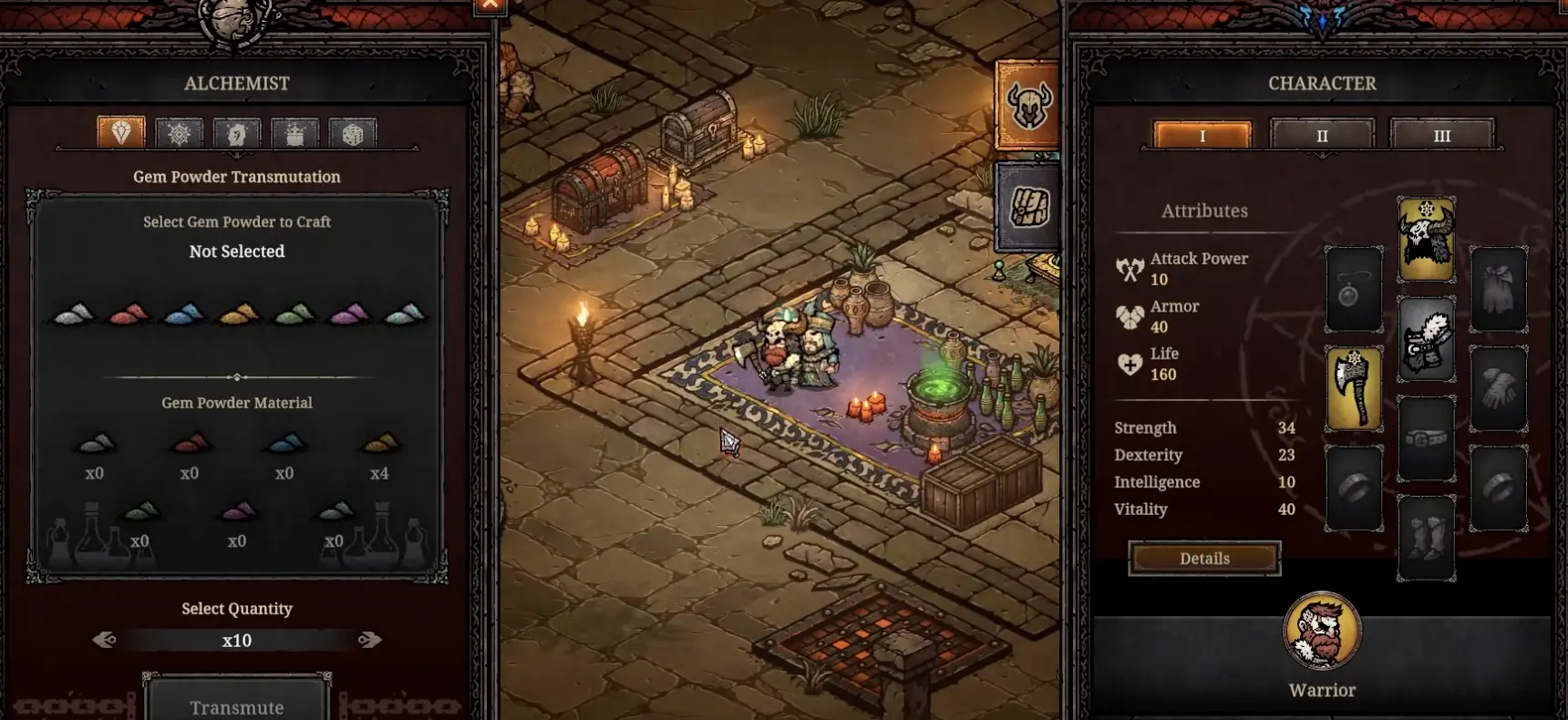
| Use gem powder | Alchemist | Open Gem Powder Transmutation and check the selected powder, material count, and quantity. |
| Convert jewels | Alchemist | Use Jewel Transmutation only after you know which jewel type your gear needs. |
| Convert runes | Alchemist | Use Rune Transmutation after checking rune requirements on your gear upgrade. |
| Work with legendary effects | Alchemist | Use the Legendary Item option, but confirm the preview before consuming gear or materials. |
| Improve a piece of equipment | Blacksmith | Place the item first, then check the upgrade cost and result. |
| Add a gem | Blacksmith | Use Add Gem only on empty socket equipment worth keeping. |
| Add a jewel | Blacksmith | Clear Floor 3 first if the Add Jewel panel is locked. |
| Add runes | Blacksmith | Match the item requirement before spending runes. |
| Add or remove sockets | Blacksmith | Use socket options only on gear with long-term value. |
| Prepare for Final Enhancement | Gear / Alchemist / Blacksmith | Finish normal enhancement, sockets, and effect decisions before locking in late-game gear. |
Use this table when you do not know which crafting menu to open.
Alchemist: When Should You Use It?
The Alchemist is not mainly where you make your current weapon stronger. It is where you convert materials, prepare resources, and make decisions around legendary item effects.
Use the Alchemist when you have a specific material or legendary-effect problem.
| Alchemist option | Use it when… |
|---|---|
| Gem Powder Transmutation | You have powder or dust materials and want to turn them into usable gem resources. |
| Jewel Transmutation | You have extra jewels or need a jewel type that better fits your gear. |
| Rune Transmutation | You have runes but need to match an upgrade or crafting requirement. |
| Legendary Item option | You want to work with legendary effects, legendary crafting, or effect transfer decisions. |
This table focuses on timing, not basic menu labels.
Gem Powder Transmutation: Step-by-Step
Gem powder is one of the first crafting materials that confuses players because it does not behave like equipment.
You do not equip gem powder. You convert it at the Alchemist.
| Step | Action |
|---|---|
| 1 | Return to the hub after a run. |
| 2 | Open the Alchemist. |
| 3 | Choose the Gem Powder Transmutation tab. |
| 4 | Select the gem powder or color option you want to craft with. |
| 5 | Check how many materials you have. |
| 6 | Choose the quantity. |
| 7 | Read the result or preview before confirming. |
| 8 | Transmute only if the output supports gear you plan to keep. |
Follow this flow when you pick up gem powder or colored dust and do not know what to do with it.
Blacksmith: When Should You Use It?
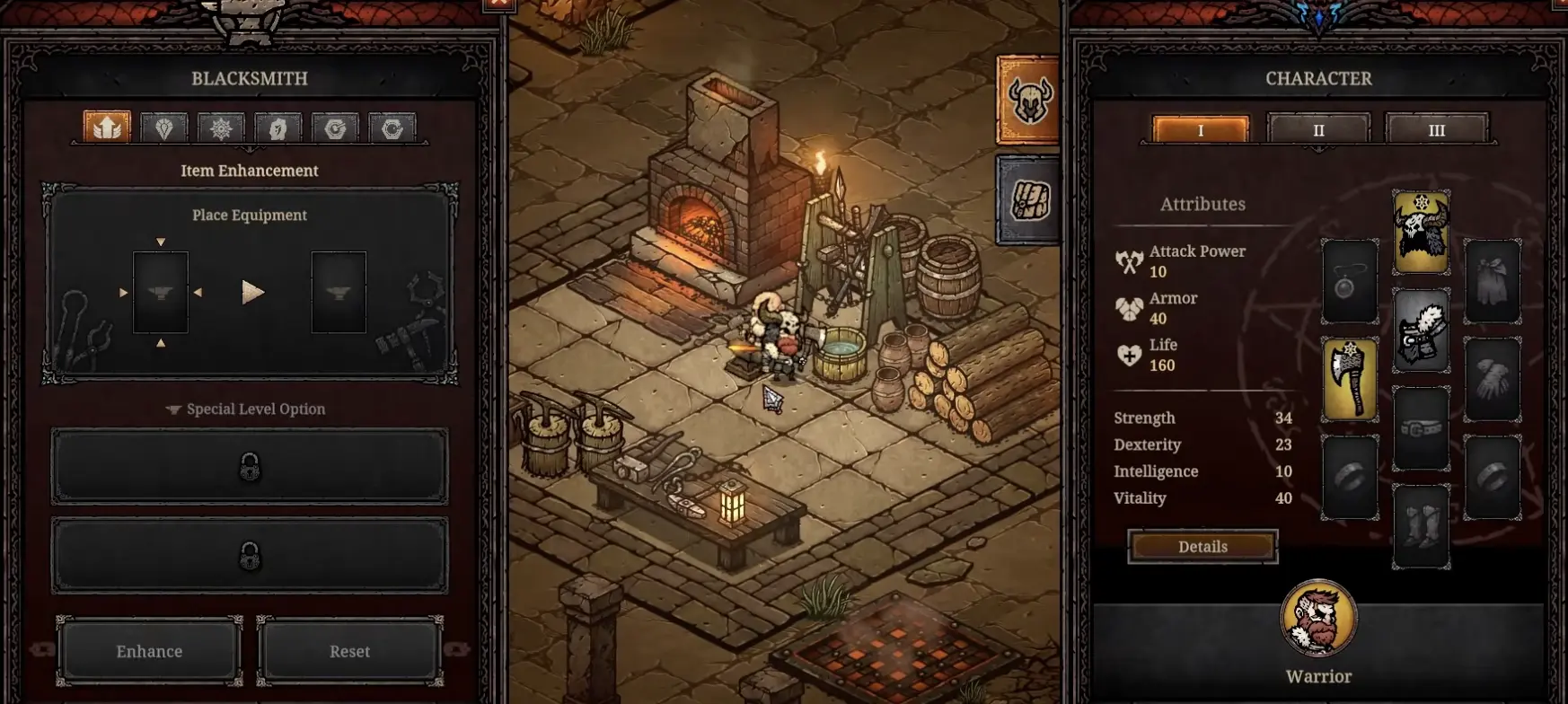
The Blacksmith is where crafting becomes gear power.
Use it when you have equipment worth improving. If the item is temporary, low level, wrong class, or unrelated to your build, do not spend rare materials on it.
| Blacksmith option | Use it when… |
|---|---|
| Item Enhancement | The item has good level, useful stats, or a legendary effect worth keeping. |
| Add Gem | The item has an empty socket and the gem fixes a real stat problem. |
| Add Jewel | You have cleared the unlock requirement and the item is worth deeper investment. |
| Add Runes | Your item or upgrade asks for runes and you can match the requirement. |
| Add Socket | The base item is strong enough to justify future gem, jewel, or rune investment. |
| Unsocket Item | You need to recover or change socketed materials from a valuable item. |
This table focuses on when to use each Blacksmith function.
How to Unlock Sockets
Socket-related crafting does not fully open immediately.
The important confirmed early unlock is:
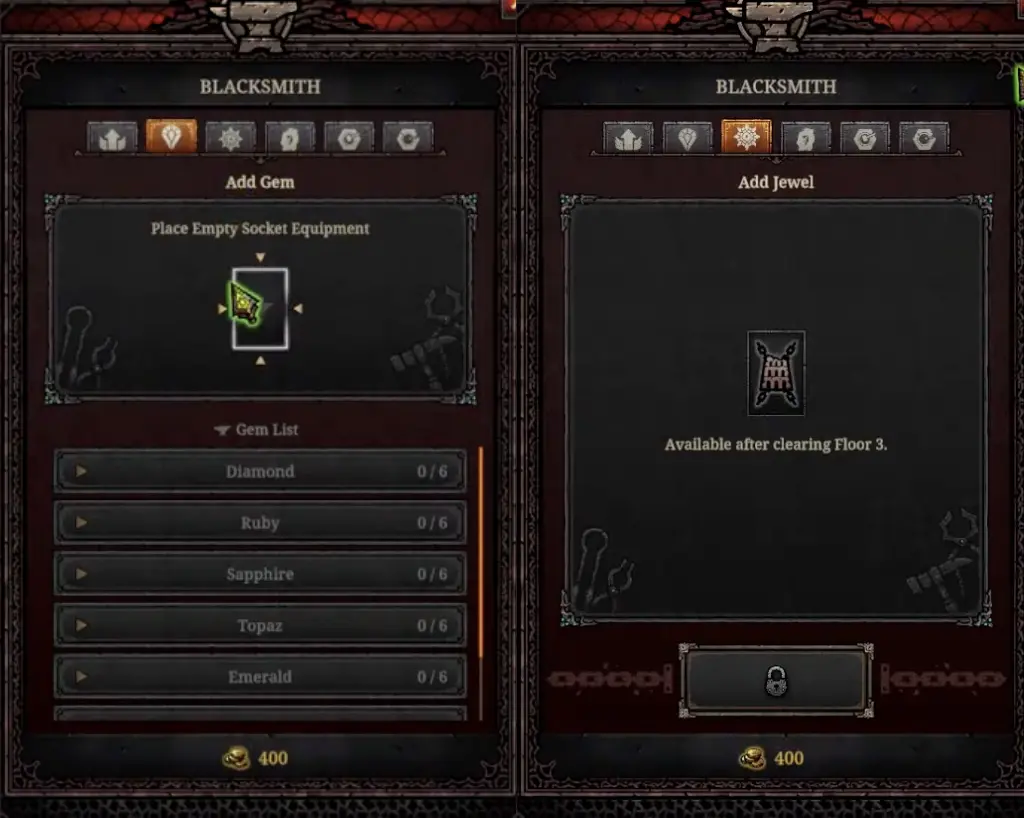
Add Jewel becomes available after clearing Floor 3.
| Problem | What it usually means |
|---|---|
| Add Jewel is locked | Clear Floor 3 first. |
| The item cannot be placed | The item may not support that upgrade type. |
| The gem list is empty | You may not have the right gem material yet. |
| The item has no empty socket | Use empty socket equipment or add sockets when available. |
| The upgrade looks too expensive | Wait until the item is worth long-term investment. |
Use this if the socket or jewel option is unavailable.
Runes Explained for Beginners
Runes are not level-up skills. They are crafting materials tied to the item system.
You should check them in three places:
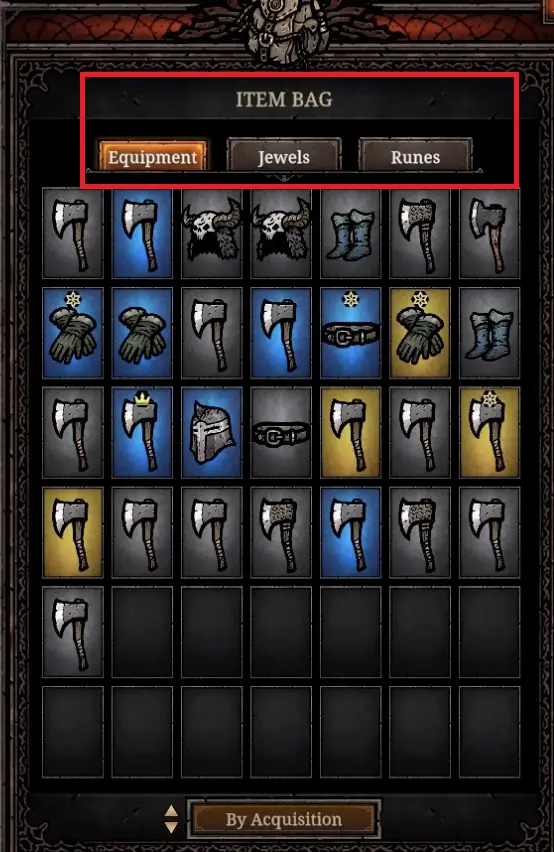
- Item Bag → Runes tab
- Alchemist → Rune Transmutation
- Blacksmith → Add Runes or rune-related upgrade requirement
| Rune question | Practical answer |
|---|---|
| Are runes skills? | No. Treat them as crafting materials. |
| Where do I see them? | Open the item bag and check the Runes tab. |
| Where do I convert them? | Use Rune Transmutation at the Alchemist. |
| Where do I apply them? | Use the Blacksmith when an item upgrade asks for runes. |
| Should I use runes immediately? | Usually no. Wait until you have gear worth keeping. |
| Should I spend runes on low item level gear? | Avoid it unless the legendary effect is build-defining. |
Use this beginner rune checklist before spending them.
Numbered Runes: What We Can Confirm
Numbered runes are one of the easiest crafting materials to misuse.
Current player testing has shown numbered rune examples such as Rune #3 and situations where a player was missing Rune #7. That does not prove that higher numbers are always better. It only proves that specific rune numbers can matter.
The safe rule is:
Do not assume a bigger rune number is automatically better. Read the item or upgrade requirement first.
| What you see | What it means for now |
|---|---|
| Rune #3 obtained | Numbered runes exist as specific rune items or requirement pieces. Save them until you know which upgrade needs them. |
| Rune #7 missing or needed | Some crafting or upgrade plans may depend on a specific rune number, not just any rune. |
| Upgrade asks for a specific rune | Match the required rune number before spending materials. |
| You have extra numbered runes | Do not transmute blindly until you know which number your build or item needs. |
| A guide says higher number is always better | Verify in-game before spending rare materials. |
Use this table when you start seeing numbered runes.
Legendary Item Option and Effect Transfer
This section connects directly to gear decisions.
Sometimes a legendary item is weak as equipment but valuable because of its effect. For example, the item level may be too low, but the legendary effect may still support a build.
When the Alchemist’s Legendary Item option is available, use it to work with legendary item resources and effect decisions.
| Step | Action |
|---|---|
| 1 | Identify the legendary item first. |
| 2 | Check whether the legendary effect supports a skill or build you use. |
| 3 | If the base item is weak but the effect is strong, do not sell it immediately. |
| 4 | Open the Alchemist. |
| 5 | Choose the Legendary Item option. |
| 6 | Place or select the legendary item only if the menu shows a clear result or preview. |
| 7 | Follow the result shown in the Legendary Item menu. Depending on your version and item type, this may involve preserving, transferring, extracting, or reusing a legendary effect. |
| 8 | Do not confirm if the result would destroy a useful effect without giving you something valuable. |
Use this flow before throwing away a low-level legendary item.
Post-Floor 21 Crafting: Warped Floor, Dual Boss Arena, and Final Greed
After the Floor 21 final boss, crafting decisions become more important. Warped Floor, Dual Boss Arena, Final Greed, and Final Enhancement all push you toward better item planning.
This does not mean you should spend every rune, jewel, and gem immediately. It means the value of good materials goes up once you are working on gear you actually plan to keep.
| Endgame system | Crafting implication |
|---|---|
| Warped Floor | Reward and modifier effects can make rune, jewel, and item planning more important. Bring stable gear, not random temporary pieces. |
| Dual Boss Arena | Boss-ready gear matters more than pure wave-clear gear. Save materials for items that help damage, survival, and uptime. |
| Final Greed | Treat this as part of the late-game gear economy, not an early spending target. |
| Final Enhancement | Finish normal enhancement, socket planning, affix decisions, and legendary effect choices before locking in late-game equipment. |
| Deeper Chaos Dungeon | Do not copy old high-floor material spending blindly. Use current-version rewards and your own result screens before committing resources. |
Use this as a post-Floor 21 crafting mindset table.
Gems vs Jewels vs Runes
These systems overlap, but they do not have the same job.
| System | Best mental model | Spend early? |
|---|---|---|
| Gem Powder | Raw crafting material | No, convert only when you know what you need. |
| Gems | Socket support for gear | Sometimes, if the item is worth keeping. |
| Jewels | Deeper customization layer | Usually later, after Floor 3 unlocks the relevant system. |
| Runes | Requirement-based upgrade material | Usually later, when gear tells you what it needs. |
| Sockets | The slot that lets materials improve gear | Only on useful gear. |
| Enhancement | Direct item improvement | Best on higher-value items. |
| Final Enhancement | Late-game final step | Only after other gear decisions are mostly finished. |
Use this simple comparison when the crafting menus start to blur together.
What Gear Is Worth Crafting On?
Before you spend materials, inspect the item.
A good crafting target usually has at least two of these:
- high item level for your current floor range
- useful base stats
- class compatibility
- a legendary effect that supports your build
- a skill bonus you actually use
- enough long-term value to justify socketing or enhancement
If the item is only a tiny upgrade, equip it if useful, but do not sink rare materials into it.
| Item check | Good sign | Bad sign |
|---|---|---|
| Item level | Higher than your current gear or current floor drops | Far behind your current drops |
| Class restriction | Fits the class you are playing | Exclusive to another class |
| Main stats | Helps damage, survival, mana, or your build plan | Random stats you do not use |
| Legendary effect | Boosts your main skill or build | Boosts a skill you never pick |
| Upgrade potential | Socketable or worth enhancing | No clear reason to invest |
| Replacement risk | You expect to use it for several runs | You will replace it after one floor |
| Endgame risk | Item is close to finished and worth long-term planning | You still need affix rerolls, socket work, or better base stats |
Use this table before spending gems, jewels, runes, or gold at the Blacksmith.
Early Crafting Priority
For most players, the early order should look like this:
| Priority | Action |
|---|---|
| 1 | Clear floors and collect gear. |
| 2 | Identify your items after runs. |
| 3 | Equip clear upgrades. |
| 4 | Sell obvious low-value gear. |
| 5 | Save gem powder, jewels, and runes until you understand your build. |
| 6 | Use the Alchemist to understand material conversion. |
| 7 | Use the Blacksmith once you have gear worth improving. |
| 8 | Add sockets, gems, jewels, or runes only when the item has long-term value. |
Follow this order if you are still clearing early floors and learning the systems.
Common Crafting Mistakes
| Mistake | What actually happens |
|---|---|
| Spending materials on the first rare item you find | You may replace the item one floor later and lose useful materials. |
| Ignoring gem powder | You miss an early material source that belongs to the Alchemist system. |
| Trying to use runes like skills | You waste time looking in the level-up screen instead of the item and crafting menus. |
| Assuming socket options are bugged | You may simply need to clear Floor 3 or meet the item requirement. |
| Transmuting without reading the preview | You may spend materials without getting the result your build needs. |
| Using numbered runes before reading the requirement | You may consume a specific rune number that should have been saved for a later upgrade. |
| Selling low-level legendary effects too quickly | You may lose an effect that could matter later through the legendary item system. |
| Crafting on temporary gear | You spend gold, gems, jewels, or runes on an item that gets replaced quickly. |
| Final enhancing before finishing normal upgrades | You may lock important gear decisions before sockets, affixes, or normal enhancement are ready. |
Practical Crafting Flow
Use this simple flow when you return to the hub after a run:
| Step | What to do |
|---|---|
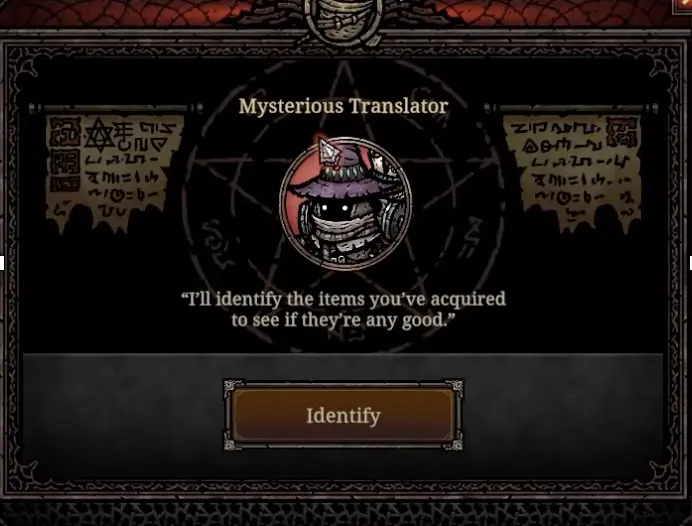
| 1. Identify items | Reveal your acquired gear first. |
| 2. Sort your inventory | Check Equipment, Jewels, and Runes tabs. |
| 3. Equip obvious upgrades | Prioritize item level, useful stats, and build effects. |
| 4. Store strong legendary effects | Keep effects that may matter later, even if the base item is weak. |
| 5. Save numbered runes | Do not transmute numbered runes until you know which upgrade needs them. |
| 6. Sell junk | Clear low-level items you will never use. |
| 7. Check Alchemist | Look at gem powder, jewel, rune, and legendary options. |
| 8. Check Blacksmith | See whether your best item is worth enhancing or socketing. |
| 9. Start next floor | Do not overcraft before every run. Improve only what matters. |
FAQ
How do runes work in Tower of Babel Survivors of Chaos? +
Runes are gear crafting materials, not level-up skills. You manage them through the item bag, the Alchemist, and the Blacksmith. Use them only after checking the item, the rune requirement, and whether the gear is worth keeping.
What do rune numbers mean in Tower of Babel? +
Rune numbers should be treated as specific rune identifiers or requirements until the game tooltip confirms more. Player testing has shown numbered rune examples such as Rune #3 and missing Rune #7, so do not transmute numbered runes blindly before checking what your upgrade needs.
How do I unlock sockets in Tower of Babel? +
Socket-related Blacksmith options start opening after floor progress. The Add Jewel panel shows that it becomes available after clearing Floor 3, so clear Floor 3 before assuming the socket system is broken.
What is gem powder used for in Tower of Babel? +
Gem powder is used at the Alchemist through Gem Powder Transmutation. Open the Alchemist, choose the Gem Powder tab, select the powder or gem option, choose the quantity, then transmute if the preview gives the material you want.
Can legendary effects be transferred? +
Legendary effects can matter even when the base item level is low. Use the Alchemist's Legendary Item option only when the menu shows a clear preview, and follow the in-game result before consuming a legendary item or effect.
Should I save runes and jewels for endgame? +
Yes, especially if the gear is temporary. Runes, jewels, sockets, and legendary effects become more important after your build and item level are stable, and they matter even more when preparing for Warped Floor, Dual Boss Arena, Final Greed, and Final Enhancement.