How to Start Ashes and Ascension in MechWarrior 5
Choose the 3058 Ashes and Ascension Career start, accept the First Whitting Conference transmission, and prepare before giving up travel control.
Updated:
Quick Answer
Choose Career, select Ashes & Ascension Quickstart, and begin in 3058. Once the Career loads, open the Priority Transmission for the First Whitting Conference.
The transmission gives you six months to accept the contract. Finish any travel, purchases, repairs, or refits you want to control before accepting it, because the offer states that your employer takes over travel and mission control for one year.
Ashes and Ascension has its own Career entry, so you do not need to wait for a normal contract to appear on the Starmap. The reliable start is the Ashes & Ascension Quickstart, followed by the Priority Transmission for the First Whitting Conference.
The important detail is the wording on that transmission. The six-month timer is an acceptance deadline, not six months you must sit and wait. Once you accept, the campaign begins taking control of where the company goes next.
Choose Ashes & Ascension Quickstart in Career mode
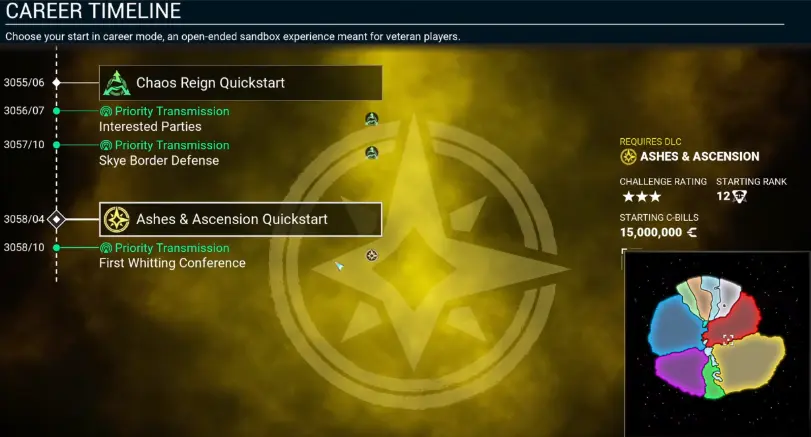
From the main start options, choose Career, then select Ashes & Ascension Quickstart on the Career Timeline.
The Quick Start appears at 3058/04, with the First Whitting Conference Priority Transmission shown at 3058/10.
The start screen also shows 15,000,000 C-Bills and Starting Rank 12, so this is not a bare-bones company that needs several months of grinding before it can enter the DLC.
The preset roster includes machines such as the Nightstar, Grasshopper, Warhammer, Victor, Cataphract, Huntsman, Thunderbolt, and Hunchback IIC. That is already enough depth to prepare a working lance without immediately buying another expensive chassis.
Do not begin by rebuilding every machine in storage. Decide which ‘Mechs you are actually likely to field, make the necessary repairs, and leave optional projects alone until you know how much calendar time you want to spend before accepting the contract.
Open the First Whitting Conference Priority Transmission
After the Career loads, check the right side of the Home screen for Priority Transmission.
You do not need to fly around looking for a yellow contract marker first.
Open the transmission and read the offer from Interstellar Expeditions. This is the invitation that brings Mason to the First Whitting Conference and moves Ashes and Ascension toward Operation Bulldog.
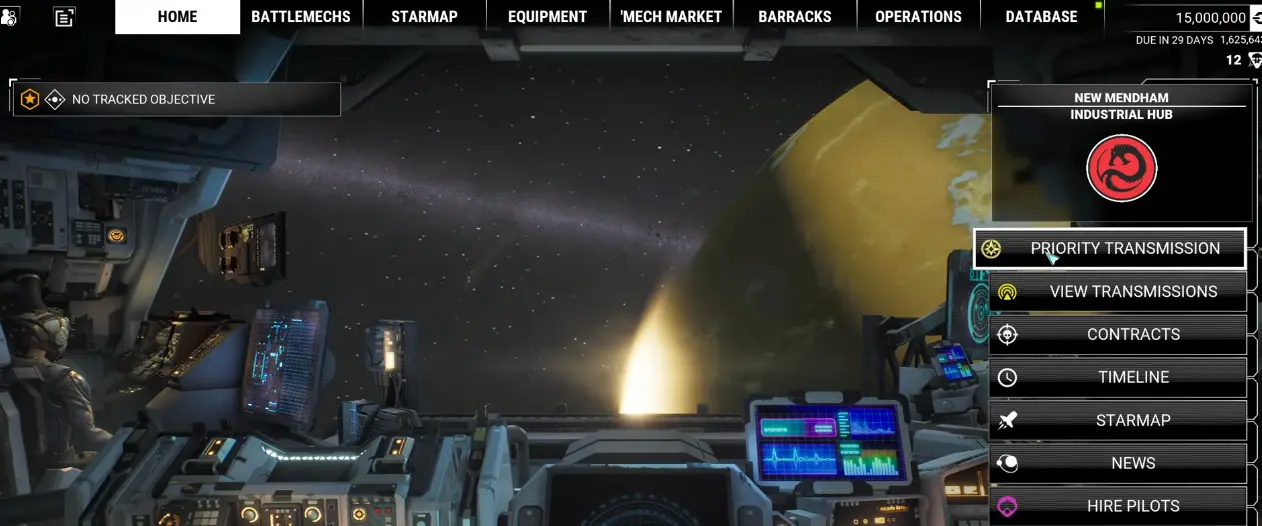
If the Career loaded correctly but you are wondering why there is no immediate battle, check this menu before doing anything else.
The campaign starts through the transmission sequence, not through an ordinary procedurally generated contract.
The six-month timer is the deadline to accept
The contract screen states:
6 MONTHS REMAIN TO ACCEPT CONTRACT
It also gives a second condition that is easy to overlook:
Accepting this offer will cede travel and mission control to your employer for 1 year.
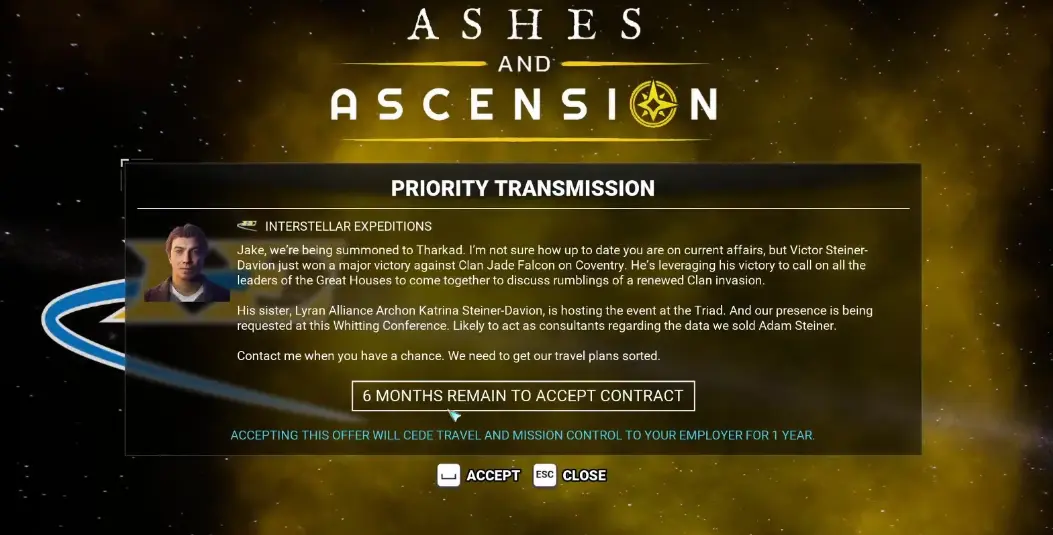
That changes what you should do before pressing Accept.
You are not waiting six months for the DLC to unlock. You are deciding how much of that window to use before committing the company to the campaign.
A practical pre-acceptance checklist is:
- repair any machine you already expect to field;
- replace missing ammunition or destroyed weapons;
- complete short refits that clearly improve an active ‘Mech;
- buy supplies you know are missing;
- finish optional travel or contracts only when they solve a real roster problem;
- save before accepting the transmission.
Once those jobs are done, accept the contract. There is no advantage in burning the entire six-month window just because it is available.
Should you take optional contracts before accepting?
A short preparation run can help when the roster has an obvious weakness, but the starting company is already capable of entering the DLC.
Optional work is most useful when it gives you something concrete: a replacement chassis, better weapons, ammunition you are short on, or enough C-Bills to repair the machines you actually intend to deploy.
Several unrelated contracts are harder to justify. They consume the same acceptance window without necessarily making the company better prepared for Ashes and Ascension.
The countdown can fall from six months to about three months after a longer detour, so keep checking the transmission rather than assuming there is unlimited preparation time.
Do you need to buy another heavy or assault ‘Mech first?
Usually not.
With 15 million C-Bills and a roster that already includes heavy and assault options, buying another expensive chassis only makes sense when it fills a specific hole in the machines you can field.
A market purchase is easier to justify when:
- one of your important weight classes has no usable reserve;
- the new chassis can be ready before you commit to the campaign;
- its weapon requirements match equipment you already own;
- buying it still leaves enough money for repairs and replacement parts.
An expensive ‘Mech that immediately needs a long rebuild can leave you with less cash and no additional machine ready for the opening missions.
Once the campaign starts, short gaps between deployments become more important than the total number of chassis in storage. The Ashes and Ascension walkthrough covers those mission-specific tonnage limits and repair deadlines.
Fresh Quick Start or an established company?
Use the 3058 Quick Start when your priority is getting into Ashes and Ascension with the intended timeline and preset roster. It gives you the First Whitting Conference setup immediately and removes uncertainty about whether the opening event has already been missed in another Career.
An established company can be stronger simply because it may have more ready ‘Mechs, spare weapons, pilots, and C-Bills. That becomes useful later when several machines are damaged at the same time.
If you are trying to use an older Career, check for the Ashes and Ascension Priority Transmission before spending time rebuilding the company around it. If the expected transmission is not available, the 3058 Quick Start is the straightforward way to begin the DLC.
Ashes and Ascension is not starting
Check the sequence in this order:
- choose Career from the start options;
- select Ashes & Ascension Quickstart;
- confirm the Career begins in 3058;
- load into the company and open Priority Transmission;
- select the First Whitting Conference offer;
- finish any preparation you still want under your own control;
- accept the contract and continue with the campaign sequence.
Do not wait for a normal combat contract to appear before opening the transmission. The First Whitting Conference is the step that moves this Career start into the DLC storyline.
What happens after you accept?
Accepting the offer commits the company to the First Whitting Conference sequence and gives the employer control over travel and missions for the campaign period shown on the contract.
From there, Mason joins the multinational Star League Defense Force effort that leads into Operation Bulldog and the first combat deployments against Clan forces.
Once Matamoras becomes your next problem, continue with the Ashes and Ascension Walkthrough.