The Witcher 3 Remastered Guide: What Changed and What Should You Do First?
See what changes affect your playthrough first, from reset Skill Points and combat to graphics, Reforge, mods, quest fixes, and quality-of-life upgrades.
If you are loading an old save, open Character first. Remastered resets your
Skill Points, and several familiar abilities now work differently, so rebuild
the skills you actually use before spending every refunded point.
Starting fresh does not require a new story route. White Orchard, Velen,
Novigrad and Skellige still follow the familiar progression; the biggest
changes are in skills, combat, graphics, equipment appearance, mods and
quality-of-life systems.
The Witcher 3 Remastered can look familiar within minutes of starting, but the
things worth checking first are not necessarily the quests you remember. An old
character may load with refunded Skill Points, PC settings now include much
heavier rendering options, and systems such as Reforge and the built-in mod
browser change decisions that used to happen outside normal progression.
The story still takes Geralt through the same major regions. Most of the
difference is felt between objectives: character development has been rebuilt,
non-boss enemies react differently, movement and Roach controls are smoother,
loot takes fewer interactions, and several older inconveniences now have direct
in-game solutions.
Rebuild Your Skill Tree Before You Resume an Old Save
Open Character before judging whether an old build still feels right.
Remastered resets Skill Points, changes several familiar abilities and replaces
the older branch-tier progression with connected prerequisite paths. Buying the
same skill names in the same order can therefore produce a character that looks
familiar on the menu but does not behave the same way in a fight.
Start from what Geralt actually does in combat. If fast attacks carry the build,
trace the new route that supports them. If Quen or another Sign is doing most of
the defensive work, rebuild that function first. Alchemy points should go back
in only when oils, potions, Toxicity or other preparation are genuinely part of
the playstyle.
The old habit of counting total points in a branch to reach deeper rows is no
longer the useful way to plan progression. The
Remastered Skill Tree guide
covers prerequisite routes, early purchases, reset builds and the Combat,
Signs and Alchemy changes in detail.
Are the Main Quest Routes Different in Remastered?
The main story still follows the familiar route through White Orchard,
Velen, Novigrad and Skellige. If you already know where a quest sends Geralt,
you can generally follow the same progression instead of looking for a new
route.
Movement feels smoother around ledges, ladders and vaults, but Geralt’s actual
jump height and jump distance have not increased. A location that required a
specific path before still needs that path now; improved animations do not
create new shortcuts across gaps that were previously unreachable.
Two quest fixes matter if an older save is already giving you trouble.
In the Eternal Fire’s Shadow
The Forgotten Wolf School Gear diagrams received a display-related fix after
being awarded.
If the reward was not showing correctly, that specific issue is addressed by
the update. The quest itself still follows the same basic progression.
Wine Is Sacred
Wine Is Sacred had a more serious progression problem.
Fast travelling around the wine seller objective could leave the quest unable
to continue. Remastered fixes that trigger, but the repair is not
retroactive for a save that is already trapped in the broken state.
If the objective is already stuck, travelling away and returning repeatedly
will not repair that save. Load a save from before the problem occurred and
continue from there.
Did Remastered Change the Ciri Endings?
The main Ciri endings and the late-game decisions that lead to them still follow
the familiar story route. Playing Remastered does not add a separate ending just
for using the updated version.
Several choices made before the final fight can still decide whether Ciri
becomes a witcher, becomes Empress or does not return from the White Frost. If
you are approaching the late game, the
Best Ending guide
covers the Ciri choices and the conditions behind each outcome.
How Should You Set Up PC Graphics?
The visual upgrade reaches much further than sharper textures.
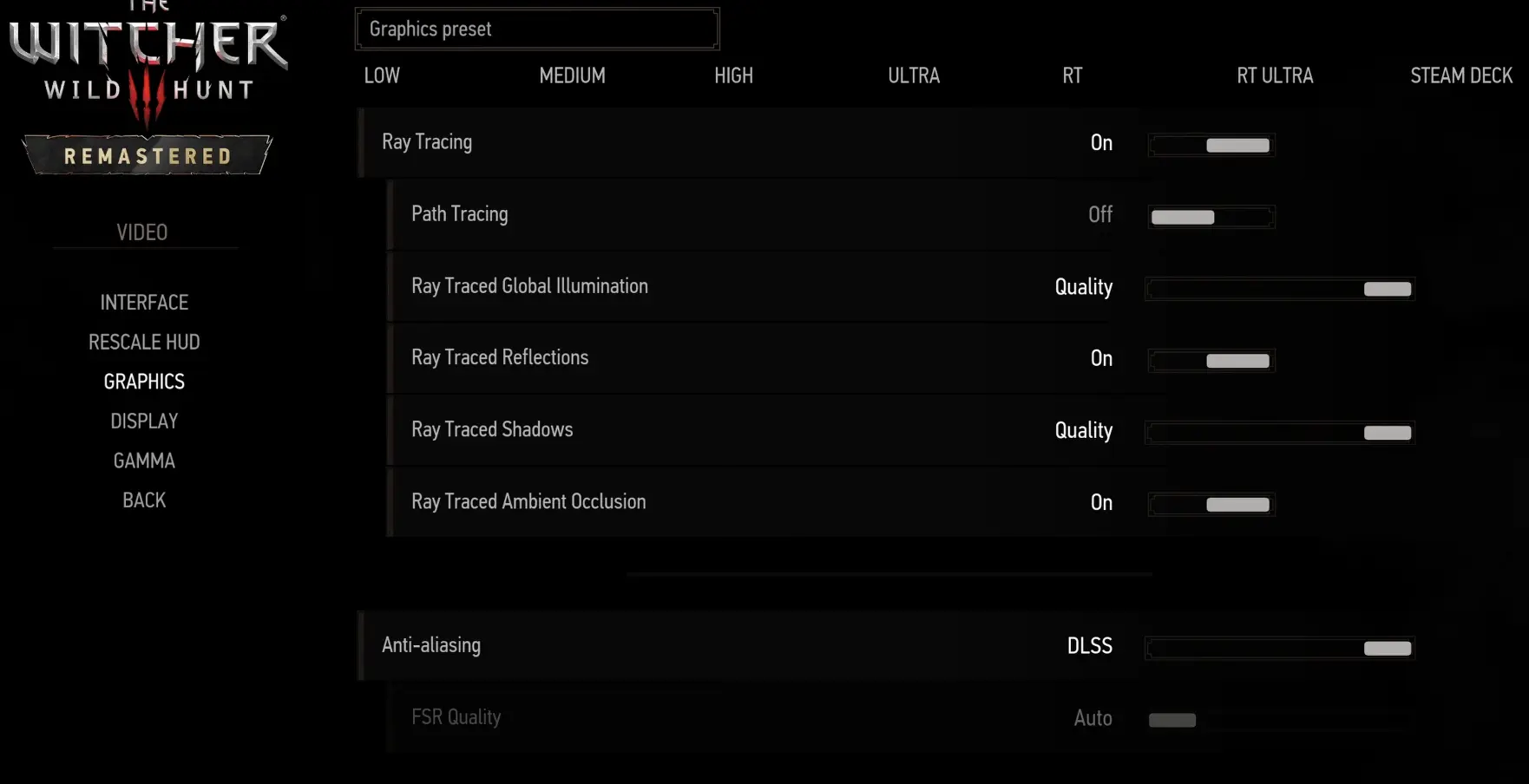
Remastered adds or updates modern DirectX 12 rendering, Path Tracing, NVIDIA
DLSS 4.5 and Ray Reconstruction, AMD FSR 4 with Frame Generation and Anti-Lag 2
on supported Radeon hardware, and Intel XeSS 2.0 with Frame Generation and
low-latency support.
The highest preset is not the best starting point for every PC.
On an RTX 3070 Ti at 1440p, Ultra+ with DLSS Quality ran at roughly
50–70 FPS without ray tracing, depending on the scene. Enabling ray tracing
brought performance into roughly the 30–45 FPS range.
Another CPU, GPU, resolution or driver can move those numbers substantially, so
I establish a stable non-RT baseline first rather than turning on every new
lighting option at once.
Start from a stable preset on your own hardware before deciding whether Ray Tracing or Path Tracing is worth the frame-rate cost.
A sensible setup order is:
Update the GPU driver before diagnosing a major rendering or stability issue.
Choose the resolution and quality preset you actually want to play at.
Check performance without ray tracing.
Add Ray Tracing only if enough headroom remains.
Treat Path Tracing as another expensive step rather than the default target.
If performance becomes unstable after the update, drivers are one of the first
things worth checking before lowering every graphics option at once.
What Feels Different in Combat?
Remastered still uses the same broad fighting toolkit: swords, dodges, Signs,
bombs, oils and Adrenaline.
The difference shows up in how those pieces respond.
Non-boss monsters received changes to attack patterns, counterattacks,
movement, reactions, flight behavior and how some effects are handled. Some
enemies are also less willing to walk blindly into dangerous situations, so a
fight that was easy to control with one repeated setup before may now require
more movement.
Geralt gets revised finishers and smoother combat animation work. Target
switching is easier while moving the camera with lock-on active, which helps
when several enemies are closing from different directions.
Fighting completely unlocked still requires more care. A Sign can occasionally
go in a direction that does not match the enemy Geralt appears to be facing,
while lock-on gives much more predictable targeting when a group becomes
crowded.
The larger change to damage comes from the redesigned skills. Some Combat
talents now reward actions such as dodging before fast attacks, combining fast
and strong strikes, or using the Crossbow to generate Adrenaline.
That makes rebuilding the character more important than relearning every old
monster encounter.
How Does Reforge Work?
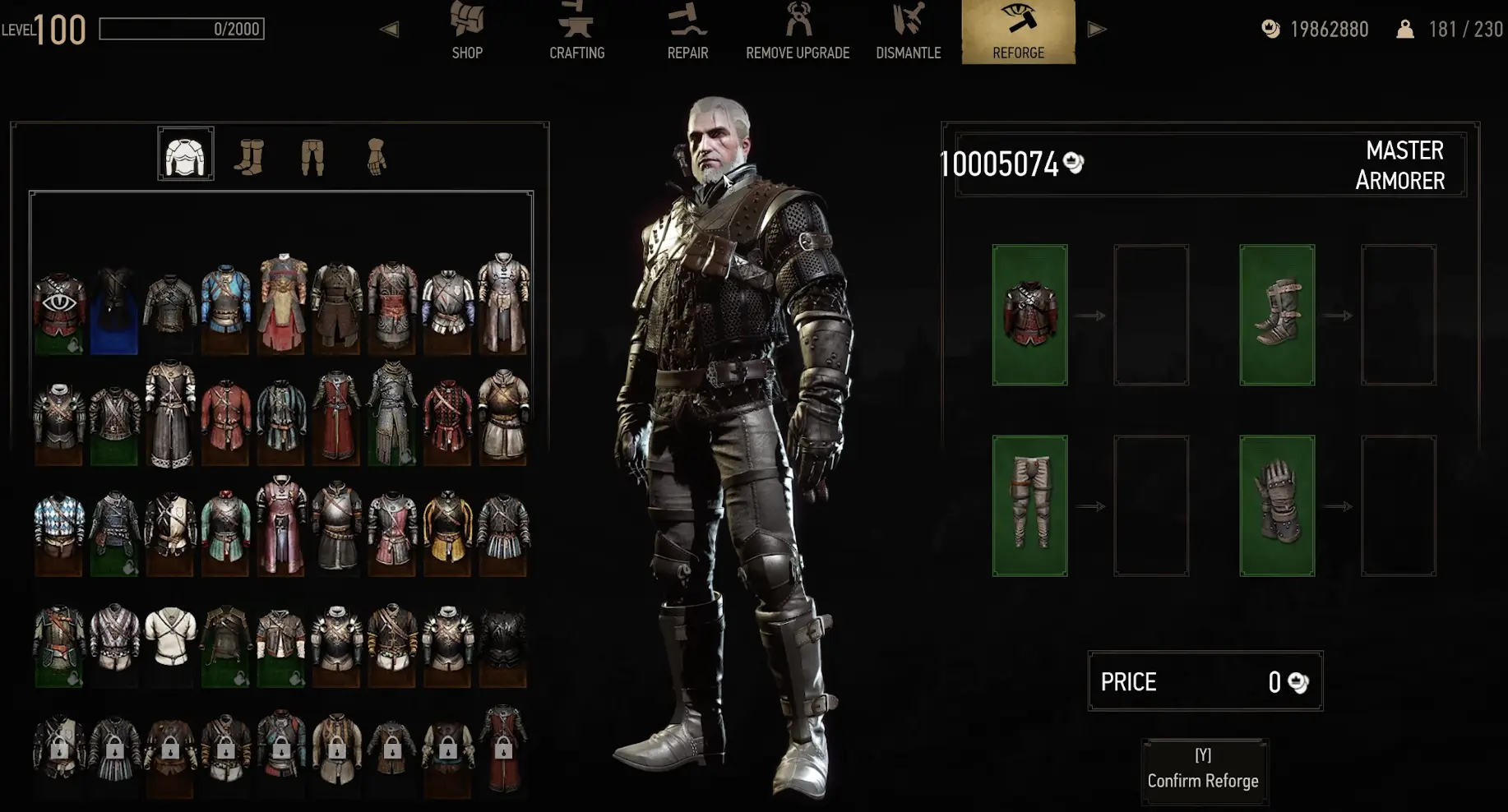
Reforge separates equipment stats from appearance.
If a weapon or armor piece has the numbers you want but not the look, Yoana
or Hattori can change its appearance without replacing those combat stats.
You do need to unlock the appearance first. Obtaining the relevant
equipment or crafting diagram adds that look to the available collection,
so a diagram can still be worth picking up even when its item would be weaker
than what Geralt currently wears.
Reforge lets you keep the combat stats you want while using an appearance you have already unlocked.
Blood and Wine dyes also remain useful with Reforge. A dye already applied
to equipment can carry across the changed appearance instead of forcing you to
give up the color because the model changed.
For normal progression, use Reforge in this order:
choose gear for stats → collect the appearance you want → visit Yoana or
Hattori → change the appearance
Early equipment is replaced quickly enough that I would not travel back to a
craftsman for every disposable piece. Reforge becomes much more useful once the
gear in the build is staying equipped for longer periods.
How Do Mods Work on PC and Console?
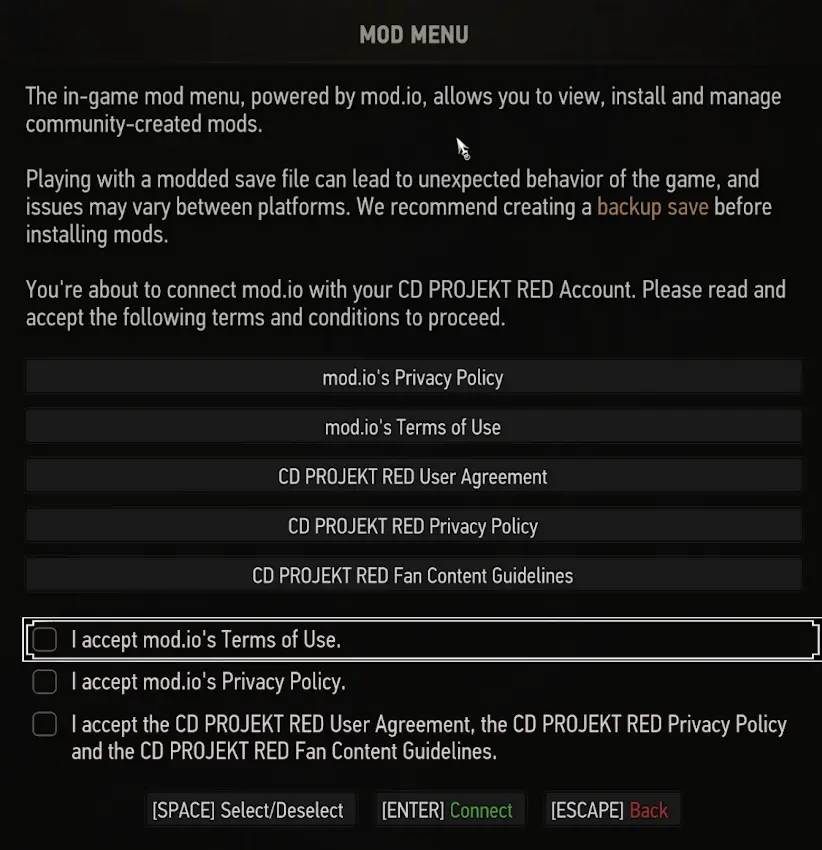
Remastered adds a built-in Mods option using mod.io, giving current PC
and console players a much simpler installation path for supported content.
After the required accounts are connected, the basic flow is:
open Mods → browse mod.io → choose a mod → install it
The built-in browser lets supported mod.io content be installed directly through the game.
PC still has access to the wider existing mod ecosystem, so the in-game browser
does not replace every other installation method.
Console libraries are more restricted. A PC mod is not automatically available
on PlayStation or Xbox because console releases have separate technical and
approval requirements.
If a mod exists on PC but does not appear in the console browser, reinstalling
the whole game is unlikely to change anything. The mod may simply not have a
console-compatible release.
Older PC mods also deserve caution after the update. An existing setup should
not be assumed to work unchanged until the individual mod supports the
Remastered version.
What Changed About Roach?
Roach receives several small changes that become noticeable during long rides.
Mounting and dismounting are cleaner, steering through tighter terrain is more
responsive, and cantering or galloping no longer requires continuously holding
the same input.
There is also a horse-control sensitivity setting. If Roach feels too twitchy
with a controller, adjust that value before deciding that the new handling does
not suit you.
Looting from horseback removes another repeated interruption. When an item is
within reach, Geralt does not need to dismount for every small pickup along the
road.
These changes do not create a new travel system; they mainly remove friction
from routes you were already riding.
Can Geralt Reach New Places With the Movement Changes?
Climbing ledges, using ladders, vaulting and closing distance in combat feel
cleaner, but the physical limits of Geralt’s jump have not increased.
Jump height and jump distance remain unchanged.
That matters when returning to an old treasure route or quest entrance. If a
gap was too wide before, repeatedly attempting it under the smoother movement
system will not turn it into a shortcut.
The improvement is responsiveness rather than extra reach.
There is also a quicker way to disengage from combat. Release target lock and
sprint away when a fight is consuming more resources than it is worth or when
enemies were pulled accidentally while travelling.
What Changed in Looting and Quest Tracking?
Nearby loot can now be grouped into one window instead of forcing several
separate interactions.
A loot feed can show recently collected items, while improved tooltips make it
easier to identify what Geralt just picked up. The value of the items has not
changed simply because the interface is faster; the gain is mainly less time
spent opening and closing small loot windows.
Quest tracking is cleaner as well.
Tracked and untracked objectives are easier to distinguish on the map, and an
untracked quest can be selected there to begin tracking it directly.
If the minimap has always felt crowded, some elements such as herbs, boats and
corpses can also be hidden.
How Does Immersive Meditation Work?
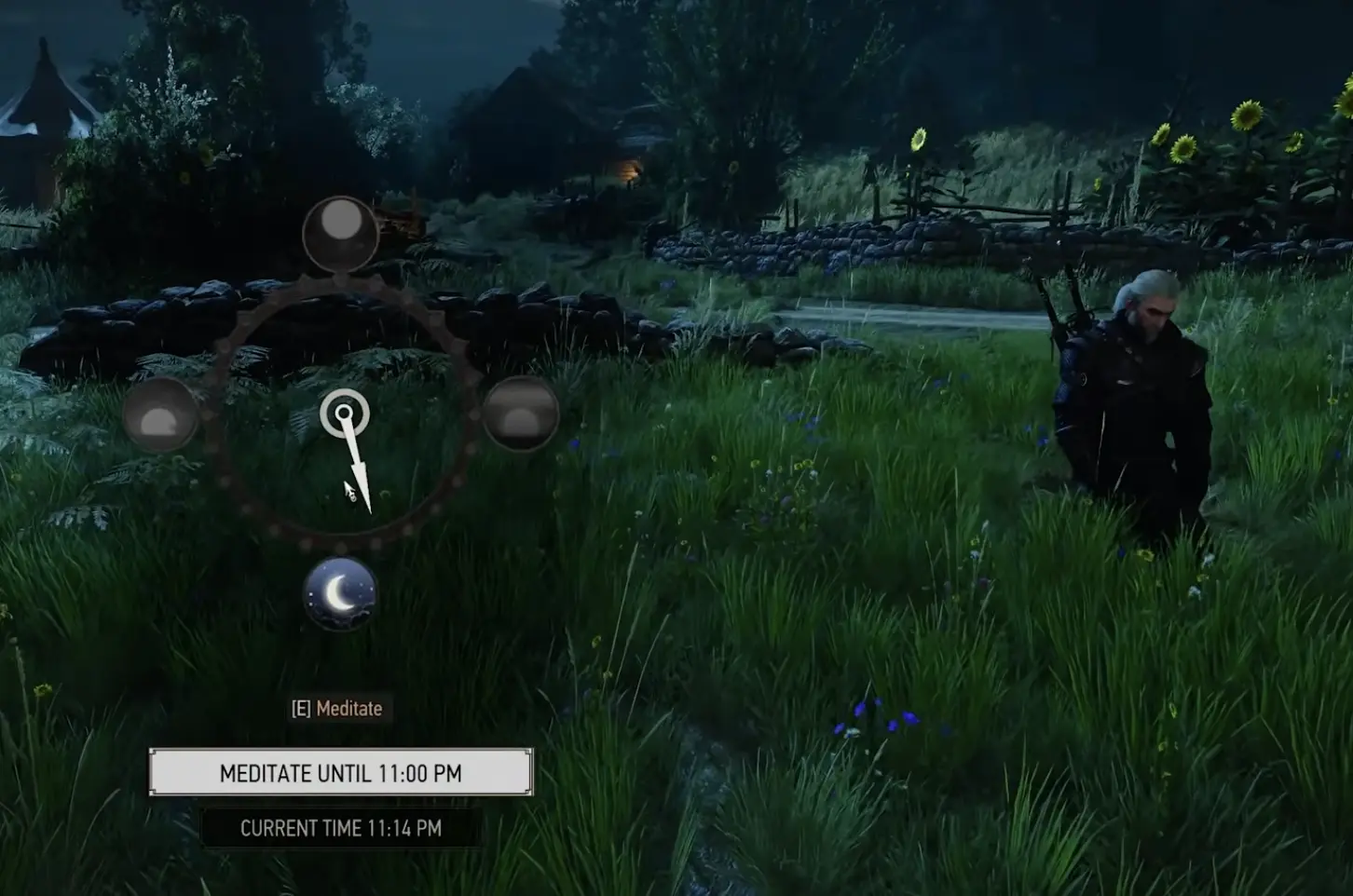
Meditation can now happen while Geralt remains visible in the world.
Instead of moving immediately into a static interface, Immersive Meditation
lets him sit while time advances toward the hour you choose.
Immersive Meditation advances time while Geralt remains in the world.
On PC, Immersive Meditation can be started directly while moving through the
world, and Geralt remains seated until you end it.
The reasons to meditate have not changed. Time still matters for shops, quests,
monster schedules and preparation; the difference is how the wait is presented.
What Does Bard’s Ballad Change?
Remastered moves accessibility options into a clearer section and adds a preset
called Bard’s Ballad.
It is available when starting a game on the easier story setting and can also be
adjusted later through Accessibility options.
The useful part is that individual pressures can be changed separately.
Available options include:
changing Vitality regeneration behavior;
infinite underwater breath;
disabling item durability;
disabling boat durability;
ignoring item weight;
faster boats;
toggle behavior for Witcher Senses.
You do not need to enable every assistance option just because one part of the
game is causing trouble. A player who only wants to remove carry weight, for
example, can change that pressure without necessarily changing combat.
What Can the Expanded Photo Mode Do?
Photo Mode now works much more like a small scene editor.
You can place characters, select poses and expressions, change where they look,
add lights, alter the weather and time of day, save camera positions and use
different aspect ratios.
Camera collision can be disabled, nearby NPCs can be hidden, and props can be
added to the scene.
None of those controls affect Geralt’s progression, so there is little reason
to learn them during the opening hour unless taking screenshots is already the
goal.
Their real value is control: a particular sunset, storm, lighting setup or
character arrangement no longer has to happen naturally before you can capture
it.
What Should You Check in the First Hour Back?
Returning players can get Geralt functional again without exploring every new
menu at once.
Start with Character. Rebuild the abilities that define the way you fight,
then reconnect equipped skills and mutagen bonuses before deciding that the old
build has become weak.
On PC, establish a stable graphics baseline before enabling the most expensive
RT options. Once skills and performance are settled, return to the quest you
were already doing.
Reforge can wait until a long-term piece looks wrong, the Mods menu can wait
until there is something you actually want to install, and Photo Mode can wait
until you want to capture a scene.
That order gets the character back onto the road quickly instead of spending
the first session in menus while the refunded Skill Points are still unused.