Scam With Your Friends: How to Unlock and Complete Scams
Unlock scam apps in Scamazon, complete their objectives, collect payouts, and work through the calls and computer tasks that can stop you from earning money.
Updated:
Quick Answer
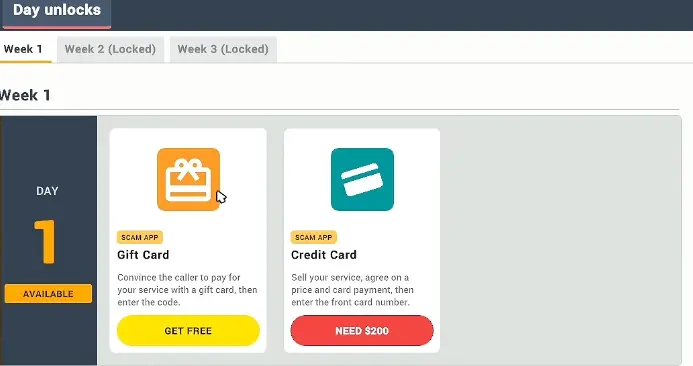
At your office computer, open Day Unlocks and claim the free Gift Card app. During a call, open the app and follow its checklist until you can enter the gift card code. Once you have enough money, return for Credit Card, which costs $200 on the opening Week 1 screen. Check the next day’s unlocks before spending on other apps.
Scamazon starts with a small selection of apps, but the choices expand as you progress through the workdays. Each application expects something different from the caller: a payment code, an accepted card payment, several conversation objectives, or information entered through a computer interface.
The app window tells you what still needs to happen. A conversation might sound successful while a required field remains empty, and switching to another scam halfway through can leave both unfinished. Before answering the phone, check which application you intend to complete and whether its requirements are available during the current day.
Where to Unlock Scam Apps in Scamazon
Start at your office computer and open the Day Unlocks screen. It organizes available Scam Apps by week and day, with locked weeks shown separately.
On Week 1, Day 1, Gift Card has a Get Free button, while Credit Card displays Need $200 until you can afford it. Weeks 2 and 3 remain locked on the opening screen.
You can begin using Gift Card without paying for the Credit Card unlock first. That gives you a way to complete an opening payment task before committing money to another app.
Which Scam Apps Should You Unlock First?
The early unlocks and later workday announcements provide these useful purchase checkpoints.
| Scam / App | Availability Shown | Unlock Cost | What to Check Before Using |
|---|---|---|---|
| Gift Card | Week 1, Day 1 | Free | Open the checklist and enter the payment code |
| Credit Card | Week 1, Day 1 | $200 | Agree on a service price and use the card-entry app |
| Romance Scam | Announced for a following day | Free | Complete five relationship objectives |
| Tech Support Scam | Announced for a later day | Free | Use the virus-protection service objective |
| AnyViewer | Separate later unlock | Check Scamazon | Obtain a connection code before remote access |
| Warranty | Announced for a later day | Free | Check the warranty task after unlocking it |
| Bank Login | Announced for the following day | $1,200 | Have the required banking-information fields ready |
A Tomorrow’s Scams announcement tells you what will become available on the following day. Finish the current shift before returning to Scamazon for the new purchase. An unlocked app gives you another task to attempt; its payout still requires completing the corresponding objectives.
Gift Card — How to Complete Your First Scam
Gift Card is the simplest place to begin because its opening unlock is free and its objectives are clearly displayed.
Open the Gift Card app before starting a serious attempt. The checklist asks you to establish a service or solution, get the caller to agree to paying with a gift card, and enter the resulting code.
The practical sequence is:
- Answer a call and establish what the fictional caller needs.
- Work toward the app’s service and payment objectives.
- Get the caller to accept the gift-card payment method.
- Obtain the gift-card code during the conversation.
- Enter the code in the Gift Card app to complete the payment task.
The final step is easy to overlook.
A caller agreeing to pay, or reading a code aloud, is not the same thing as completing the app. The code still needs to be entered where the game expects it.
Why Your Gift Card Attempt Can Fail
An unsuccessful opening call demonstrates what happens when conversation and app progress become disconnected.
One caller wanted help with a cereal-related problem. The player repeatedly offered solutions and requested a payment, but the caller rejected the offer. The attempt ended without a successful payment.
Another call involved an elderly character with computer problems. This time, the conversation progressed to an accepted gift-card payment. The player received the code and reported a $200 payout.
That $200 was the result of that completed call, not a guaranteed payout for every Gift Card attempt.
The difference between those attempts is useful when your opening day is going badly. Randomly asking for money does not replace the app’s required sequence. If the caller keeps rejecting the offer, check which objective is still incomplete rather than repeating the same request.
When a call ends unsuccessfully, start with a new caller and keep the Gift Card checklist open so you can see what has actually changed.
Credit Card — How to Buy It and Complete a Payment
Credit Card costs $200 on the opening Week 1 screen. After purchasing it from Scamazon, open the application at your workstation. Its task requires the caller to accept your service, agree on a price and card payment, and provide the card number for entry into the app.
The $200 is the cost of unlocking Credit Card, not the price you must charge during a call. These are separate amounts. A caller agreeing that they need your service does not complete the payment; the agreed price and required card information still need to be handled in the application.
Once the caller provides the necessary details, enter them in the Credit Card window and check whether the task completes. Leaving the information in the conversation without finishing the application can leave the payment unfinished.
When to Delay the $200 Purchase
Gift Card is already free at the beginning, so it gives you a way to earn money before buying Credit Card. If your first few conversations are ending without payment, spending $200 on another application will not solve the unfinished Gift Card objectives.
Credit Card becomes a more useful purchase once you have enough money and understand how to finish an app’s payment task. It adds another payment option, but the conversation still needs to satisfy that application’s requirements.
Romance Scam — How to Complete All Five Objectives
Romance Scam works differently from the payment apps. Its reward comes from completing a relationship objective rather than entering a payment code.
The Romance Scam window displays a $600 reward and 0/5 objectives complete at the beginning of an attempt.
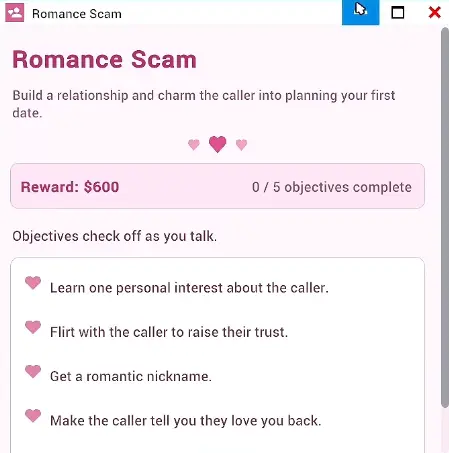
The five objectives involve:
- Learning one personal interest about the caller.
- Flirting to raise their trust.
- Getting a romantic nickname.
- Having the caller say they love you back.
- Getting the caller to agree to a date.
These requirements are connected, but they are not interchangeable.
Learning that a character enjoys something does not complete the nickname objective. A friendly response is not necessarily a romantic response, and an affectionate exchange does not finish the scam until the date condition is satisfied.
Why the Romance Scam Stops Progressing
One unsuccessful attempt involved a celebrity-style caller named Kanye East.
The player managed to build a friendly conversation, received permission to use a nickname, and exchanged affectionate remarks. However, the conversation continued into concert tickets and an autograph before an abrupt request to meet.
The caller rejected the proposed meeting. Trust fell, and the Romance Scam did not finish.
That is a useful distinction: a caller can be friendly and still refuse the final date objective.
When the nickname or affectionate response has already registered, look at the remaining objective rather than trying to repeat earlier conversation milestones. The app makes it possible to see whether the relationship has actually advanced.
A Completed $600 Romance Scam
A later successful attempt followed a more natural progression with an elderly caller.
The conversation began around the character’s computer problems and gradually moved toward personal attention. The caller responded positively to affectionate remarks, returned the declaration of love, and then accepted a proposed date with a specific meeting time.
The player received $600 after finishing the interaction.
The successful sequence shows why the final agreement matters. The relationship objectives build toward a date; stopping after the caller expresses affection leaves the final task unfinished.
Because callers respond dynamically, exact sentences are not guaranteed to produce the same result with every character. The objective counter is a more dependable indicator than whether a particular line sounded convincing.
The practical checkpoint is simple: before ending the call, inspect the Romance Scam window and confirm that it has registered all five objectives.
Tech Support Scam — From Service Payment to AnyViewer
A later unlock announcement makes Tech Support Scam available for free in Scamazon.
Its basic objective involves selling virus protection for a fictional computer problem. Once unlocked, this provides a more structured alternative to a generic payment conversation.
The first part of the task remains tied to the caller’s computer issue and the service being offered. Later interactions can involve the separate AnyViewer application, which introduces a remote-computer interface.
These are not necessarily the same unlock.
One workday announces Tech Support Scam, while a later announcement introduces AnyViewer with the instruction to connect to a caller’s computer.
If Tech Support is available but you cannot open the expected remote-computer tools, inspect your current Scamazon unlocks before spending time looking for a window you may not have obtained yet.
How AnyViewer Works During a Call
When AnyViewer is available, it provides an interface for connecting to the fictional caller’s computer.
A call can progress through these game actions:
- Continue the Tech Support conversation until remote access becomes relevant.
- Obtain the caller’s AnyViewer connection code.
- Enter the code into the AnyViewer application.
- Open the connected computer’s folders or relevant programs.
- Use the information required by the active computer-based task.
Connecting successfully does not automatically complete every task available on the remote computer. AnyViewer gives access to another interface; applications such as Password Recovery have their own requirements.
During one remote-computer interaction, the player opened several folders and found account-related information. The caller became increasingly suspicious as the player continued exploring unrelated files.
That creates an important time pressure. Once the connection is established, keeping the conversation active while working through the required computer task can be more difficult than getting access in the first place.
Password Recovery — What Does 0/3 Verified Mean?
The Account Password Recovery window shows a separate objective requiring three verified entries for a displayed $500 reward.
Those entries are:
- Recovery Email Address
- Recovery Question
- Recovery Answer
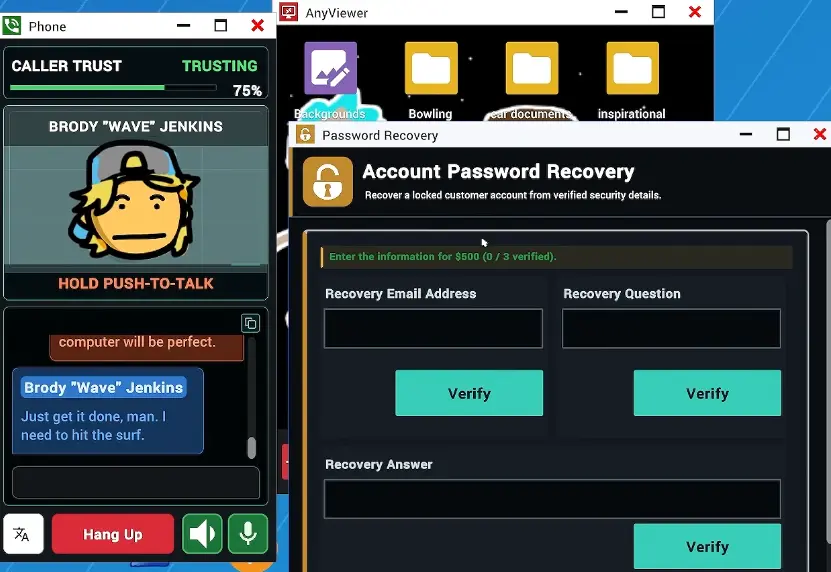
The active call shows 75% Trust and a Trusting status, but Password Recovery is still at 0/3 verified. These indicators describe different things. Caller Trust reflects the current conversation, while Password Recovery tracks whether the required account information has been accepted.
The displayed $500 reward belongs to the recovery task. Reaching 75% Trust or connecting through AnyViewer does not award that money. The three recovery fields still need to be completed and verified individually.
Why Password Recovery Stays at 0/3
Each field has its own Verify button. Finding information inside a remote folder is only part of the process; the corresponding entry must also be accepted by Password Recovery.
During one remote-computer interaction, the player searched through several folders while the caller repeatedly questioned what was happening. The connection remained active, but the conversation became increasingly difficult to maintain. Spending too long exploring unrelated files can leave the recovery task unfinished when the caller loses patience.
After finding a required detail, return to Password Recovery and check its verification state before continuing the search. The 75% Trust shown in the example is the condition of that particular call, not an established minimum needed to complete the task.
Bank Login — When Does It Unlock, and What Information Is Required?
Bank Login appears later in the progression.
An end-of-day announcement states that Bank Login will go on sale in Scamazon the following day for $1,200.
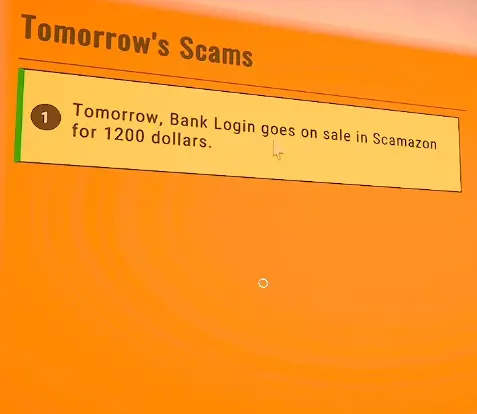
The important detail is the timing. The notification is an upcoming unlock, not confirmation that Bank Login has already been purchased or activated.
Once the appropriate day begins, return to Scamazon and check the available apps.
The Bank Login interface uses four information fields:
- Online banking username
- Online banking password
- Bank account number
- Routing number
The task is more involved than entering a single payment code because the required fields must be completed separately.
Should You Spend $1,200 on Bank Login Immediately?
Bank Login is a substantial purchase compared with the opening payment apps. The application requires four separate banking fields, so buying it only makes sense when you can afford the unlock and are ready to work through those requirements.
If your earlier apps are still producing unfinished calls, continue earning with them before committing $1,200. An unlocked Bank Login application does not guarantee that the next caller will provide every required detail. The purchase gives you access to the task, while completing all four fields determines whether that attempt can succeed.
Other Scams That Unlock During Later Workdays
Several additional scam types appear as the workdays progress. They introduce different conversation objectives, but they should not be confused with the initial Gift Card and Credit Card payment tasks.
Social Security — The Identity Mix-Up Objective
The Social Security task uses a fictional identity mix-up scenario with multiple conversation steps.
Its displayed instruction describes working through an identity mix-up in four conversation steps.
An unsuccessful attempt shows the player repeatedly referring to the wrong identity before requesting a Social Security number. The caller questioned why that information was relevant to their original problem, and the interaction failed to produce the intended result.
The game expects the conversation objective to progress, not merely the same piece of information to be requested repeatedly.
If this scam is available, keep its current instructions visible and check the conversation-stage requirements before assuming the task has advanced.
Police Impersonation
A later workday announces Police Impersonation.
Its in-game objective involves a fictional police case and a payment connected to that scenario.
The available attempts show how easily a conversation can become unproductive when the caller rejects the premise or responds to an unrelated explanation.
Complete the app’s displayed stages rather than assuming that mentioning the police automatically counts as progress.
Investment Scam
Investment Scam introduces a fictional investment objective.
One later interaction involved an elaborate banana-caviar business proposal. A player proposed an $800 investment during the conversation, but that spoken amount should not be mistaken for a fixed app reward.
The character responded to the investment discussion, and the players continued attempting other objectives during the same call.
When using Investment Scam, distinguish the amount mentioned in dialogue from whatever completion result the application actually registers. An apparent agreement is useful only if the game’s objective progresses.
Warranty Scam
A later announcement makes Warranty available for free in Scamazon.
One attempt began when a caller wanted help moving belongings. The conversation shifted toward an extended vehicle warranty, but the caller resisted a proposed $300 charge until the player could explain what the service covered.
That attempt illustrates a common reason conversations stall: the caller has not accepted the service’s connection to their problem.
Warranty becomes another available task after its unlock, but its free purchase price does not remove the need to complete the conversation objective.
Can You Complete Several Scam Apps During One Call?
You can keep multiple applications open while talking to the same caller, but each task still has its own requirements. A payment completed in one app does not fill the missing fields in another, and having remote access to a computer does not automatically finish an information-recovery task.
This becomes a time-management decision during longer calls. When one application is already close to completion, finish its remaining objective before shifting to a different request. Otherwise, the caller may disconnect while several tasks are partially completed and none has paid out.
Once the earnings have been added to your total, compare them with the current workday target. The workday quota and progression instructions explain how that total affects your next boss review.