Unlock scam apps in Scamazon, complete their objectives, collect payouts, and work through the calls and computer tasks that can stop you from earning money.
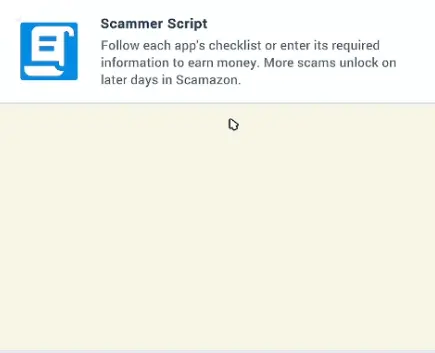
Start Day 1, check the displayed quota, and use an office computer to begin taking calls. Open Scammer Script to see how your available apps earn money, then complete their objectives before the workday ends. After the boss’s review, check the next unlock announcement before starting another day.
Your first workday in Scam With Your Friends can go badly even when the callers seem cooperative. You answer the phone, spend several minutes talking, and hear someone agree to your offer. Then the call ends, your earnings barely move, and the clock keeps running.
The game gives you a money target rather than a fixed sequence of dialogue choices. You need to earn enough from the available scam applications before the workday finishes. Every completed call contributes toward that goal, while unsuccessful conversations can consume most of your remaining time.
On the opening single-player screen, Week 1, Day 1 starts with a $600 quota. From there, later workdays introduce new applications, more demanding targets, performance reviews, and eventually another office floor.
The opening is much easier once you know where the actual objectives appear, when a conversation counts as completed, and what the boss checks at the end of the day.
How to Start Your First Workday
After entering the office, get to an available workstation and begin your shift.
The opening area contains computers, phones, and other employees when playing with friends. There are also character customization and caller-selection options, but those are not required to understand your first money-making objective.
Your immediate priority is the workday target.
The opening single-player workday displays a $600 quota for Week 1. Check the amount in your own game before deciding how much you need to earn.
With a $600 target, earning $200 from one successful call leaves another $400 to collect. It is possible to have a successful interaction and still be well below the required total.
The quota is also not a universal number for every lobby. A two-player game shows a $960 opening quota, while the single-player opening displays $600. Later workdays have different targets again.
Use the amount displayed at the start of your current day instead of planning around a number remembered from a previous run.
Find the Computer and Begin Taking Calls
The office computers are where you manage the applications used during calls.
Once you are working at a desk, you can answer an incoming phone call and interact with the caller. The Phone window provides the conversation interface, including the caller’s responses, a text area, and controls such as Hang Up and Push-to-Talk.
The important part of the setup is having access to both the caller and the relevant application. A conversation can continue while you are opening other windows on the computer.
If you are unsure how to earn money, check Scammer Script before spending the entire day experimenting with dialogue.
Why Talking to Callers Does Not Always Earn Money
A caller can stay on the phone for several minutes without adding anything to your earnings. The conversation itself is not the payment. Your active Scam App needs to register the required objectives before the money counts toward the workday.
Open Scammer Script at your workstation if you are unsure what the application expects. It explains why simply talking to someone, even when the conversation seems successful, may leave your total unchanged.
Complete the active application's checklist or required information to earn money from a call.
Once you know which application you want to use, follow the Scams and Apps instructions for its payment requirements, unlocks, and completion steps.
How to Meet the Daily Quota Before Time Runs Out
The workday timer limits how many calls you can attempt before the boss reviews your results. On the opening solo day, the target is $600. A completed $200 payment brings you one-third of the way there, but another $400 is still needed before the shift ends.
Watch the remaining amount as carefully as the clock. A caller who spends several minutes questioning your offer can leave you with too little time to complete another task, even if the conversation appears to be going well.
When to Give Up on a Call
One conversation with a caller named Lexi continued while the remaining workday time fell to roughly 30 seconds and then 16 seconds. The player was still talking when the opportunity to complete a useful objective disappeared.
Repeated objections can create the same problem earlier in the day. When a caller keeps rejecting the proposed service or payment, check the active task and the time remaining before continuing. An unfinished conversation contributes nothing toward the missing quota.
If the caller disconnects, return to the phone and start another attempt while there is still time. Near the end of a shift, a task that is already close to completion may be more useful than starting a long conversation with an uncertain result.
Should You End the Day Early?
An End Day Early option can appear while exploring the office.
Before using it, check the current total against the target. Ending a shift while still short removes the remaining opportunity to earn money that day.
If you have already met the displayed quota, the situation is different: additional calls are no longer necessary merely to reach that amount.
However, the money target and the complete performance evaluation are not identical. The boss also comments on individual behavior and results. Reaching the quota should not be confused with guaranteeing a particular personal rank.
How Boss Reviews and the Scammer Tier List Work
At review time, the manager examines the team’s performance and assigns individual rankings.
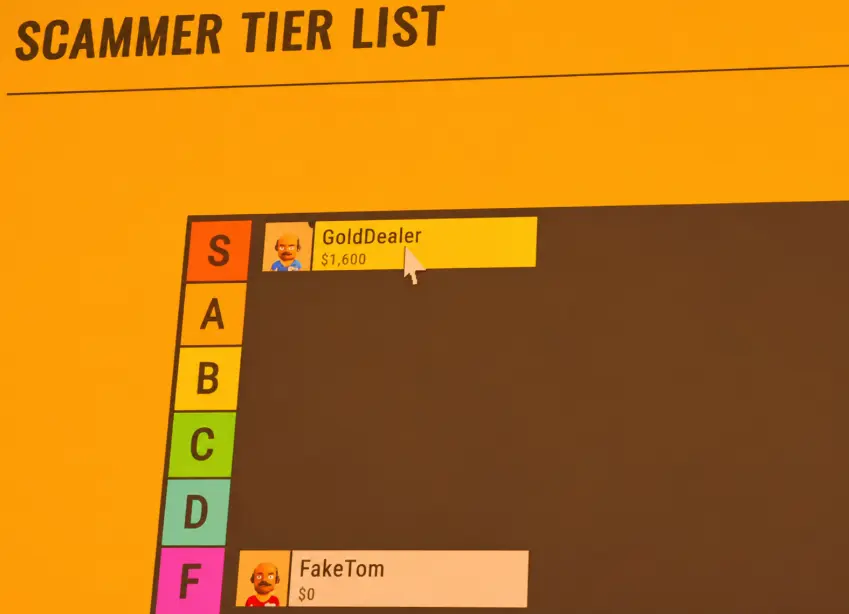
The game uses an S-to-F Scammer Tier List, with each player’s earnings displayed beside their name.
One review ranks GoldDealer S with $1,600 and FakeTom F with $0. The rankings show individual performance during that workday, not fixed earnings thresholds for each tier.
The Scammer Tier List shows individual results, even when everyone shares the same workday target. In this review, GoldDealer finished with an S rank while FakeTom received F. The displayed earnings explain the difference in their contributions, but they do not establish a fixed dollar requirement for every rank.
The manager also comments on what happened during calls, including unsuccessful attempts and inappropriate remarks. A team can earn enough to pass the workday while one employee still receives a poor individual evaluation.
Can One Player Carry the Team?
Yes, a team can pass a workday even when the contributions are very uneven.
In one two-player opening day, the quota was $960. One player struggled to earn anything while their teammate brought in enough money for the group to pass the target.
The boss still criticized the weaker performance.
This is useful when playing co-op because you do not need to assume that every participant must personally earn an equal share of the quota. What matters for getting through the workday is the team’s required total, while the individual results remain visible in the review.
Later, another successful review reported $6,750 in total earnings, with one player contributing $4,150 and receiving S, while the other contributed $2,600 and received A.
Those individual amounts add up to the team’s reported total. The review also commented on inappropriate lines, showing that earning money is not the only thing the manager notices.
For a group trying to survive the next day, the immediate concern is whether enough money was earned. The personal rankings help explain which teammate contributed most and whose calls went poorly.
What Happens When You Fail the Quota?
Failing the required total can end the run in a firing sequence.
One later two-player workday demonstrates how narrow the margin can be:
Required quota: $1,608
Money earned: $1,500
Shortfall: $108
The manager reported that the team had missed the target, criticized the players’ performances, and the workday ended in a firing outcome.
The team had earned substantial money, but the $108 difference was still enough to fail.
That makes the current quota more useful than the amount that feels like a good day’s earnings. A $1,500 total is impressive against an early $600 target, but insufficient against a later $1,608 target.
Can You Keep Playing After Getting Fired?
A separate run also reaches a firing outcome after unsuccessful calls. The players discuss restarting and returning to the game, then begin another attempt.
The important limitation is that a firing outcome does not establish one universal restart point for every run.
Before continuing, check the day and week displayed after the restart. If the game has returned you to an earlier stage, your next priority is the current quota and available applications, not the purchases or targets you remember from the failed day.
If the workday ends in failure, it is also worth identifying what caused the shortfall. In one case, a teammate reached the end of the shift with zero earnings after spending time on conversations that did not result in completed sales.
The missing money mattered more than the number of calls attempted.
What Unlocks After Each Workday?
After the boss’s review, read the Tomorrow’s Scams announcement before beginning another shift. It tells you which applications will become available next, although they cannot necessarily be purchased during the current review.
When the new workday begins, return to the office computer and open Scamazon. Check the Scams and Apps unlock requirements before spending your earnings on a newly available application.
How to Reach the Second Floor
The game eventually introduces another office floor.
During a later successful workday, the manager reports $5,400 in team earnings. Shortly afterward, the office announces that the players have reached the next business level and that Floor Two is available.
The announcement also mentions an upgraded break room.
This is a genuine progression milestone, not simply another app becoming available.
Once the new floor opens, explore the additional office space and locate an active workstation. A player returning to the game later initially struggled to find a working call, discovered the additional floor, and then realized they needed to clock in.
The practical lesson is to check which floor and workstation you are using whenever the office has expanded.
Floor Two becomes available after further workday progression. One team received the unlock announcement after a day with $5,400 in earnings, but that amount should not be treated as a fixed unlock requirement. Continue through the workdays until the new floor is announced, then clock in at an available workstation before waiting for calls.
Why Calls May Stop Appearing
Not every missing call means the AI caller system has stopped working.
There are several different situations worth checking before abandoning the run.
Check That You Are Clocked In
After an office-floor change, a player spent time looking for calls at the computers and questioning why nothing was happening. They eventually found the correct area and realized they needed to clock in.
If the office is quiet, confirm that you have actually started work at an available desk, particularly after reaching another floor.
A phone conversation cannot progress if you are waiting at an inactive workstation.
Make Sure Push-to-Talk Is Active
The Phone interface displays a Hold Push-to-Talk instruction during calls.
If the caller is not reacting to what you say, check the microphone control and your current voice settings before assuming the character is refusing to respond.
The game can show conversation text and caller reactions while the Phone window is open. Watch for an actual response after speaking.
A lack of response is different from a caller answering and rejecting your offer. The first points toward voice input or the active call state; the second is part of the interaction.
Check the Caller Manager
The Caller Manager lets you configure which fictional characters are included.
During one session, a player looked through the character roster after becoming concerned that nobody was calling. They selected additional existing characters and returned to the office to try again.
That does not prove that every missing call is caused by the roster, but it gives you a useful place to inspect when the available caller selection seems unexpectedly empty.
Custom callers may also display a status such as Waiting for Workshop Upload and be skipped when calls begin. A character appearing in the creator does not necessarily mean that character is already available for the active call pool.
If you encounter that message, check the upload status rather than repeatedly waiting for the same custom character to call.